Home>AI> How to Create the Viral Phone Cover Face Photo Using AI
How to Create the Viral Phone Cover Face Photo Using AI
By EDITORIAL STAFF • October 4, 2026 • 14499 Views • No Comments
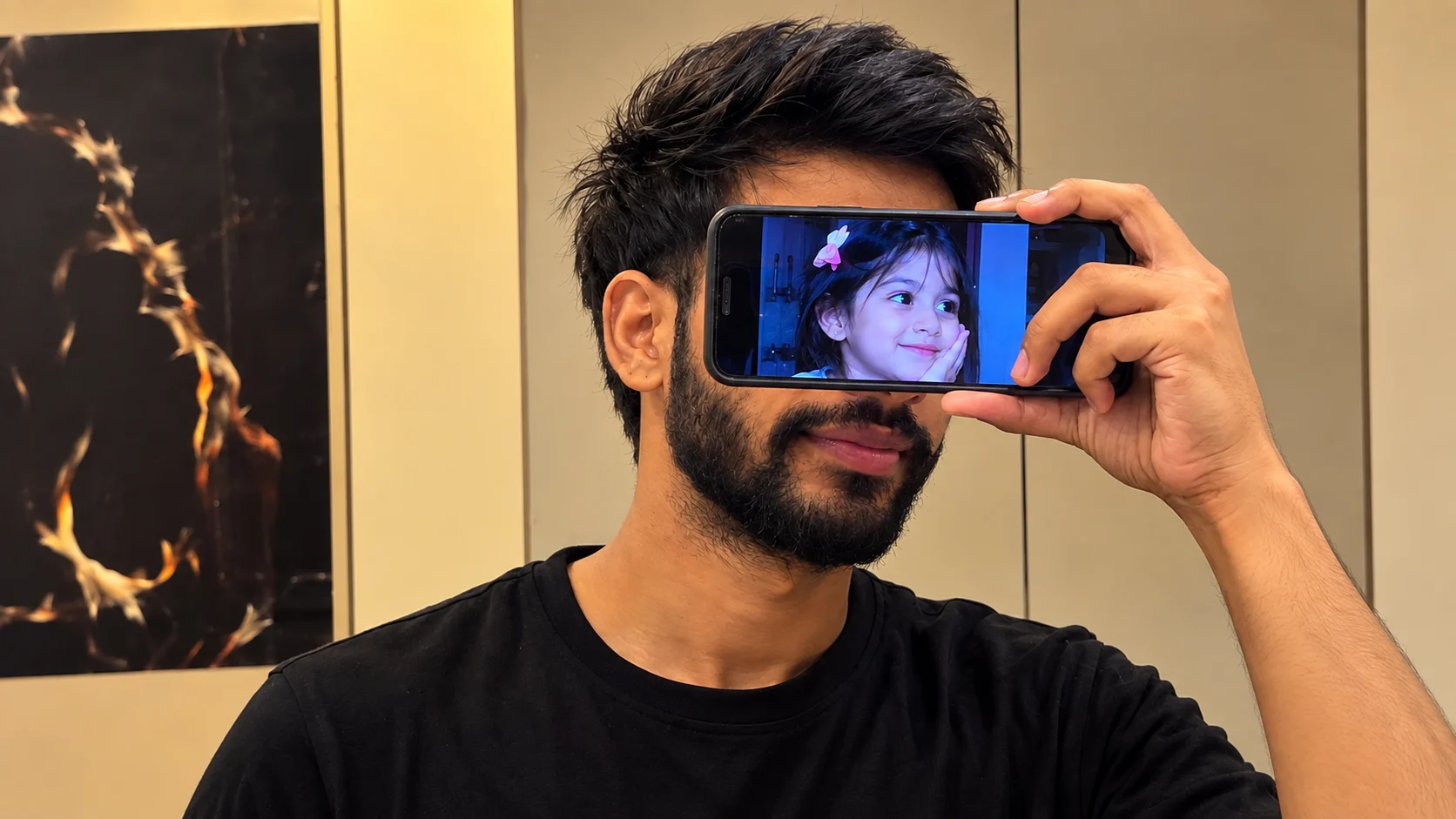
I recently came across this creative photo-editing idea where a person holds a phone in front of their face, while another person's photo appears perfectly on the phone screen. The result looks simple at first, but the composition makes it look like the phone is actually covering the face.
I tried creating a similar image using AI, and the main thing that makes this effect interesting is the position of the phone and the image displayed on its screen. The phone needs to look naturally held in front of the face, while the person shown on the screen should fit properly inside the display.
How to Create This AI Photo
Start with a clear photo of yourself and another image that you want to display on the phone screen. The AI can combine both images into one scene while keeping the main person's appearance and pose natural.
For the best result, the phone should remain clearly visible, with the screen facing the camera. The displayed photo should also have the correct perspective so it looks like it is actually playing on the phone rather than simply being pasted over it.
Keep the Original Pose Natural
The pose is another important part of this effect. In the reference image, the person is holding the phone directly in front of the face while looking toward the camera.
You can experiment with different poses, phone angles, outfits, and backgrounds, but keeping the hand and phone position realistic will make the final image much better.
✨ AI PROMPT
Use the uploaded image as the STRICT MASTER REFERENCE for the entire image.
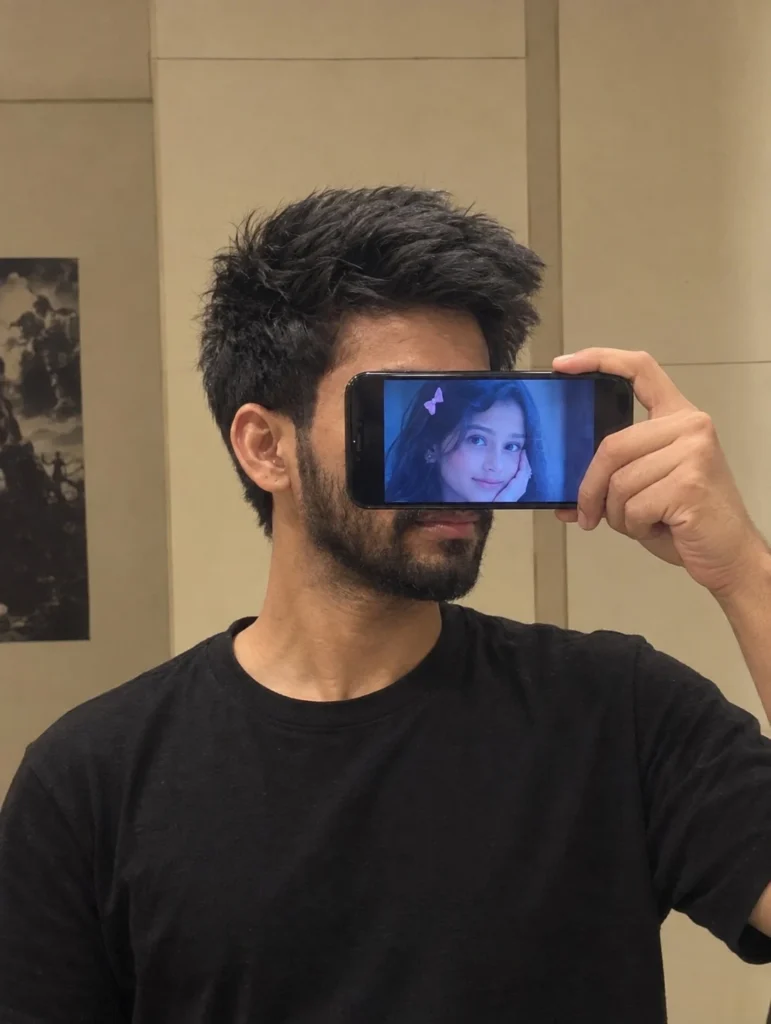
Recreate the photo as closely and naturally as possible. Preserve the exact same composition, camera angle, framing, crop, perspective, subject position, head angle, body posture, hand placement, phone placement, hairstyle, clothing, lighting, shadows, background, colors, proportions, and overall photographic aesthetic.
SUBJECT:
A young man taking a casual indoor mirror selfie/portrait. He is wearing a plain black crew-neck T-shirt. His head is turned slightly toward the side, showing a natural side-profile/three-quarter view. He has thick, voluminous, slightly messy black hair with the same shape and direction as the reference, and a natural short-to-medium beard and moustache.
PHONE:
A black smartphone is held horizontally across the middle of his face with one hand. The phone must remain in exactly the same horizontal orientation, size, position, angle, and distance from the face as in the reference. The hand and fingers should match the reference placement naturally.
The phone screen displays a close-up image of a young girl with a small pink bow in her hair. Preserve the blue-toned appearance of the screen exactly as seen in the reference.
COMPOSITION:
Match the reference framing exactly:
vertical portrait composition
close-up chest-up framing
subject positioned in the center/right area
head and shoulders occupying most of the frame
same amount of empty space around the head
same camera height and perspective
same crop
same phone position across the face
same hand and finger positions
same visible ear, jawline, neck and shoulder proportions
BACKGROUND:
Recreate the same simple indoor room/bathroom-like background with warm beige/off-white walls, vertical and horizontal panel/seam lines, and the partially visible dark poster/artwork on the left side. Keep the background placement and geometry consistent with the reference.
LIGHTING:
Use the same soft, warm indoor lighting. Natural low-contrast shadows, slightly warm skin tones, subtle ambient room light, realistic exposure, and no dramatic studio lighting.
PHOTOGRAPHIC STYLE:
Highly realistic ordinary smartphone-camera photograph. Natural skin texture, realistic hair strands, realistic beard texture, realistic hands and fingers, authentic phone-camera noise and slight softness. Do not make it look like professional studio photography or CGI.
IMPORTANT:
The uploaded reference image is the MASTER REFERENCE. Do not redesign or reinterpret the composition. Do not change the pose, camera angle, crop, phone position, hand placement, hairstyle, clothing, background, lighting, or proportions.
No beauty filter.
No skin smoothing.
No face reshaping.
No artificial sharpening.
No HDR.
No cinematic color grading.
No plastic skin.
No extra objects.
No extra fingers.
No distorted hands.
No duplicate phone.
No changes to the original composition.
The final result should look like the SAME photograph naturally recreated by a normal smartphone camera, with only the requested identity/reference changes if any.
Add a Realistic Phone Screen
The phone screen is the main focus of this concept. Make sure the image inside the display fits completely within the screen and follows its perspective.
Small details such as screen reflections, brightness, shadows, and the phone's edges can make the effect look much more realistic.
Final Words
That's it! This phone-screen face photo effect is a simple but creative way to combine two different photos into one AI-generated image.
You can use your own photo, a friend's picture, or create different versions with different backgrounds and phone styles. The key is keeping the phone, hand position, screen image, and perspective natural so the final result looks like a real photograph rather than a basic photo edit.
Eliza is a content writer who has a passion for exploring different genres of literature and music. Her professional expertise lies in the field of India geopolitics and technology relations. She has a keen eye for detail and a natural ability to distill complex ideas into simple, easy-to-understand language.













Leave a Reply