
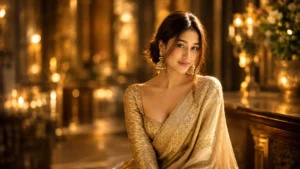
I recently created a devotional Ganesh Chaturthi photo using AI, and I was really impressed with how realistic the final image looked. I wanted the image to have a traditional festive feel, with Lord Ganesha, diyas, flowers, warm lighting, and a woman wearing a beautiful saree.
Usually, AI-generated images can sometimes look artificial, especially when there are people, jewellery, traditional clothes, and many small details in the background. However, after trying different settings and references, I was able to create an image that looked much closer to a real photograph.
If you also want to create a similar Ganesh Chaturthi photo using AI, you can easily do it with an AI image generator. You don't need to be a professional photo editor or know complicated editing techniques.
How to Create a Ganesh Chaturthi Photo Using AI
The process is quite simple. You just need an AI image generation tool and, if you want a personalized photo, a clear reference image of the person.
Step 1. Choose an AI Image Generator
First, open an AI image generator that supports creating images from text and reference images.
There are several AI tools available today, and many of them allow you to upload an image and create a new scene around it.
Step 2. Upload Your Reference Photo
If you want the generated woman to look like you or someone from your photo, upload a clear reference image.
I recommend using a photo where the face is clearly visible. A good reference image helps the AI understand the person's facial features and overall appearance.
Step 3. Describe the Scene
Now describe the type of Ganesh Chaturthi scene you want to create.
For example, you can choose a traditional setup where the person is sitting beside Lord Ganesha, surrounded by flowers, diyas, decorations, and warm festive lights.
You can also decide what type of saree, jewellery, hairstyle, pose, and background you want.
Step 4. Choose a Vertical Image
If you want to use the image for Instagram Stories, Reels, WhatsApp Status, or a phone wallpaper, choose a vertical format.
A 9:16 aspect ratio works very well for this type of image because it gives enough space to show both the person and the decorated Ganesha idol.
Step 5. Generate the Image
Once everything is ready, generate the image.
The AI will create the scene based on your description and reference image. Depending on the tool, you may get several variations, so you can choose the one that looks the most natural.
Step 6. Check the Face and Details
After generating the image, don't immediately save the first result.
Look closely at the face, hands, jewellery, saree, Ganesha idol, and background. Sometimes AI can make small mistakes in these areas.
If something doesn't look right, generate another version or make small changes to the description.
Step 7. Download and Share
Once you're happy with the result, you can save the final image and use it on Instagram, WhatsApp, Facebook, or anywhere else you want.
You can also use it as a festive greeting or share it with your friends and family during Ganesh Chaturthi.


Make the Image Look More Realistic
One thing I noticed while creating these images is that small details make a big difference.
Instead of only mentioning Lord Ganesha and a woman, include details about the surroundings, lighting, clothing, flowers, diyas, jewellery, and the overall atmosphere.
Warm golden lighting also works really well for devotional images because it gives the photo a natural festive feeling.
Another important thing is to avoid making the image look overly perfect. Natural skin texture, realistic lighting, normal facial expressions, and small imperfections can make the final result look much more like an actual photograph.
Use Your Own Photo for a Personalized Result
If you're creating the image for yourself, using your own reference photo can make the result much more personal.
You can keep your appearance recognizable while changing the surroundings, clothes, pose, and overall theme. This makes it possible to create a completely different festive photograph without actually visiting a decorated Ganesh Chaturthi pandal.
Final Words
That's it! Creating a beautiful Ganesh Chaturthi photo with AI is much easier than it looks. With a good reference photo, the right description, and a little patience, you can create a realistic devotional image with Lord Ganesha, traditional clothing, flowers, diyas, and a beautiful festive background.
I personally like this type of AI image because it gives the photo a traditional and emotional feel while still looking like a professionally captured photograph.
You can also experiment with different saree colors, decorations, poses, backgrounds, and lighting to create your own unique Ganesh Chaturthi photo.





Leave a Reply