By EDITORIAL STAFF • October 20, 2026 • 406 Views • No Comments
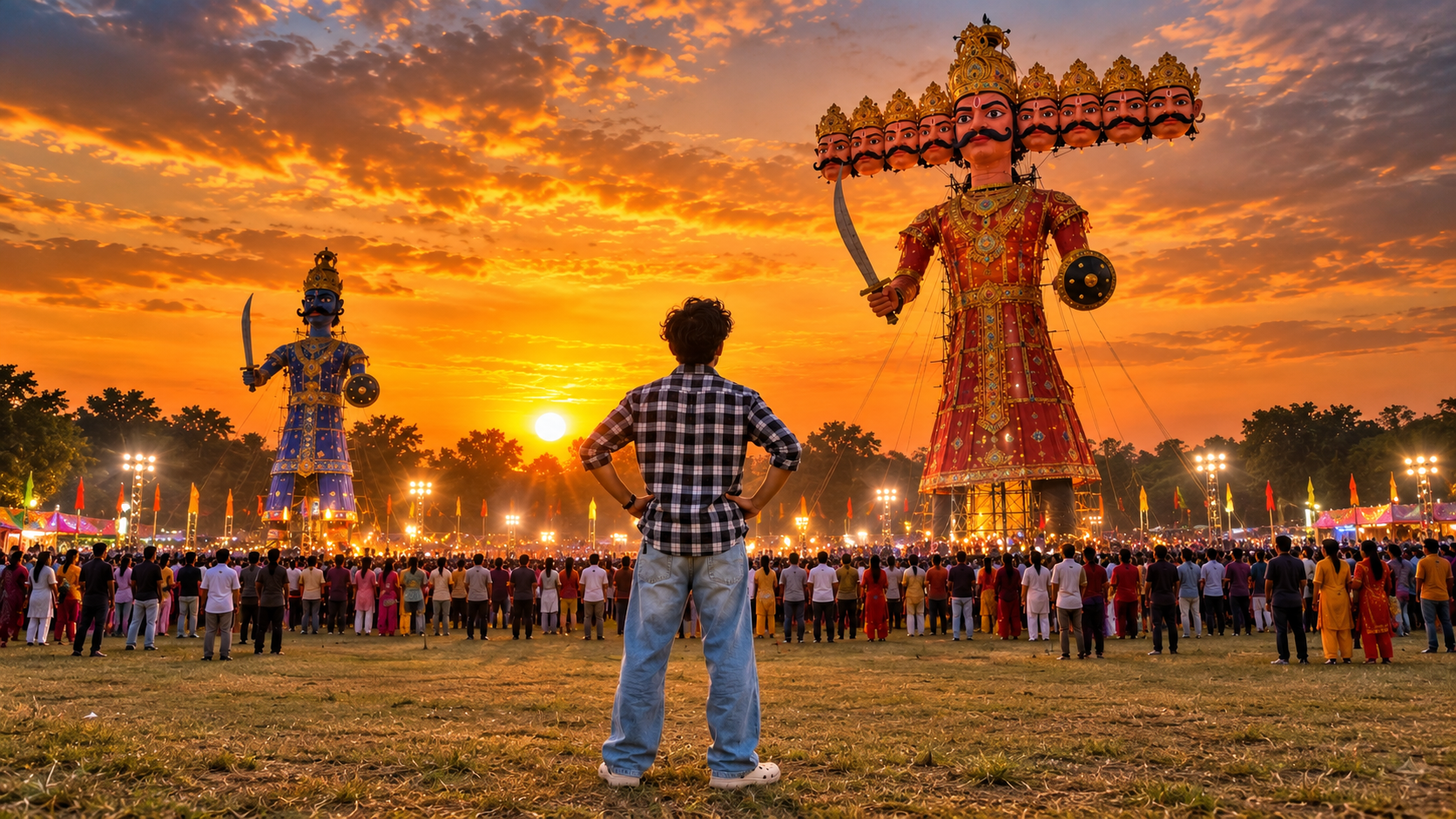
I recently created this Dussehra festival photo using AI, and I really liked the way it captured the atmosphere of Ravan Dahan at sunset. The image shows a person standing in an open field, looking at giant Ravana effigies surrounded by a large crowd.
What makes this photo special is the combination of the orange sunset, dramatic clouds, festival lights, and enormous Ravana statues. It looks like a moment captured during a real Dussehra celebration.
How to Create a Dussehra Photo Using AI
To create a similar image, you can use an AI image generator with a reference photo of yourself. This helps you create a personalized festival scene without needing to visit an actual event.
The first thing to focus on is the setting. Choose an open festival ground with a large crowd, giant Ravana effigies, and a beautiful sunset in the background.
Make the Scene Look Realistic
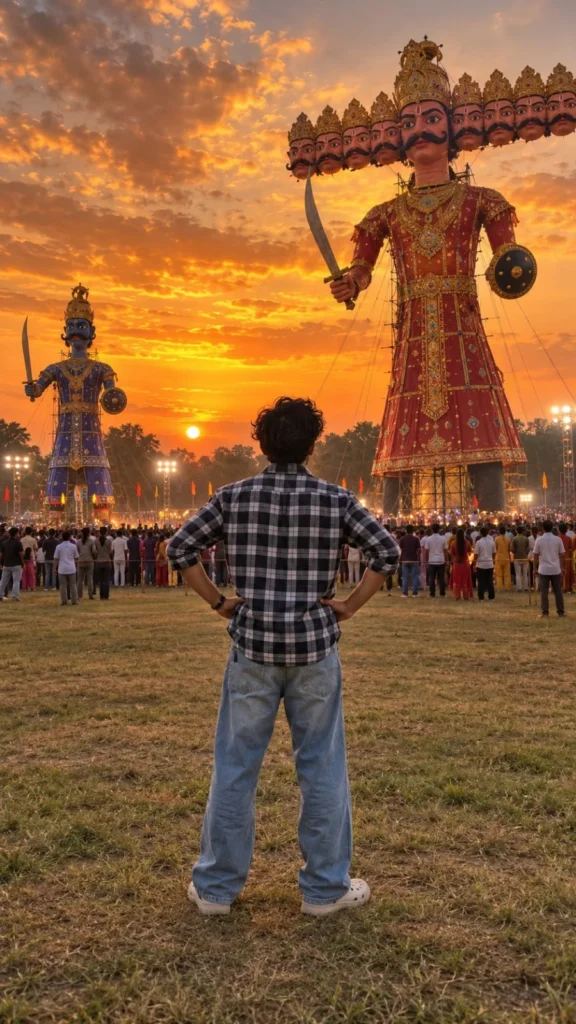
In this image, the person is standing with his back toward the camera, wearing a black-and-white checkered shirt and loose blue jeans. His hands are resting on his waist as he looks toward the giant Ravana effigy.
This simple pose makes the scene feel natural and helps the viewer focus on the festival.
The lighting is equally important. The warm orange sky, glowing festival lights, realistic shadows, and detailed ground give the image a cinematic appearance.
✨ AI PROMPT
Create an ultra-realistic, cinematic photograph of a young Indian boy standing in a large open field during a traditional Indian Dussehra Ravan Dahan festival at sunset.
STRICT POSE AND OUTFIT REFERENCE:
Use the uploaded boy's photograph as the exact reference for his appearance, hairstyle, clothing, and body proportions. Preserve his original black hairstyle, black-and-white checkered shirt with rolled-up sleeves, loose faded blue baggy jeans, and off-white Crocs-style shoes.
POSE AND CAMERA ANGLE:
Show the boy standing in the center foreground with his back facing the camera, looking directly toward the giant Ravana effigy. His feet are slightly apart, both hands resting naturally on his hips, and his elbows pointing outward. His head is facing forward toward the effigy. Reproduce the same relaxed, confident standing posture as the reference image. The boy's face should not be visible because he is facing away from the camera.
BACKGROUND AND ENVIRONMENT:
A huge, incredibly detailed Ravana effigy stands in the center-right background. It has multiple heads arranged horizontally, a golden crown, a thick black moustache, a richly decorated red-and-gold traditional royal costume, and traditional props including a sword and shield.
A smaller blue-and-gold decorated Ravana-style effigy stands on the left side of the scene. Both effigies are towering above the crowd.
A large crowd of Indian people gathers across the field, watching the festival. Include realistic trees in the distance, bright stadium floodlights, small colorful festival flags, and a natural grassy and slightly dry ground.
LIGHTING AND SKY:
Create a breathtaking golden-orange sunset with a dramatic sky filled with beautiful textured clouds. Use warm golden sunlight near the horizon, orange and yellow tones, soft natural shadows, and realistic festival lighting.
COLOR GRADING:
Full natural color photography. Rich orange-gold sunset, realistic red-and-gold decorations, deep blue clothing on the smaller effigy, natural green trees, realistic skin tones, and detailed blue denim. Do not make the image black and white.
CAMERA AND COMPOSITION:
Vertical 9:16 aspect ratio, full-body rear view of the boy, wide-angle composition, eye-level camera positioned behind the boy, realistic perspective, detailed foreground grass, a large crowd in the middle ground, and towering effigies in the background.
Photorealistic DSLR photography, realistic textures, natural lighting, high dynamic range, sharp details, authentic Indian Dussehra festival atmosphere, professional photography, 4K-quality details.
STRICT REQUIREMENTS:
- Show only ONE boy in the foreground.
- Remove the original boy from the previous reference composition and replace him with the boy from the uploaded photograph.
- The boy must face away from the camera toward the Ravana effigies.
- Maintain the exact checkered shirt, baggy blue jeans, hairstyle, and off-white shoes from the boy's reference photo.
- No text, captions, logos, watermarks, or typography anywhere in the image.
- No black-and-white filter.
- No additional foreground people.
- Do not change the boy's clothing or hairstyle.
- Do not create distorted hands, extra fingers, extra limbs, or unnatural body proportions.
- Keep the composition realistic and visually consistent with the reference image.
FINAL RESULT:
A colorful, ultra-realistic vertical photograph of the same boy standing with his hands on his hips, watching two enormous Ravana effigies at a spectacular Indian Dussehra festival during a golden-orange sunset.
Add a Traditional Ravan Dahan Atmosphere
You can make the scene more interesting by including a giant ten-headed Ravana effigy, another smaller effigy in the distance, colorful decorations, and people gathered around the festival ground.
If you want a sunset photograph like this one, warm golden and orange tones work particularly well. Keeping the foreground, crowd, and effigies at different distances also adds depth to the image.
Final Words
That's it! Creating a personalized Dussehra photo using AI is a creative way to capture the festive atmosphere without visiting a crowded festival ground.
The combination of giant Ravana effigies, a sunset sky, festival lights, and a natural standing pose gives the image its cinematic look. You can experiment with different outfits, camera angles, and festival backgrounds to create your own version.
Eliza is a content writer who has a passion for exploring different genres of literature and music. Her professional expertise lies in the field of India geopolitics and technology relations. She has a keen eye for detail and a natural ability to distill complex ideas into simple, easy-to-understand language.






Leave a Reply