Home>AI> Realistic Night Photo With a Motorcycle Using AI
Realistic Night Photo With a Motorcycle Using AI
By Kiara Sharma • September 15, 2026 • 72471 Views • No Comments
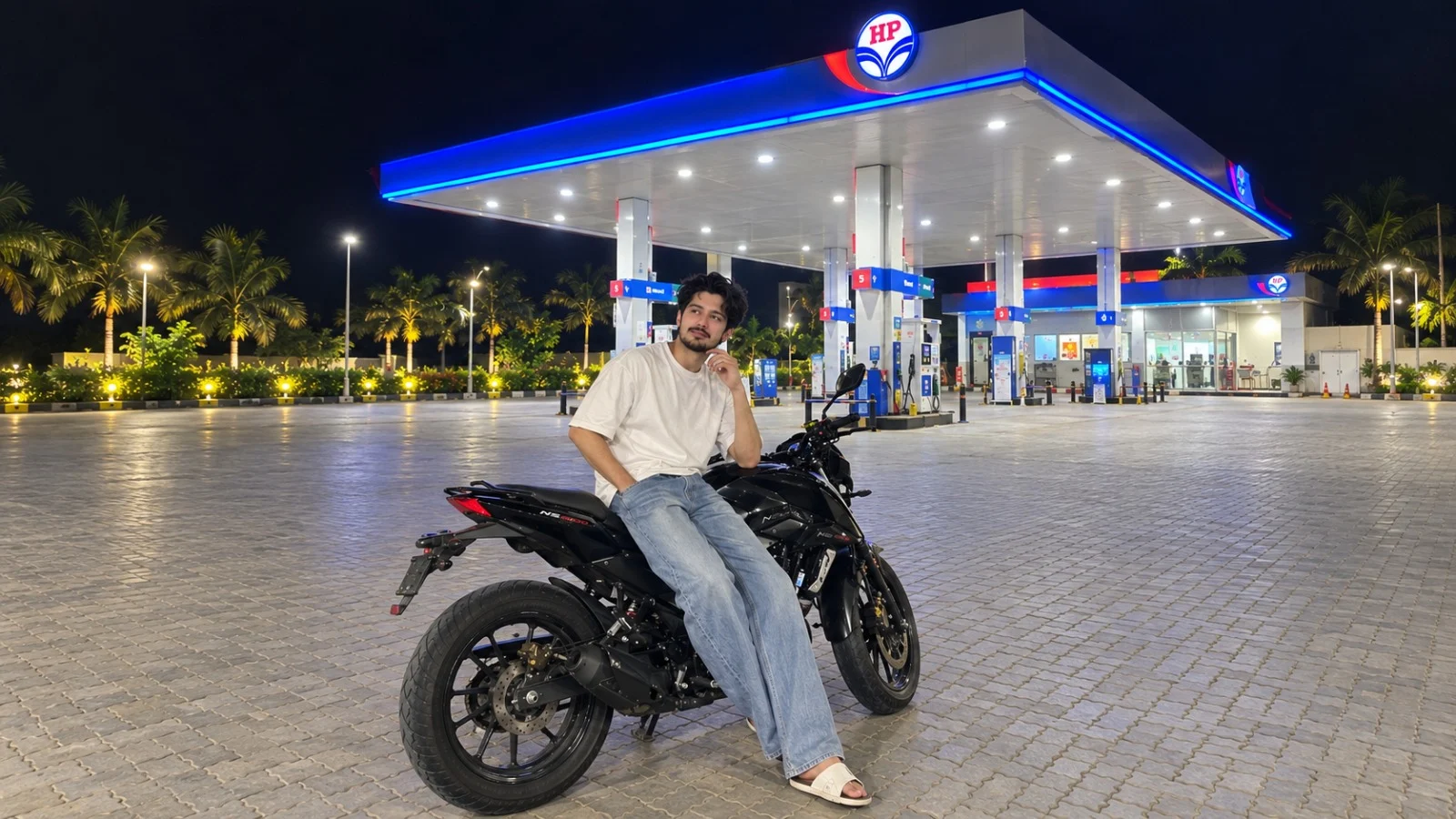
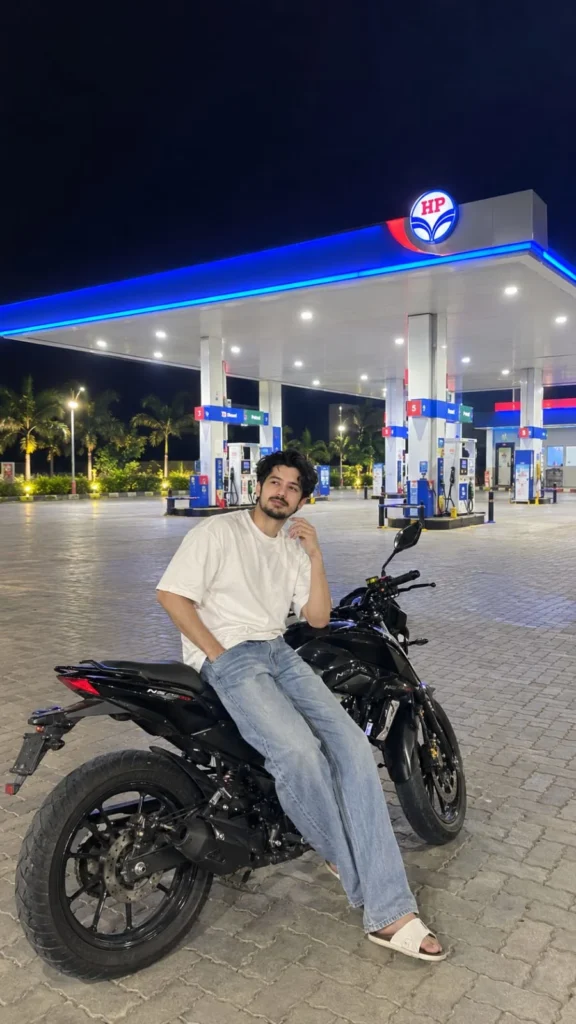
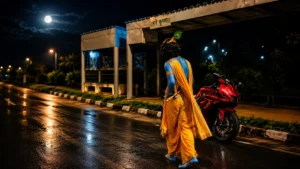
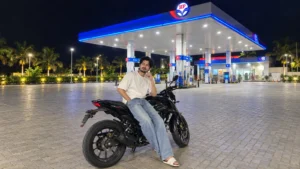
I recently created a night-time photo using AI, and I wanted it to look like a normal photograph rather than an obviously AI-generated image. The idea was pretty simple: a person sitting casually on a black motorcycle at a brightly lit petrol station at night.
What makes this type of photo interesting is the lighting. The petrol station is bright, while the sky and surrounding area are dark. The blue and white lights, reflections on the motorcycle, paved ground, and natural pose all work together to make the image look like it was actually captured at night.
If you also want to create a similar realistic motorcycle photo using AI, here's what I did.
Creating a Realistic Motorcycle Photo With AI
I didn't want the image to look like a professional photoshoot. I wanted something that could easily pass as a casual phone photograph taken while stopping at a petrol station.
The first thing I focused on was the location. A brightly illuminated petrol station gives the image plenty of realistic light sources, which makes it easier to create a convincing night scene.
The second important part was the pose. Instead of making the person stand in a dramatic pose, I kept the pose relaxed, with the person sitting naturally on the motorcycle.
Use a Reference Photo for a Personal Image
If you want to create this image with your own appearance, you can start with a clear photo of yourself.
A reference photo gives the AI something to work from when creating the new scene. You can then change the location, clothing, motorcycle, pose, lighting, and other elements while keeping the overall appearance of the person consistent.
For the best result, use a photo where your face is clearly visible and isn't heavily covered by filters or effects.
Choose a Realistic Night Location
The background plays a huge role in making an AI photograph believable.
In this image, the petrol station provides several natural light sources. There are ceiling lights, illuminated signs, blue accent lighting, and lights around the fuel pumps.
Because the light sources are already part of the environment, the person and motorcycle can appear naturally illuminated instead of looking like they were pasted onto a background.
You can use the same idea with other locations, such as:
A city street at night
A shopping mall parking area
A roadside café
A hotel entrance
A highway stop
A well-lit parking lot
Keep the Pose Natural
I wanted the person to look relaxed rather than posing for a fashion shoot.
Advertisement
Sitting on the motorcycle with one hand near the face and looking slightly away from the camera gives the photograph a casual feeling.
This is something I would recommend when creating realistic AI photos. A simple pose often looks more believable than an exaggerated one.
You can also try other natural poses, such as sitting normally on the motorcycle, looking toward the petrol station, checking your phone, or standing beside the bike.
Pay Attention to the Motorcycle
The motorcycle is an important part of the composition, so it shouldn't look like a separate object placed behind the person.
The person's position should match the seat, foot placement, handlebars, and overall shape of the motorcycle.
AI can sometimes make mistakes with complicated objects, so check the wheels, mirrors, handles, hands, and legs carefully after generating the image.
If something looks unusual, generate another version rather than trying to use a poor result.
Why Night Lighting Makes a Difference
One of the things I liked most about this image is the contrast between the dark sky and the brightly illuminated petrol station.
The environment has different levels of brightness, which makes the photograph feel more natural.
For example, the subject is clearly visible, but the sky remains almost completely dark. The motorcycle has brighter reflections in some areas, while other parts remain in shadow.
These small differences are important. If everything in the image has the same brightness, it can quickly start looking artificial.
✨ AI PROMPT
Create an ultra-photorealistic, naturally captured iPhone night photograph of a young person casually sitting on a modern black motorcycle at a large, brightly illuminated petrol station. IPHONE REALISM — HIGHEST PRIORITY: The final image must look like a genuine spontaneous photo taken with a recent iPhone, not a professional photoshoot, DSLR photograph, CGI render, or AI-generated image. Simulate a modern iPhone main camera at 1×: - Natural iPhone computational photography - Realistic Smart HDR - Natural exposure and white balance - Authentic low-light processing - Subtle realistic digital sharpening - Natural shadow detail - Realistic highlight roll-off - Slight natural sensor noise in dark areas - Mild light bloom around extremely bright lights - Realistic lens characteristics - Natural color rendering - No excessive HDR - No excessive saturation - No dramatic movie-style color grading - No artificial portrait-mode blur - No fake cinematic bokeh - No studio-perfect lighting The photograph should feel like someone casually stopped at the petrol station and took the picture with their iPhone. SCENE: A large modern petrol station at night, completely illuminated against a deep dark navy-black sky. The petrol station has a very large flat white canopy extending across the fuel pumps. The canopy is supported by multiple tall rectangular columns. The canopy has bright white recessed ceiling lights and vivid blue LED strip lighting running along the outer edges. Red and blue branding accents are integrated naturally into the canopy structure. Place a large circular petrol-station logo/sign prominently on top of the canopy structure. Under the canopy, include several realistic fuel dispensers arranged in multiple rows. The pumps should look authentic, detailed, and naturally illuminated. The station should feel spacious, clean, modern, and mostly empty. FOREGROUND: A modern black motorcycle is parked on the petrol station forecourt. Show the motorcycle from a rear-side three-quarter angle. The motorcycle should have: - Realistic black body panels - Detailed seat - Realistic rear tire - Visible tire tread - Rear suspension - Brake components - Chain/mechanical details where appropriate - Handlebars and mirrors - Realistic metal and plastic textures - Natural reflections from the petrol station lights The motorcycle must look like a real commercially available motorcycle, not a futuristic concept bike. PERSON: A young person is sitting casually on the motorcycle. Position the person in the lower-center foreground. The person is sitting sideways on the motorcycle in a relaxed, natural pose. Pose: - Body turned slightly sideways - Head looking toward the side - One hand casually raised near the face - Other arm relaxed naturally - One leg extending downward beside the motorcycle - Feet positioned naturally - Relaxed shoulders - Casual body language - Natural posture If a person reference image is supplied, preserve that person's identity accurately: - Same facial structure - Same face shape - Same eyes - Same nose - Same lips - Same jawline - Same hairstyle - Same skin tone - Same recognizable appearance Do not beautify, reshape, age, de-age, or stylize the person's face. If no person reference is supplied, create a realistic young adult with natural facial features. CLOTHING: Dress the person in a simple contemporary casual outfit suitable for a nighttime ride. For example: - Oversized white short-sleeve T-shirt - Loose light-blue jeans - Casual open footwear Clothing must have realistic fabric texture, natural wrinkles, folds, stitching, and physically accurate shadows. Do not make the clothing look overly fashionable or like a commercial fashion shoot. ENVIRONMENT: The entire ground is covered with realistic gray interlocking rectangular paving blocks. Show the paving pattern clearly across the foreground, gradually becoming smaller toward the background. Add subtle greenery and several palm trees around the outer edge of the petrol station. The landscaping should be naturally illuminated by small warm-white outdoor lights. Keep the distant background mostly dark, creating strong contrast with the brightly illuminated station. LIGHTING: Use realistic nighttime lighting from the petrol station itself. Main illumination: - Bright white ceiling lights - Blue LED canopy strips - Subtle red/blue reflected light - Soft warm environmental lights around trees - Natural ambient night light The blue canopy lighting should cast a subtle cool glow onto nearby surfaces and pavement. The person's skin and clothing should receive realistic mixed lighting from the surrounding lights. The motorcycle should have realistic highlights and reflections from the station. Avoid exaggerated neon lighting. CAMERA POSITION: Photograph taken naturally from a standing person's perspective several meters away from the motorcycle. Camera approximately chest-to-eye level. Use a natural 1× iPhone main-camera perspective. Do not use an extreme wide-angle lens. Keep natural perspective and realistic proportions. FRAMING: Vertical 9:16 photograph. Place the person and motorcycle in the lower-center portion of the image. Keep the entire motorcycle visible, including the rear wheel. Leave sufficient space above the person so the large petrol station canopy dominates the background. The petrol station canopy should occupy a large portion of the upper-middle frame. Show enough foreground pavement to create depth. Do not crop the motorcycle, feet, wheels, or canopy unnaturally. COMPOSITION: Foreground: Person + black motorcycle. Middle ground: Open paved petrol station forecourt and fuel dispensers. Background: Large illuminated petrol station canopy, columns, building, palm trees, and dark night sky. Create realistic depth and scale. PHOTOGRAPHIC IMPERFECTIONS: Make the image feel genuinely photographed rather than generated. Include subtle real-world imperfections such as: - Slight low-light grain - Minor exposure variation - Natural shadow softness - Subtle lens bloom around bright lights - Slightly uneven illumination - Realistic reflections - Natural pavement texture - Small imperfections in surfaces - Realistic environmental darkness Do NOT make every surface unnaturally perfect. REALISM: Ultra-photorealistic. Authentic human anatomy. Realistic hands and fingers. Realistic feet. Realistic hair. Realistic skin pores and texture. Realistic clothing. Realistic motorcycle materials. Realistic pavement. Realistic reflections. Realistic nighttime atmosphere. The final image must look like an actual photo taken spontaneously on an iPhone at a petrol station at night. NEGATIVE PROMPT: No CGI, no 3D render, no illustration, no cartoon, no anime, no painting, no artificial-looking face, no plastic skin, no beauty filter, no excessive skin smoothing, no excessive HDR, no oversaturation, no extreme contrast, no professional studio lighting, no DSLR look, no cinematic movie still, no fake bokeh, no excessive depth of field, no distorted anatomy, no extra fingers, no missing fingers, no duplicated limbs, no malformed hands, no warped feet, no distorted motorcycle, no floating objects, no unrealistic reflections, no unrealistic lighting, no fantasy environment, no text overlay, no captions, no stickers, no watermark. FINAL RESULT: A completely natural-looking, spontaneous iPhone photograph of a person casually sitting on a black motorcycle at a brightly illuminated petrol station late at night, with the large glowing canopy in the background, realistic pavement and landscaping, authentic iPhone low-light processing, natural colors, realistic human proportions, and absolutely convincing photographic realism. Aspect ratio: 9:16 Camera style: Recent iPhone, 1× main camera Style: Natural spontaneous photography Quality: Ultra-photorealistic
Don't Make the Image Too Perfect
Another thing I learned while creating realistic AI images is that making everything extremely sharp and polished doesn't always help.
Real photographs can have:
Slight background blur
Different levels of sharpness
Natural shadows
Small reflections
Uneven lighting
Slightly soft details in distant objects
Adding this type of realism can make the final image feel more like a photograph captured with a phone camera.
Try Different Camera Angles
Once you have created the basic scene, you can experiment with the camera position.
A slightly low angle can make the motorcycle look more prominent, while a wider camera angle can show more of the petrol station.
You can also try a closer portrait-style composition where the person and part of the motorcycle fill most of the frame.
For social media, I personally prefer the vertical 9:16 format because it works well on a phone screen.
Check the Final Image Carefully
Before using the final image, zoom in and check the small details.
I usually look at the:
Face
Hands and fingers
Feet and footwear
Motorcycle wheels
Mirrors
Handlebars
Clothing
Shadows
Background signs
Lighting
AI-generated images can look great at first glance but sometimes contain small mistakes that become obvious when you look closely.
Final Words
That's how I approached this realistic night-time motorcycle photo using AI.
The main thing I learned is that creating a realistic AI photo isn't just about making the person look good. The entire environment needs to make sense.
The lighting should match the location, the pose should look natural, the motorcycle should interact correctly with the person, and the background should have realistic depth.
In this case, the combination of a casual pose, black motorcycle, bright petrol station, dark night sky, and natural lighting gives the image the feeling of a real photograph rather than a heavily edited AI picture.
If you're creating your own version, experiment with different locations and poses, but keep the lighting and perspective realistic. That's usually what makes the biggest difference.
Kiara provides detailed insights and updates on Xiaomi products, helping readers stay informed about the latest trends, tips, and reviews to maximize their tech investments.




Leave a Reply