Home>AI> How to Create a Realistic Photo in a Grass Field Using AI
How to Create a Realistic Photo in a Grass Field Using AI
By Kiara Sharma • September 25, 2026 • 161959 Views • No Comments
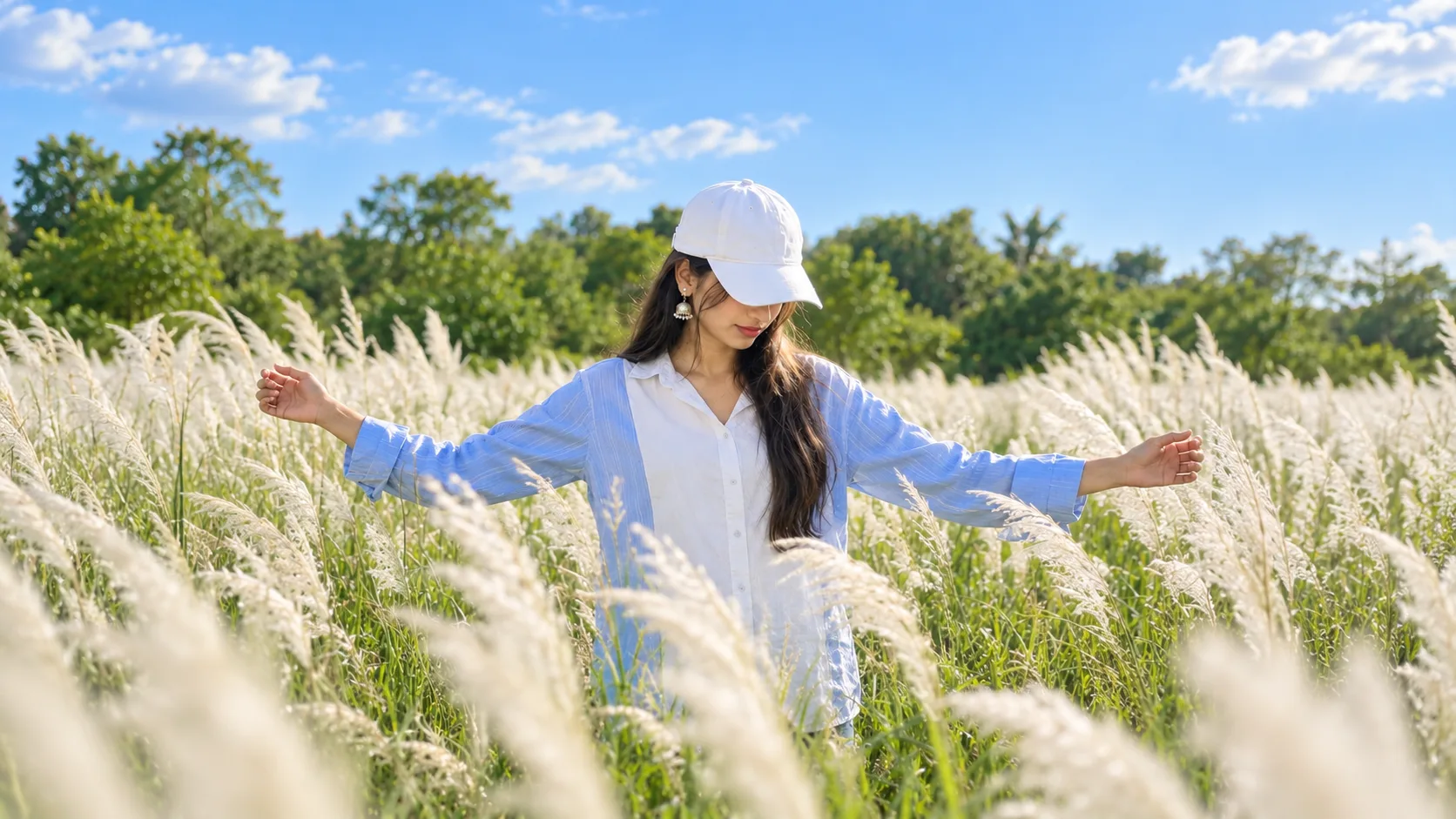
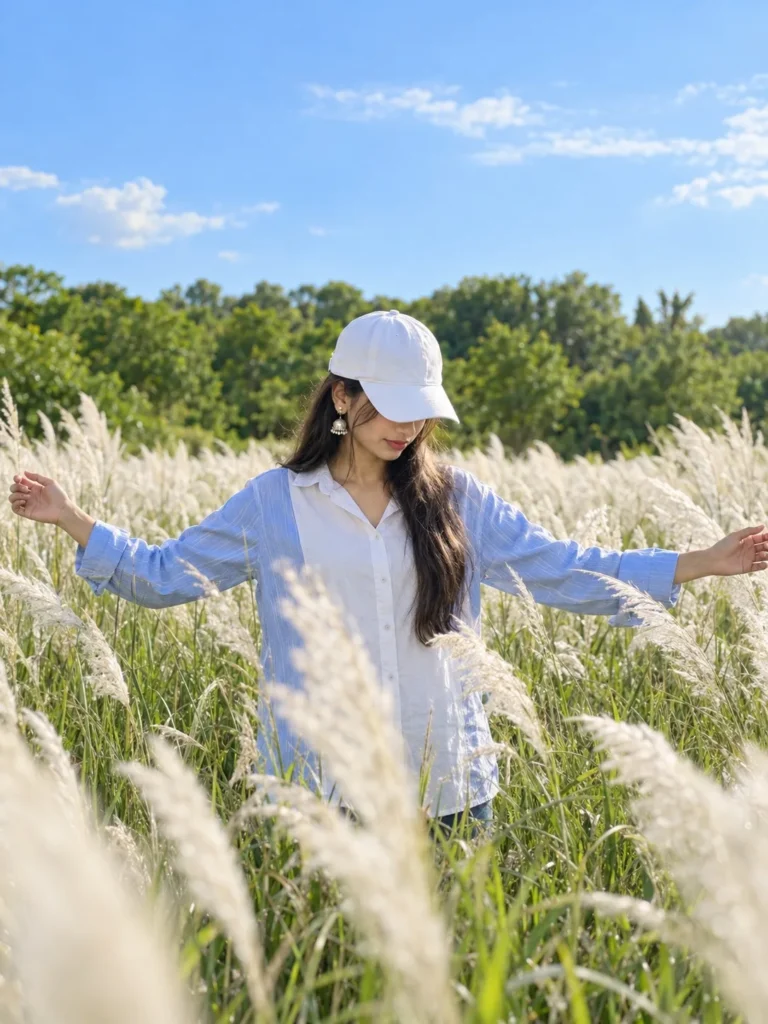
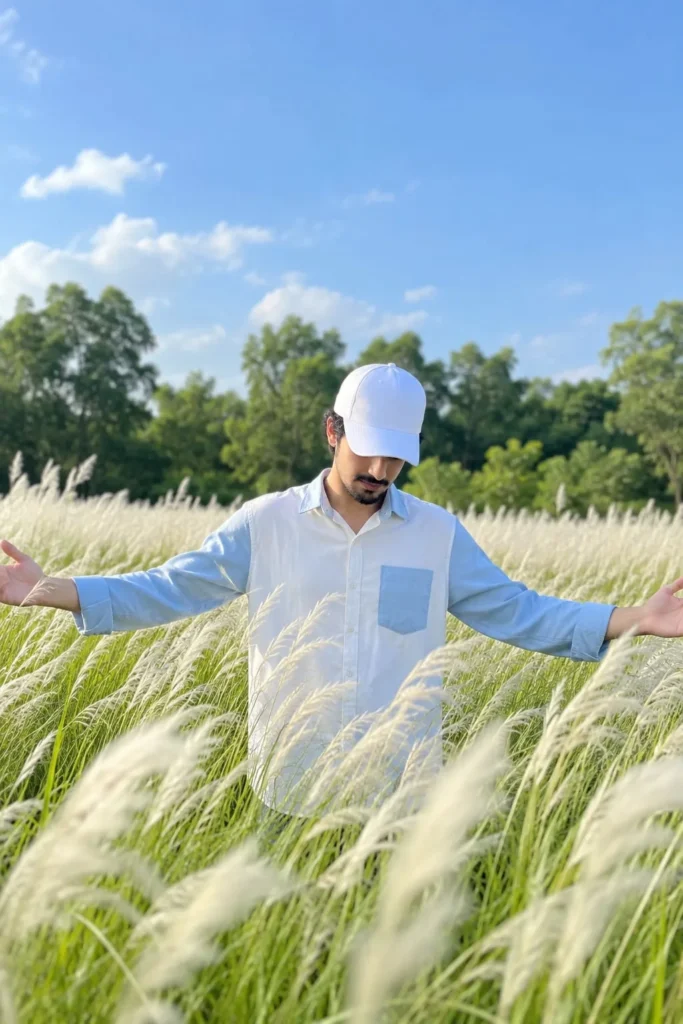
I recently created this outdoor photo using AI, and I really liked how natural the final result looked. The image shows a person standing in a beautiful grass field with both arms open, surrounded by tall white grass and greenery. The clear blue sky and soft sunlight make the photo look like it was captured outdoors with a phone camera.
What I liked most about this image is that it doesn't have that typical artificial AI look. The background, sunlight, grass, clothes, and overall depth of the photo look quite natural. If you also want to create a similar realistic outdoor photo using AI, you can easily do it with an AI image generator.
How to Create a Realistic Grass Field Photo Using AI
Creating this type of image is quite simple. You don't need to know professional photo editing or Photoshop. All you need is an AI image generation tool and, if you want to use your own appearance, a clear reference photo.
Step 1. Choose an AI Image Generator
First, open an AI image generator that allows you to create images from a description and supports reference images.
There are many AI tools available, so you can use the one you are already comfortable with.
Step 2. Add Your Reference Photo
If you want the person in the final image to look like you, upload your photo as a reference.
I recommend using a clear photo where your face and appearance are easy to see. A good reference image can help the AI maintain your overall appearance while creating the new outdoor scene.
Step 3. Choose an Outdoor Setting
For this type of photo, a natural grass field works really well.
You can create a scene with tall white grass, green plants, trees in the distance, and a clear blue sky. The background should have enough depth so that the person remains the main focus of the image.
Step 4. Add a Natural Pose
The pose also makes a big difference.
In this image, the person is standing in the middle of the field with both arms extended outward. The head is slightly lowered, which gives the photograph a relaxed and natural feeling.
You can also experiment with different poses, such as looking toward the camera, walking through the field, or looking toward the sky.
Step 5. Keep the Clothing Simple
I wanted the outfit in this image to look simple and realistic rather than overly styled.
A light-colored shirt with a matching cap works particularly well with the green field and blue sky. Simple clothing also helps keep the focus on the outdoor environment.
Advertisement
Step 6. Use Natural Lighting
Lighting is one of the most important parts of creating a realistic AI photograph.
For this type of image, bright natural daylight works best. Soft sunlight falling across the subject and grass can make the photograph look much more like something captured outdoors.
Avoid making the lighting too dramatic if your goal is a normal smartphone-style photograph.
Step 7. Generate the Image
Once everything is ready, generate the image.
The AI will create the outdoor scene based on your instructions and reference photo. You may need to generate a few versions before getting the result you like.
Sometimes the first image can have problems with the hands, face, clothing, or grass. If that happens, simply try another generation or make small changes.
✨ AI PROMPT
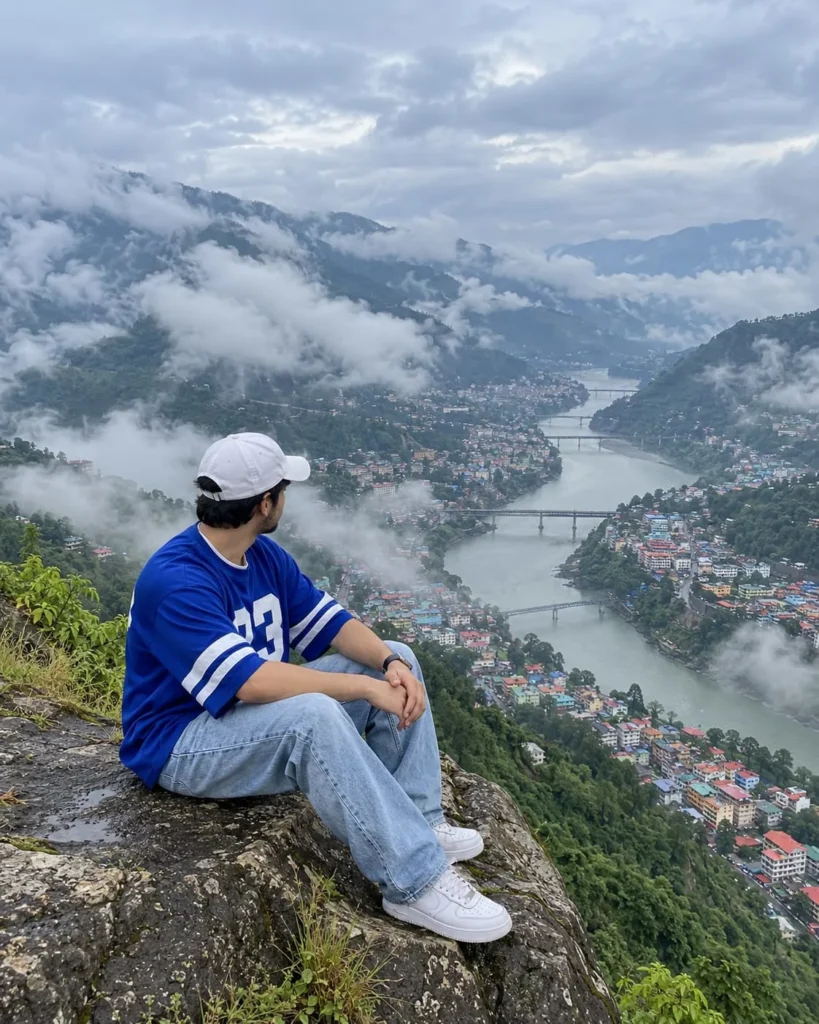
Create an ultra-realistic, high-resolution iPhone photograph that recreates the uploaded reference image with maximum possible visual similarity.
USE THE UPLOADED IMAGE AS THE PRIMARY REFERENCE:
Treat the uploaded image as the exact visual reference for the entire scene. Preserve the same composition, framing, camera perspective, subject placement, subject pose, clothing, cliff, river, town, mountains, clouds, fog, lighting, colors, proportions, depth and overall atmosphere.
Do not redesign or reinterpret the scene. The goal is to make the final image look like the same moment was photographed again on an iPhone.
━━━━━━━━━━━━━━━━━━━━
SUBJECT
━━━━━━━━━━━━━━━━━━━━
A young adult man is sitting naturally on the very edge of a large rugged mountain cliff in the foreground.
Position him exactly like the reference:
- lower-left / lower-center area of the frame
- sitting sideways on the cliff
- body facing toward the valley
- head turned toward the right side of the frame
- looking at the landscape
- NOT looking at the camera
- knees naturally bent and raised
- both hands loosely clasped together around his knees
- relaxed shoulders
- slightly relaxed forward posture
- legs extending toward the lower-right
- natural human anatomy
- realistic body proportions
The subject should look completely natural and candid, as if he is simply sitting and enjoying the mountain view.
Do not make him pose for the camera.
━━━━━━━━━━━━━━━━━━━━
CLOTHING
━━━━━━━━━━━━━━━━━━━━
Match the reference clothing exactly:
White baseball cap.
Oversized royal-blue sports jersey with:
- white horizontal stripes around the sleeves
- large white number "23" on the front
- realistic fabric folds
- natural loose fit
Light blue relaxed-fit denim jeans.
Clean white sneakers.
Simple wristwatch.
Preserve the exact overall clothing colors, proportions, fit and arrangement from the reference.
━━━━━━━━━━━━━━━━━━━━
IDENTITY
━━━━━━━━━━━━━━━━━━━━
If a separate subject/face reference image is provided, use it as the ONLY source of the person's facial identity.
Preserve:
- facial structure
- face proportions
- skin tone
- hairstyle
- hairline
- eyebrows
- eyes
- nose
- lips
- jawline
- natural facial asymmetry
- recognizable identity
Do not beautify or alter the person's identity.
If no separate face reference is provided, keep the man's face mostly turned away from the camera, matching the uploaded reference.
━━━━━━━━━━━━━━━━━━━━
CLIFF
━━━━━━━━━━━━━━━━━━━━
Recreate the large rocky cliff exactly in the foreground.
The cliff should be:
- large
- rugged
- naturally irregular
- dark gray and brown
- heavily weathered
- rough textured
- covered with natural cracks
- containing small patches of moss
- containing subtle natural graffiti/markings
- surrounded by small green plants and vegetation
The man must appear naturally seated directly on the cliff edge.
The cliff should occupy approximately the same lower-left portion of the image as the reference.
Do not make the cliff look artificially generated or perfectly shaped.
━━━━━━━━━━━━━━━━━━━━
VALLEY
━━━━━━━━━━━━━━━━━━━━
Below the cliff is a huge mountainous valley.
Recreate the valley layout from the reference image.
A wide river winds through the center of the valley.
The river should create a natural curved/S-shaped path from the distant background toward the lower-right portion of the frame.
The river should have realistic blue-gray water reflecting the overcast sky.
On both sides of the river are densely populated hillside neighborhoods.
Thousands of small houses and buildings should naturally cover portions of the valley.
The houses should have varied realistic rooftops:
- red
- orange
- blue
- green
- turquoise
- gray
- muted pastel colors
Do not make the houses individually oversized or too sharp.
They should look appropriately distant.
━━━━━━━━━━━━━━━━━━━━
BRIDGES
━━━━━━━━━━━━━━━━━━━━
Recreate the bridges visible in the reference.
Include several bridges crossing the river in the middle and distant background.
They should:
- remain relatively small because of distance
- have realistic structural proportions
- naturally connect the two sides of the town
- follow the same approximate placement as the reference
Do not add unnecessary bridges.
━━━━━━━━━━━━━━━━━━━━
MOUNTAINS
━━━━━━━━━━━━━━━━━━━━
Surround the valley with large steep green mountains.
The mountains should be:
- densely covered with natural vegetation
- realistic
- humid
- slightly softened by atmospheric haze
- darker and more detailed in the nearer areas
- progressively softer in the distance
Preserve the mountain arrangement and framing from the reference.
━━━━━━━━━━━━━━━━━━━━
CLOUDS & MIST
━━━━━━━━━━━━━━━━━━━━
This is a very important part of the image.
Recreate the thick natural mountain fog and low clouds visible throughout the reference.
Large soft white clouds should pass between the mountains.
Mist should partially cover:
- distant houses
- parts of the river
- mountain slopes
- portions of the town
The fog must have realistic transparency and atmospheric depth.
Some areas should be more obscured while other areas remain visible.
The mist should naturally blend into the mountains and valley.
Do NOT create smoke-like fog.
Do NOT create perfectly smooth artificial clouds.
The atmosphere should feel like a real cool, humid mountain morning after rainfall.
━━━━━━━━━━━━━━━━━━━━
SKY
━━━━━━━━━━━━━━━━━━━━
The upper portion of the image should contain a large cloudy sky.
Soft blue-gray overcast sky.
Large natural white and pale-gray clouds.
No visible dramatic sunset.
No orange sky.
No golden-hour lighting.
No dramatic sun rays.
Keep the sky soft and naturally exposed like a real iPhone photograph.
━━━━━━━━━━━━━━━━━━━━
CAMERA
━━━━━━━━━━━━━━━━━━━━
The photograph must look like it was genuinely captured using a modern iPhone.
Use the main rear camera.
1× main camera.
Approximately 24mm equivalent focal length.
Natural smartphone perspective.
Camera positioned behind and slightly to the side of the seated man.
Camera height approximately around the subject's upper-body/seated level.
The photographer should appear to be standing naturally near the subject.
Do NOT make it look like:
- DSLR photography
- mirrorless professional photography
- cinema camera
- drone photography
- studio photography
- professional landscape photography
It should look like a real person casually captured this beautiful moment on an iPhone.
━━━━━━━━━━━━━━━━━━━━
IPHONE IMAGE PROCESSING
━━━━━━━━━━━━━━━━━━━━
Use authentic modern iPhone computational photography.
Natural Smart HDR-style dynamic range.
Realistic:
- highlight recovery
- shadow recovery
- exposure
- skin tones
- contrast
- micro-detail
- lens rendering
- computational sharpening
- atmospheric detail
Keep the image naturally sharp without making everything unnaturally crisp.
Subtle smartphone image texture.
Very slight natural digital noise where appropriate.
Realistic HDR but NOT excessive HDR.
Natural computational photography.
The image should look like a high-quality original iPhone photo straight from the camera.
━━━━━━━━━━━━━━━━━━━━
COMPOSITION
━━━━━━━━━━━━━━━━━━━━
Use a vertical 4:5 portrait composition.
Match the uploaded reference composition as closely as possible.
The composition should have:
TOP:
Large cloudy sky and mountain mist.
MIDDLE:
Green mountains, winding river, bridges and dense colorful town.
BOTTOM:
Large rugged cliff with the seated man.
The man should remain in approximately the same location and size as the reference.
The valley should occupy most of the image.
The winding river should naturally guide the viewer's eye through the center of the composition.
Do not crop the man's feet.
Do not crop the cliff unnaturally.
Do not move the subject to the center of the image.
━━━━━━━━━━━━━━━━━━━━
PERSPECTIVE
━━━━━━━━━━━━━━━━━━━━
Maintain the same perspective as the reference.
The subject should appear relatively close to the camera while the valley appears enormous and distant.
Natural smartphone perspective.
No fisheye effect.
No extreme wide-angle distortion.
No warped buildings.
No distorted mountains.
No unnatural stretching of the subject.
━━━━━━━━━━━━━━━━━━━━
DEPTH OF FIELD
━━━━━━━━━━━━━━━━━━━━
Keep the man and foreground cliff reasonably sharp.
The distant town, river and mountains should remain sufficiently detailed to be recognizable.
Use natural atmospheric perspective instead of artificial portrait-mode blur.
Do NOT heavily blur the background.
The distant valley should become naturally softer because of mist and distance.
━━━━━━━━━━━━━━━━━━━━
LIGHTING
━━━━━━━━━━━━━━━━━━━━
Soft, diffused natural daylight.
Heavy overcast mountain conditions.
No harsh direct sunlight.
No studio lighting.
No artificial rim light.
No dramatic cinematic lighting.
Natural shadows.
Soft highlights on the white cap, jersey and sneakers.
Realistic light scattering through the mountain mist.
━━━━━━━━━━━━━━━━━━━━
COLOR
━━━━━━━━━━━━━━━━━━━━
Match the reference color palette.
Cool blue-gray sky.
Soft white and pale-gray clouds.
Natural green mountains.
Blue-gray river.
Muted but colorful rooftops.
Natural skin tones.
Royal-blue jersey.
Light-blue denim.
Neutral gray/brown rock.
Keep the colors realistic.
Do not oversaturate.
Do not use cinematic teal-and-orange grading.
Do not apply a movie color grade.
Do not make the image look like a poster.
━━━━━━━━━━━━━━━━━━━━
PHOTOREALISM
━━━━━━━━━━━━━━━━━━━━
Extreme photorealism.
The final image must look like a genuine photograph.
Realistic:
- skin
- hair
- fabric
- denim
- shoes
- hands
- fingers
- rock
- plants
- houses
- roads
- bridges
- river
- clouds
- fog
- mountain vegetation
Natural imperfections are welcome.
Avoid the overly perfect appearance common in AI-generated images.
━━━━━━━━━━━━━━━━━━━━
NATURAL IPHONE DETAILS
━━━━━━━━━━━━━━━━━━━━
Add subtle characteristics of a genuine iPhone photograph:
- realistic smartphone lens rendering
- subtle computational sharpening
- natural HDR
- realistic highlight roll-off
- natural shadow detail
- slightly softer distant details
- subtle digital texture
- realistic atmospheric haze
- natural exposure
- realistic cloud detail
- natural color reproduction
No artificial cinematic grain.
No film emulation.
No vintage filter.
No DSLR depth-of-field effect.
━━━━━━━━━━━━━━━━━━━━
IMPORTANT RECREATION INSTRUCTIONS
━━━━━━━━━━━━━━━━━━━━
Preserve the exact visual concept of the reference.
Preserve the same:
- camera angle
- framing
- subject position
- subject size
- seated pose
- head direction
- hand position
- clothing
- cliff position
- river path
- town placement
- mountain arrangement
- bridges
- cloud placement
- foggy atmosphere
- overall color balance
Do not add extra people.
Do not remove the main subject.
Do not change the subject's clothing.
Do not change the blue jersey.
Do not remove the number 23.
Do not remove the white cap.
Do not change the jeans.
Do not change the white sneakers.
Do not change the seated pose.
Do not move the subject to the center.
Do not replace the valley with a different landscape.
Do not remove the river.
Do not remove the bridges.
Do not remove the colorful houses.
Do not remove the mountain fog.
Do not add fantasy elements.
Do not make the scene more dramatic than the reference.
The goal is NOT to create a similar-looking mountain photo.
The goal is to recreate THIS exact visual composition and moment as closely as possible, while making it appear as though it was naturally photographed on an iPhone.
━━━━━━━━━━━━━━━━━━━━
FINAL OUTPUT
━━━━━━━━━━━━━━━━━━━━
Ultra-realistic high-resolution vertical iPhone photograph.
Authentic travel moment.
Natural candid composition.
Realistic human subject.
Realistic mountain environment.
Realistic atmospheric fog.
Natural smartphone HDR.
Natural colors.
No AI appearance.
No illustration.
No CGI.
No cinematic movie look.
The final result should be believable as a real photograph captured on a modern iPhone.
✨ AI PROMPT
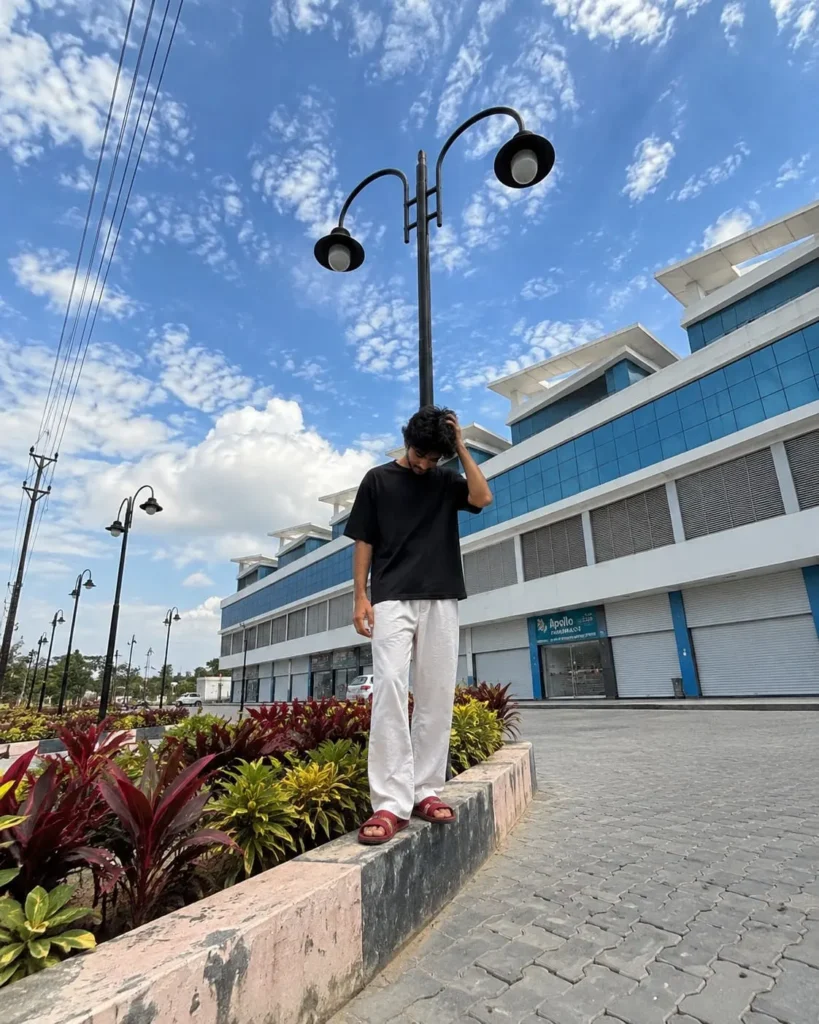
Create an ultra-photorealistic recreation of the reference image, matching the original image as closely as possible in composition, framing, perspective, environment, subject placement, architecture, lighting, colors, shadows, and photographic characteristics.
SCENE & COMPOSITION:
A vertical full-body outdoor photograph captured in a large paved commercial/public complex during bright daytime. The camera is positioned low and slightly wide-angle, pointing upward, creating a dramatic perspective where the sky occupies a large portion of the frame. The subject stands in the lower-middle/right portion of the image on the raised edge of a landscaped roadside planter.
BACKGROUND ARCHITECTURE:
Behind the subject is the exact same large modern multi-story commercial building shown in the reference. Recreate its distinctive white exterior, multiple angular/slanted roof sections, large reflective blue-tinted glass windows, horizontal ventilation panels, and long ground-floor storefront section with closed white rolling shutters and blue structural columns. Preserve the building's exact proportions, geometry, facade layout, window placement, roof shapes, colors, and visible signage exactly as seen in the reference. Do not redesign or simplify the building.
FOREGROUND & LANDSCAPING:
The foreground contains a long raised concrete planter running diagonally from the bottom-left toward the subject. The planter has a weathered pinkish/cream concrete exterior with dark gray/black painted sections along the upper edge. Inside the planter are dense ornamental plants with vivid red, burgundy, green, and yellow-green foliage. Preserve the exact landscaping arrangement and diagonal leading lines.
The surrounding ground is covered with gray interlocking rectangular paving blocks arranged in a repeating zig-zag pattern. Recreate the pavement texture and perspective accurately.
STREET LIGHTS:
Include the distinctive tall black decorative streetlight directly behind and above the subject. It has a vertical black metal pole with two curved arms extending outward, each ending in a round black lamp shade with a visible pale bulb underneath. Preserve the exact height, shape, curvature, position, and proportions.
Include additional matching black decorative streetlights receding into the distance along the left side of the scene, creating strong perspective depth.
POWER LINES:
On the upper-left side of the image, include three dark electrical wires running diagonally from the top edge toward the distant utility pole on the left. Include the black utility pole and its cross-support structure exactly as visible in the reference.
SKY:
The sky should occupy approximately the upper half of the image. Recreate the bright vivid blue sky with naturally scattered white clouds, including the dense textured cloud formations around the upper-left and center portions. Strong daylight creates bright highlights while retaining realistic cloud detail. Do not use a sunset or dramatic cinematic sky.
SUBJECT:
Recreate the same general human subject placement and body proportions shown in the reference without changing the composition. Full body visible from head to feet.
The subject is casually standing on the raised planter edge, wearing:
- oversized plain black short-sleeve T-shirt
- loose-fitting white wide-leg pants
- red/maroon open-toe slide sandals
The subject has dark, thick, naturally curly/wavy hair.
POSE:
Match the reference pose precisely:
The subject stands upright but casually relaxed.
One arm hangs naturally downward beside the body.
The other arm is bent upward, with the hand placed against/near the side of the head and hair.
The head is tilted slightly downward and toward the side, with the face mostly obscured by the hair and hand.
The subject looks downward rather than directly toward the camera.
Keep the exact relaxed, candid body language and hand positioning from the reference.
CAMERA:
Simulate a modern smartphone photograph, preferably an iPhone-style camera.
Vertical 4:5 composition.
Ultra-wide/24mm-equivalent perspective.
Low camera position approximately waist-to-chest height relative to the subject, tilted slightly upward.
Strong perspective distortion consistent with a smartphone ultra-wide lens.
The subject remains full-body and relatively small within the overall frame.
Do not crop the feet, head, streetlights, building, or sky.
PHOTOGRAPHIC REALISM:
Extremely realistic smartphone photography.
Natural daylight exposure.
Realistic HDR processing.
Sharp architectural details.
Natural skin and hair texture.
Realistic fabric texture.
Natural shadows and reflections.
Subtle smartphone computational photography.
Slight wide-angle lens distortion.
No artificial studio lighting.
No cinematic color grading.
No artificial depth-of-field blur.
Everything from foreground to background should remain naturally detailed and recognizable.
COLOR & LIGHT:
Bright midday/late-morning sunlight.
Vivid natural blue sky.
White clouds with realistic soft shadows.
White building facade.
Strong blue reflections in the glass windows.
Natural green, yellow, and red landscaping.
Neutral gray pavement.
Accurate sunlight and shadow direction matching the reference.
IMPORTANT:
Reproduce the reference image's exact visual layout rather than creating a similar generic location. Maintain the same camera angle, subject scale, subject position, building position, streetlight position, planter angle, pavement perspective, electrical wires, sky distribution, background vehicles, storefronts, landscaping, and overall geometry.
Do not add new objects.
Do not remove existing major objects.
Do not change the architecture.
Do not change the clothing.
Do not change the pose.
Do not change the camera perspective.
Do not make the subject larger.
Do not make the image cinematic or studio-like.
Do not beautify or stylize the scene.
FINAL RESULT:
A highly convincing, naturally captured smartphone photograph that looks like the exact same real-world photograph and location as the reference, with authentic imperfections and realistic photographic detail.
✨ AI PROMPT
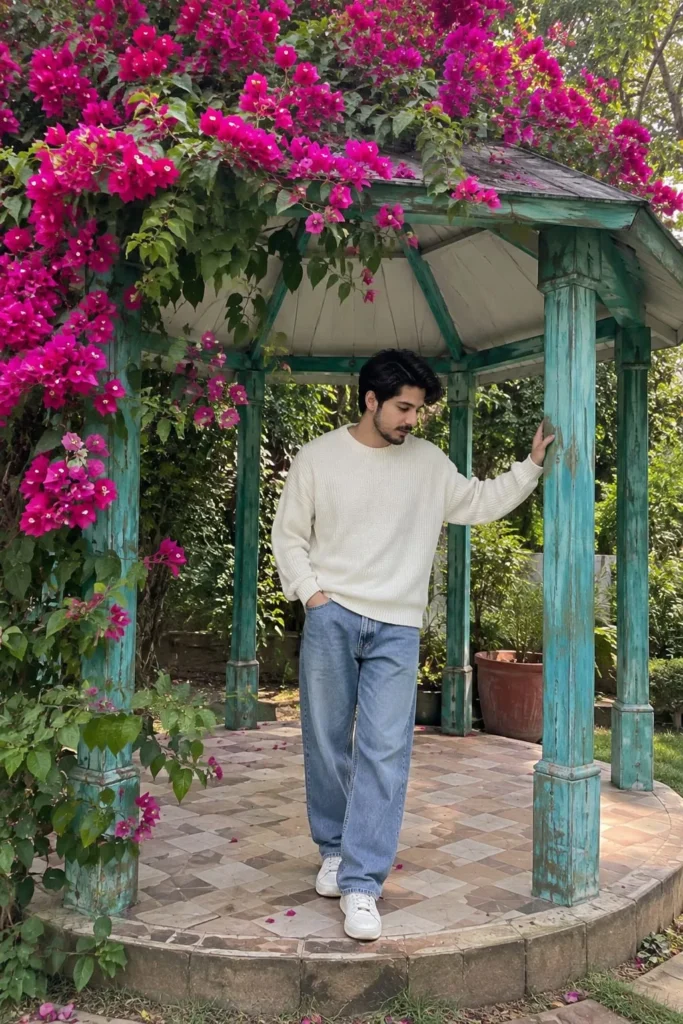
Create an ultra-realistic candid photograph in 9:16 vertical format that looks like a genuine photograph naturally captured on an iPhone camera.
FACIAL IDENTITY — HIGHEST PRIORITY:
Use the uploaded reference image exclusively as the facial identity reference. Preserve the person's facial identity with maximum accuracy: exact facial structure, face shape, forehead, eyebrows, eyes, eye shape and spacing, nose shape and proportions, lips, mouth shape, jawline, cheek structure, chin, ears, natural skin tone, hairline, and all distinctive facial characteristics. The person must unmistakably look like the same individual in the uploaded reference image. Do not redesign, beautify, stylize, age, de-age, or alter the face.
Keep the person's identity consistent even if the head is slightly lowered and viewed from a natural candid angle. Maintain realistic facial proportions and natural asymmetry. Do not create a generic face.
SCENE & COMPOSITION:
A young person standing casually underneath a small rustic garden gazebo surrounded by lush greenery and abundant bright pink/magenta bougainvillea flowers. The person stands beneath the gazebo, with one hand naturally resting on a turquoise-painted wooden pillar and the other arm relaxed downward. Head slightly lowered in a quiet candid pose. Full body visible.
The gazebo has four turquoise/teal weathered wooden pillars, a broad rustic silver-gray textured roof with a pale underside, and a circular raised platform with beige-and-brown patterned tiles. Dense bougainvillea grows heavily from the left side and naturally spreads across the roof. Numerous vivid pink flowers surround the structure.
The garden continues into the background with dense green foliage, additional pink flowers, and a soft natural pathway. A few fallen pink petals are scattered across the tiled platform.
CAMERA — iPHONE LOOK:
Photograph captured casually using a modern iPhone main camera, vertical 9:16 composition. Natural smartphone perspective, realistic computational photography, natural HDR, balanced highlights and shadows, authentic iPhone exposure, realistic skin tones, subtle smartphone sharpening, natural micro-contrast, realistic lens rendering, gentle computational depth separation, and natural background bokeh.
The image should look like someone genuinely took this photograph on an iPhone in a real garden, rather than a professionally staged photoshoot.
NATURAL PHOTOGRAPHIC DETAILS:
Realistic skin pores, individual hair strands, natural facial texture, authentic clothing wrinkles, physically accurate hands and fingers, realistic flower petals, detailed leaves, weathered wood, believable roof texture, natural shadows and reflections. Keep small natural imperfections that occur in an actual smartphone photograph.
LIGHTING:
Soft natural outdoor daylight filtered through surrounding trees and foliage. Realistic ambient illumination, gentle shadows underneath the gazebo roof, naturally illuminated face and clothing, subtle highlights on leaves and flowers. No studio lighting.
REALISM REQUIREMENT:
Make it indistinguishable from a real iPhone photograph. Natural colors, realistic exposure, believable depth, authentic smartphone processing, no artificial cinematic grading.
DO NOT:
Do not change the person's facial identity. Do not create a different face. Do not beautify the face. Do not make the skin plastic or overly smooth. No CGI, no 3D render, no illustration, no painting, no anime, no fantasy, no cinematic poster look, no DSLR studio appearance, no excessive bokeh, no artificial HDR, no oversaturation, no distorted anatomy, no extra fingers, no unnatural hands, no text or watermark.
✨ AI PROMPT
Create a highly photorealistic outdoor cinematic photograph based on the uploaded reference image. HIGHEST PRIORITY — REFERENCE IMAGE: Use the uploaded image as the definitive visual reference for the overall composition, camera angle, framing, subject placement, pose, environment, lighting, colors, depth of field, and photographic style. COMPOSITION & FRAMING: Recreate the same vertical portrait composition as the reference image. Place the main subject approximately in the center of the frame, positioned in the middle distance and partially surrounded by tall white feathery grass. Maintain the same amount of open sky above the subject and the same foreground-to-background proportions. Keep the subject's size, position, and overall silhouette visually consistent with the reference. SUBJECT & POSE: A person is standing in the middle of a large field of tall white ornamental grass. The person is facing toward the camera but their head is tilted downward, with the face mostly hidden by the brim of a white baseball cap. Both arms are extended outward and slightly upward in a relaxed, open gesture. Hands are naturally open with relaxed fingers. Reproduce the exact body posture, arm positioning, head angle, and overall silhouette seen in the reference. CLOTHING: White baseball cap. Light blue and white long-sleeve button-up shirt with a white central panel and blue sleeves/details. Natural realistic fabric texture, folds, stitching, buttons, and subtle shadows. Preserve the clothing design and proportions shown in the reference. ENVIRONMENT: A vast lush green field filled with tall white feathery grass/plumes. Dense green trees form a soft background along the horizon. Bright clear blue sky occupying a large portion of the upper frame. A few soft natural white clouds in the sky. Create a peaceful, fresh, summery outdoor atmosphere. FOREGROUND: Use abundant tall white grass in the foreground. The closest grass should be noticeably out of focus with realistic optical blur. Grass should naturally overlap parts of the lower body. Create realistic variation in grass height, direction, density, and texture. Add subtle movement/wind to the grass. BACKGROUND: Dense green vegetation and trees behind the subject. Strong natural background separation with a smooth creamy bokeh effect. Do not make the background artificially sharp. Keep the background colors vibrant but natural. LIGHTING: Bright natural daylight. Soft diffused sunlight illuminating the subject and grass. Natural highlights on the white grass and shirt. Soft realistic shadows. Balanced exposure with a bright blue sky but preserved detail. Fresh, airy, high-key photographic appearance. CAMERA & PHOTOGRAPHY: Professional full-frame camera photography. Natural 50mm–85mm portrait lens look. Moderate telephoto compression. Wide aperture around f/2.0–f/2.8. Shallow depth of field. Sharp subject with beautifully blurred foreground and background. Realistic optical bokeh, not artificial blur. Natural HDR-like dynamic range. High-resolution professional photography. Realistic skin, fabric, grass, foliage, and atmospheric details. COLOR & STYLE: Natural vibrant greens. Clean sky-blue tones. Soft white grass. Bright but realistic exposure. Fresh cinematic color grading. Subtle contrast. No excessive saturation. No artificial CGI appearance. No illustration or painting effect. No plastic-looking textures. REALISM: Extremely photorealistic. Natural camera optics. Realistic depth, perspective, shadows, reflections, textures, and atmospheric haze. Authentic outdoor photography. Fine photographic details. The final image should look like an actual photograph captured with a professional camera, not an AI-generated image. IDENTITY INSTRUCTION: If a person reference image is also provided, preserve that person's facial identity exactly as the reference, including facial structure, skin tone, hairstyle, and recognizable features. Do not beautify, reshape, age, de-age, or alter the person's identity. NEGATIVE PROMPT: cartoon, illustration, painting, anime, CGI, 3D render, artificial skin, plastic skin, oversharpening, excessive HDR, oversaturation, distorted body, incorrect anatomy, extra fingers, missing fingers, malformed hands, extra limbs, duplicate person, distorted face, altered identity, unnatural pose, floating body, unrealistic grass, fake bokeh, excessive blur, low resolution, noise, artifacts, watermark, logo, text
✨ AI PROMPT
Create a highly photorealistic outdoor cinematic photograph based on the uploaded reference image. HIGHEST PRIORITY — REFERENCE IMAGE: Use the uploaded image as the definitive visual reference for the overall composition, camera angle, framing, subject placement, pose, environment, lighting, colors, depth of field, and photographic style. COMPOSITION & FRAMING: Recreate the same vertical portrait composition as the reference image. Place the main subject approximately in the center of the frame, positioned in the middle distance and partially surrounded by tall white feathery grass. Maintain the same amount of open sky above the subject and the same foreground-to-background proportions. Keep the subject's size, position, and overall silhouette visually consistent with the reference. SUBJECT & POSE: A person is standing in the middle of a large field of tall white ornamental grass. The person is facing toward the camera but their head is tilted downward, with the face mostly hidden by the brim of a white baseball cap. Both arms are extended outward and slightly upward in a relaxed, open gesture. Hands are naturally open with relaxed fingers. Reproduce the exact body posture, arm positioning, head angle, and overall silhouette seen in the reference. CLOTHING: White baseball cap. Light blue and white long-sleeve button-up shirt with a white central panel and blue sleeves/details. Natural realistic fabric texture, folds, stitching, buttons, and subtle shadows. Preserve the clothing design and proportions shown in the reference. ENVIRONMENT: A vast lush green field filled with tall white feathery grass/plumes. Dense green trees form a soft background along the horizon. Bright clear blue sky occupying a large portion of the upper frame. A few soft natural white clouds in the sky. Create a peaceful, fresh, summery outdoor atmosphere. FOREGROUND: Use abundant tall white grass in the foreground. The closest grass should be noticeably out of focus with realistic optical blur. Grass should naturally overlap parts of the lower body. Create realistic variation in grass height, direction, density, and texture. Add subtle movement/wind to the grass. BACKGROUND: Dense green vegetation and trees behind the subject. Strong natural background separation with a smooth creamy bokeh effect. Do not make the background artificially sharp. Keep the background colors vibrant but natural. LIGHTING: Bright natural daylight. Soft diffused sunlight illuminating the subject and grass. Natural highlights on the white grass and shirt. Soft realistic shadows. Balanced exposure with a bright blue sky but preserved detail. Fresh, airy, high-key photographic appearance. CAMERA & PHOTOGRAPHY: Professional full-frame camera photography. Natural 50mm–85mm portrait lens look. Moderate telephoto compression. Wide aperture around f/2.0–f/2.8. Shallow depth of field. Sharp subject with beautifully blurred foreground and background. Realistic optical bokeh, not artificial blur. Natural HDR-like dynamic range. High-resolution professional photography. Realistic skin, fabric, grass, foliage, and atmospheric details. COLOR & STYLE: Natural vibrant greens. Clean sky-blue tones. Soft white grass. Bright but realistic exposure. Fresh cinematic color grading. Subtle contrast. No excessive saturation. No artificial CGI appearance. No illustration or painting effect. No plastic-looking textures. REALISM: Extremely photorealistic. Natural camera optics. Realistic depth, perspective, shadows, reflections, textures, and atmospheric haze. Authentic outdoor photography. Fine photographic details. The final image should look like an actual photograph captured with a professional camera, not an AI-generated image. IDENTITY INSTRUCTION: If a person reference image is also provided, preserve that person's facial identity exactly as the reference, including facial structure, skin tone, hairstyle, and recognizable features. Do not beautify, reshape, age, de-age, or alter the person's identity. NEGATIVE PROMPT: cartoon, illustration, painting, anime, CGI, 3D render, artificial skin, plastic skin, oversharpening, excessive HDR, oversaturation, distorted body, incorrect anatomy, extra fingers, missing fingers, malformed hands, extra limbs, duplicate person, distorted face, altered identity, unnatural pose, floating body, unrealistic grass, fake bokeh, excessive blur, low resolution, noise, artifacts, watermark, logo, text
Make the AI Photo Look Like a Real Camera Shot
One thing I noticed while creating realistic outdoor images is that the background and lighting are just as important as the person.
If the grass looks too perfect or the background is too sharp, the image can easily look artificial. Adding natural depth of field, slightly blurred foreground grass, realistic sunlight, and distant trees can make a big difference.
In this type of photograph, having some grass slightly out of focus in front of the subject also creates a nice camera-like effect.
Try Different Locations
You don't have to use a grass field every time.
Once you understand the process, you can create similar photos in different outdoor locations, such as:
Green farms
Flower fields
Mountain areas
Open parks
Rural roads
Wheat fields
Forest surroundings
Sunset locations
You can also change the season, clothes, weather, and time of day to create completely different versions.
Final Words
That's it! Creating a realistic outdoor photo using AI is much easier than it may seem. With a good reference photo and the right description, you can create a natural-looking photograph without actually visiting the location.
I personally like this type of image because it has a simple outdoor feel rather than looking heavily edited. The combination of the blue sky, green field, white grass, natural daylight, and relaxed pose makes the final photo look like something that could have been captured during a normal outdoor photoshoot.
If you want to create your own version, try experimenting with different poses, outfits, locations, and lighting until you get the look you want.
Kiara provides detailed insights and updates on Xiaomi products, helping readers stay informed about the latest trends, tips, and reviews to maximize their tech investments.





Leave a Reply