By EDITORIAL STAFF • September 18, 2026 • 249716 Views • No Comments
Black and white photos have a different kind of charm. They look simple, classy, and timeless without needing bright colors or heavy editing. When you add a luxury car, a formal outfit, and city lights, the result can look like a professional photoshoot.
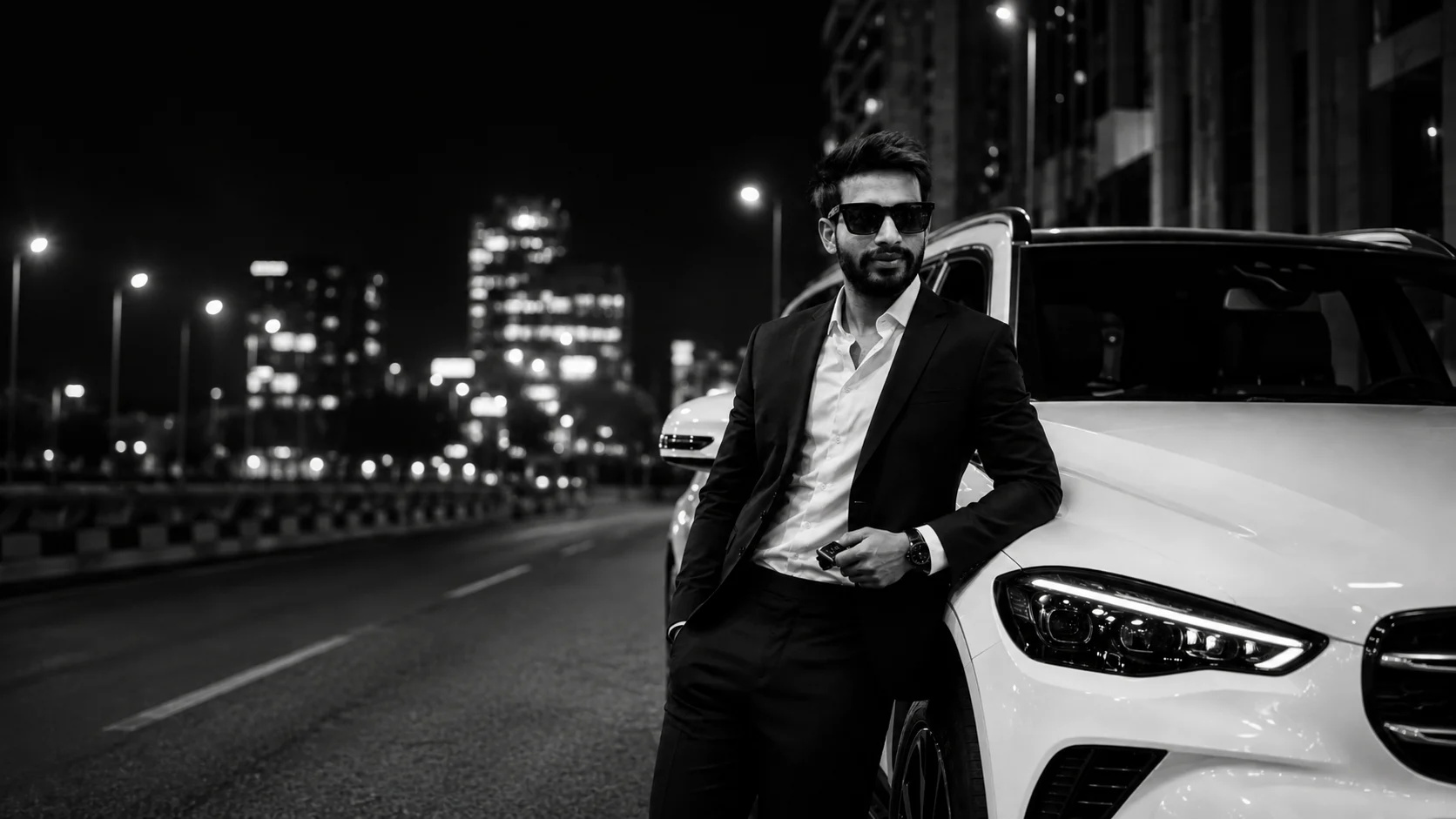
The Black and White Luxury Car AI Photo trend is becoming popular among people who want to create stylish portraits using AI. In this style, you can turn your normal photo into a cinematic night portrait where you are wearing a black suit and standing beside a premium car.
The best part is that you don't need an expensive car or professional camera to create this look. With your own photo and the right AI prompt, you can try it using ChatGPT or Google Gemini.
What is the Black and White Luxury Car AI Photo Trend?
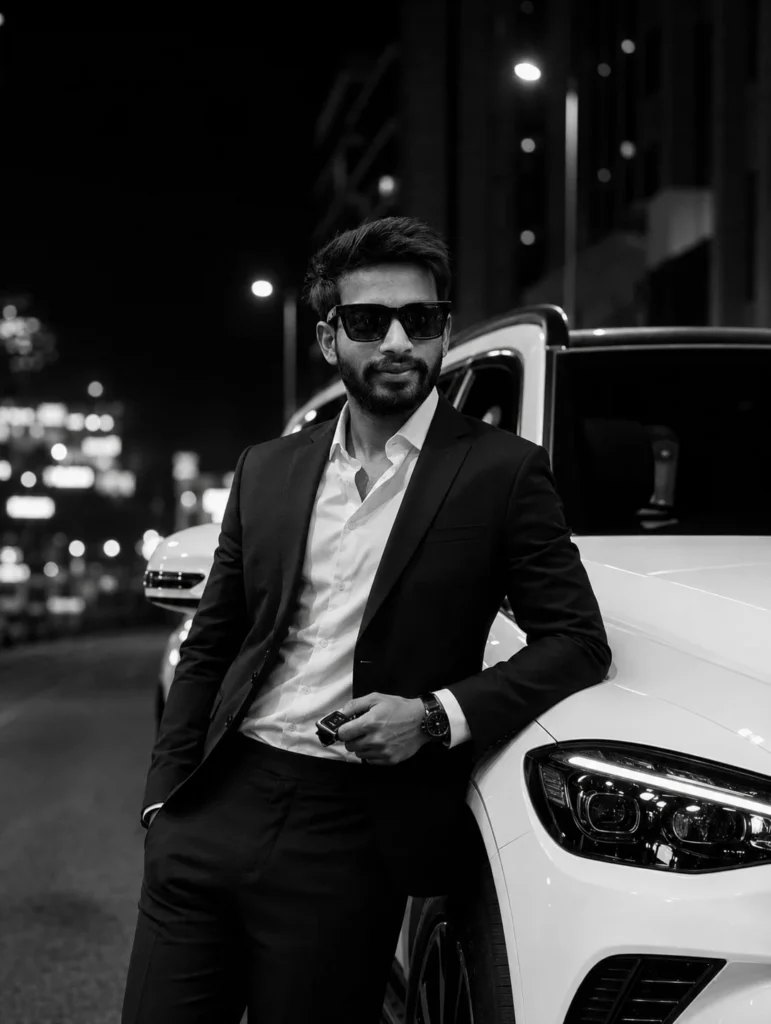
This AI photo trend creates a realistic black and white portrait of a person standing or leaning against a luxury car at night.
The person usually wears a black suit with a white shirt, sunglasses, and a stylish watch. The car is placed beside the person, while city lights and buildings appear softly blurred in the background.
The black and white effect gives the entire image a premium and cinematic look.
How to Create This AI Photo with ChatGPT
First, choose a clear photo where your face is properly visible. Upload it to ChatGPT and use a detailed prompt describing the outfit, car, pose, background, and lighting.
✨ AI PROMPT
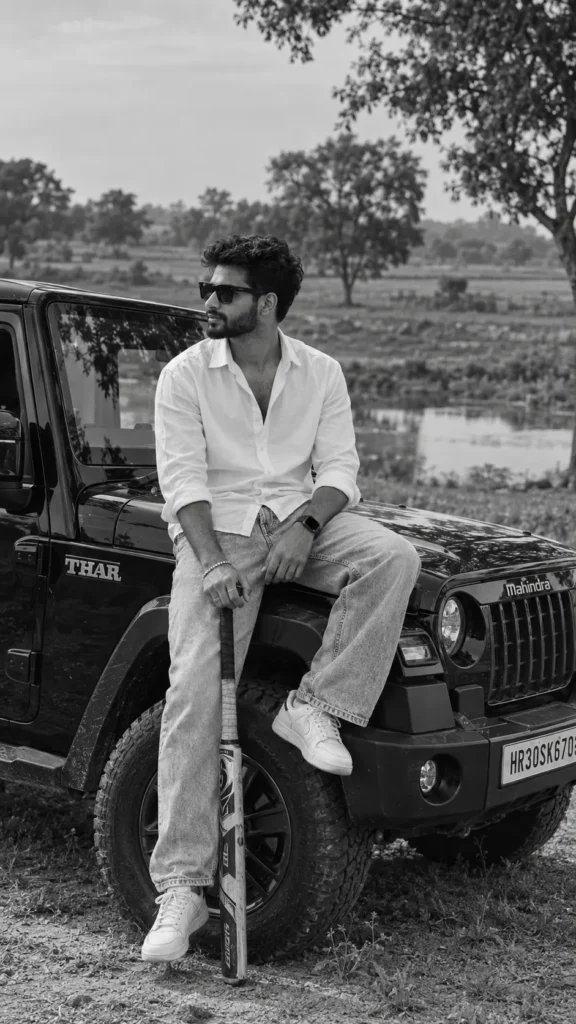
A cinematic, black and white, outdoor portrait of a stylish young man sitting on the front fender of a black Thar SUV in a rural landscape, captured in a natural, candid moment with a relaxed and confident attitude. The subject is facing towards the left, looking off into the distance, wearing dark sunglasses, a crisp white linen shirt with a few buttons open, light-wash relaxed-fit jeans, and white sneekers. His curly hair and trimmed beard add character, with a calm, thoughtful expression. One hand rests on a baseball bat held vertically, while the other hand is placed on his thigh, matching the original pose. The scene is set in an open, dry field with scartered trees and a small pond in the background, shot in natural dayalight with soft contrast, giving a timeless monochrome aesthetic. The composittion uses a mid-shot from a slightly lower angle, creating a strong, masculine, fashion-editorial vibe. Sharp focus on the subject with detailed textures in clothing, hair, and the vehicle, natural depth of field, film-like tonality, subtle grain, and high dynamic range. Shot on a DSLR with an 85mm lens, f/2.0 aperture, ISO 100, capturing authentic shadows, highlights, and fine details, ultra detailed, photorealistic, premium editorial photography.
✨ AI PROMPT
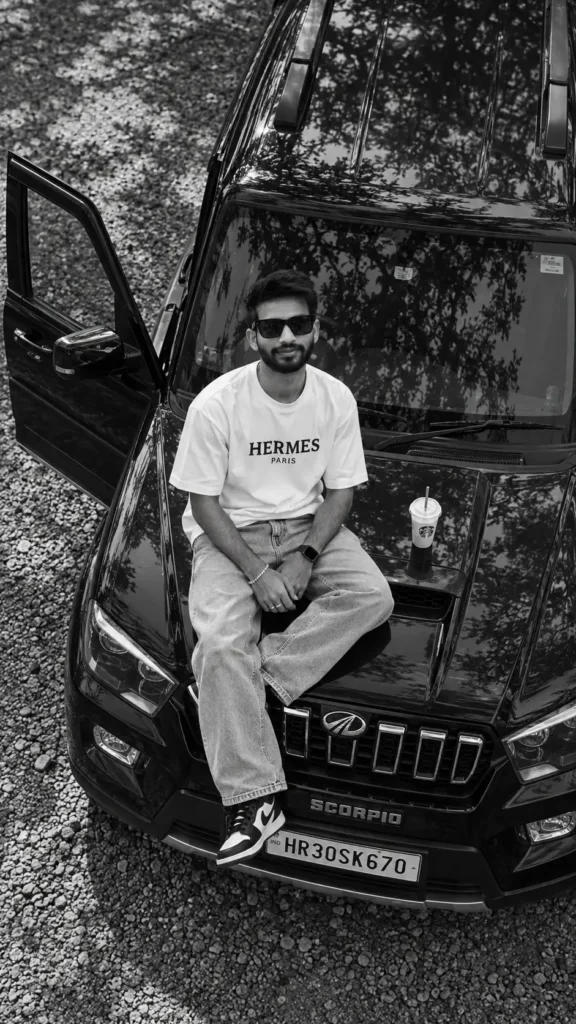
A young stylish Indian man sitting on the bonnet of a black Mahindra Scorpio SUV,
top-down aerial drone view, black and white photography,
Details:
Wearing white oversized t-shirt with text "HERMES PARIS"
Light baggy jeans, black and white sneakers
- Black sunglasses, messy hair, beard
Car door open on left side
White cold drink cup on bonnet
Car number plate: HR30SK670
- Tree shadows reflecting on car roof
Gravel ground background
Style: cinematic, moody, ultra realistic, highly detailed, 8k Aspect Ratio: 9:16 Filter: Black and white
✨ AI PROMPT
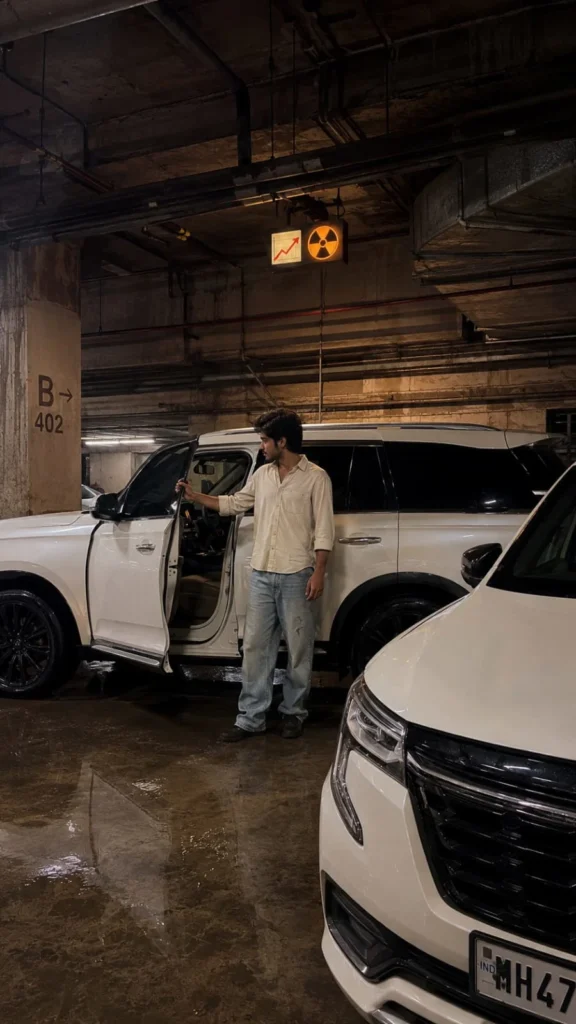
Create an ultra-realistic photograph that recreates the uploaded reference image with the highest possible visual fidelity.
IMPORTANT: The uploaded reference image is the single source of truth. Do not redesign, reinterpret, beautify, simplify, or creatively modify the scene. Recreate what is actually visible in the reference.
🔒 HIGHEST PRIORITY — EXACT REFERENCE MATCH
Match the uploaded reference image as closely as possible in:
- Exact composition
- Exact framing and crop
- Exact camera angle
- Exact camera height
- Exact perspective
- Exact lens/focal-length appearance
- Exact subject placement
- Exact subject proportions
- Exact pose and body position
- Exact facial appearance and identity
- Exact hairstyle
- Exact clothing
- Exact clothing colors and textures
- Exact vehicles and objects
- Exact background
- Exact architecture
- Exact signs and markings
- Exact shadows
- Exact highlights
- Exact reflections
- Exact exposure
- Exact brightness
- Exact contrast
- Exact color temperature
- Exact color grading
- Exact atmosphere
- Exact depth and scale
- Exact photographic realism
Reference fidelity must take priority over creativity.
---
📐 COMPOSITION & CAMERA LOCK
Preserve the reference's exact:
- Camera position
- Camera height
- Camera angle
- Perspective
- Field of view
- Focal-length appearance
- Subject scale
- Subject positioning
- Foreground/background relationship
- Negative space
- Crop
- Framing
- Depth
- Architectural lines
Do not move, resize, rotate, crop, or rearrange important elements.
---
🎨 EXACT COLOR LOCK
Keep all colors exactly as they appear in the uploaded reference.
Preserve:
- Overall color palette
- Hue
- Saturation
- Brightness
- Contrast
- Warm/cool balance
- Skin tones
- Clothing colors
- Vehicle colors
- Wall colors
- Floor colors
- Ceiling colors
- Shadow colors
- Highlight colors
- Reflection colors
- Light colors
- Overall color grading
Do not make the image brighter, darker, warmer, cooler, more colorful, more saturated, or more cinematic than the reference.
Do not apply an artificial teal/orange grade.
---
💡 LIGHTING LOCK
Reproduce the same lighting shown in the reference.
Match:
- Light direction
- Light intensity
- Light softness
- Shadow direction
- Shadow density
- Highlight placement
- Ambient light
- Light falloff
- Reflected light
- Color temperature
- Exposure
If the reference is dark, keep it dark.
If the reference has warm lighting, keep the same warm lighting.
Do not add studio lights, sunlight, neon lights, or dramatic fantasy lighting.
---
👨 PERSON & IDENTITY LOCK
If a person is present, preserve their appearance as closely as possible to the uploaded reference.
Keep:
- Face shape
- Facial proportions
- Eyes
- Eyebrows
- Nose
- Lips
- Jawline
- Cheeks
- Skin tone
- Hairline
- Hairstyle
- Hair texture
- Expression
- Age appearance
- Natural skin texture
Do not beautify, smooth, reshape, age, de-age, stylize, or reinterpret the face.
If the face is partially turned, shadowed, or obscured in the reference, preserve that same presentation.
---
👕 CLOTHING LOCK
Reproduce the clothing exactly as visible in the reference.
Preserve:
- Garment type
- Color
- Material
- Texture
- Fit
- Length
- Sleeves
- Collar
- Buttons
- Patterns
- Logos if visible
- Wrinkles
- Folds
- Shadows
Do not replace or redesign the clothing.
---
🚙 VEHICLE & OBJECT LOCK
Recreate every visible vehicle and major object in the same position and scale.
Preserve:
- Vehicle type
- Body shape
- Proportions
- Paint color
- Windows
- Wheels
- Tires
- Grille
- Headlights
- Mirrors
- Doors
- Trim
- Reflections
- Dirt and natural imperfections
Do not add vehicles or remove vehicles.
Do not change their positions.
Do not change their proportions.
---
🏢 BACKGROUND & ENVIRONMENT LOCK
Recreate the entire visible environment.
Preserve:
- Ceiling
- Walls
- Floor
- Pillars
- Pipes
- Ducts
- Electrical cables
- Lights
- Signs
- Parking markings
- Doors
- Fixtures
- Background objects
- Dirt
- Stains
- Cracks
- Water marks
- Surface imperfections
Every important background element should remain in its original location.
---
📈 ☢️ TWO-SYMBOL SIGN — EXACT LOCATION LOCK
CRITICAL: The uploaded reference contains two symbols near the upper-center area.
Recreate both symbols in the exact same place where they appear in the reference:
📈 ☢️
First symbol:
- 📈 red upward-trending graph symbol
- Same position as reference
- Same size as reference
- Same orientation
- Same color
- Same spacing from the second symbol
Second symbol:
- ☢️ orange radiation symbol
- Same position as reference
- Same size as reference
- Same orientation
- Same orange color
- Same spacing from the first symbol
Placement requirements:
- Keep both symbols together exactly where they appear in the reference
- Do not move them higher or lower
- Do not move them left or right
- Do not enlarge or shrink them
- Do not separate them
- Do not replace them with different symbols
- Do not add additional symbols
- Preserve the same perspective and angle
- Preserve the same lighting and shadows falling on the sign
- Make them look physically present in the original environment rather than digitally pasted onto the image
The 📈 and ☢️ symbols must remain in the same location and visual relationship as the uploaded reference.
---
💧 FLOOR & REFLECTION LOCK
If the reference shows a wet or reflective floor, reproduce it exactly.
Preserve:
- Wet concrete
- Puddles
- Water patches
- Reflections
- Distorted reflections
- Gloss level
- Natural surface imperfections
If the reference floor is dry, keep it dry.
Do not invent reflections that are not present.
---
📷 PHOTOGRAPHIC REALISM
Make the final result look like a genuine photograph captured with a modern smartphone or professional camera.
Use realistic:
- Skin texture
- Hair strands
- Fabric fibers
- Concrete texture
- Metal
- Glass
- Vehicle paint
- Tire rubber
- Water
- Reflections
- Shadows
- Natural imperfections
- Low-light sensor behavior
- Optical depth
- Perspective
- Exposure
Avoid the clean, plastic, perfect appearance commonly associated with AI-generated images.
---
🧍 ANATOMY & PHYSICAL REALISM
If a person is present:
- Correct anatomy
- Correct body proportions
- Natural posture
- Correct hands
- Correct fingers
- Correct arms and legs
- Natural joints
- Realistic interaction with objects
- Feet naturally touching the ground
No extra fingers, duplicated limbs, malformed hands, warped body parts, or unnatural poses.
---
📝 TEXT, NUMBERS & MARKINGS
Preserve every visible:
- Sign
- Number
- Letter
- Parking marking
- Symbol
- Emoji
- Logo
- Graphic
Keep the same:
- Location
- Size
- Orientation
- Color
- Perspective
- Lighting
Do not add captions, titles, stickers, or text overlays.
---
🚫 STRICT NEGATIVE REQUIREMENTS
No:
- CGI
- 3D render
- Illustration
- Painting
- Anime
- Cartoon
- Plastic skin
- Beauty filter
- Artificial face
- Different identity
- Different clothing
- Different vehicle
- Different background
- Different colors
- Different lighting
- Different composition
- Extra people
- Extra vehicles
- Extra objects
- Removed objects
- Duplicated objects
- Floating objects
- Deformed hands
- Extra fingers
- Missing fingers
- Extra limbs
- Warped vehicles
- Incorrect reflections
- Excessive HDR
- Oversaturation
- Excessive sharpening
- Fake bokeh
- Fantasy lighting
- Neon lighting
- Unnecessary text
- Watermarks
- Borders
- Stickers
---
🎯 FINAL MASTER INSTRUCTION
Recreate the uploaded reference image as faithfully as possible.
The reference image controls the entire result:
Same composition + same framing + same camera angle + same perspective + same person + same identity + same pose + same clothing + same vehicles + same objects + same background + same lighting + same shadows + same reflections + same colors + same color grading + same atmosphere + same details + same realism.
Most importantly, preserve the 📈 red graph symbol and ☢️ orange radiation symbol in the exact same location, size, orientation, spacing, color, perspective, and lighting as shown in the uploaded reference image.
Do not creatively reinterpret the reference. Do not improve it. Do not change it. Use the uploaded image as the complete visual blueprint.
✨ AI PROMPT
Use the uploaded image only as the face reference. Preserve the person's exact facial identity, hairstyle, facial structure, skin tone, jawline, nose, lips, eyes, body proportions, and natural expression with maximum accuracy. Do not change the identity in any way.
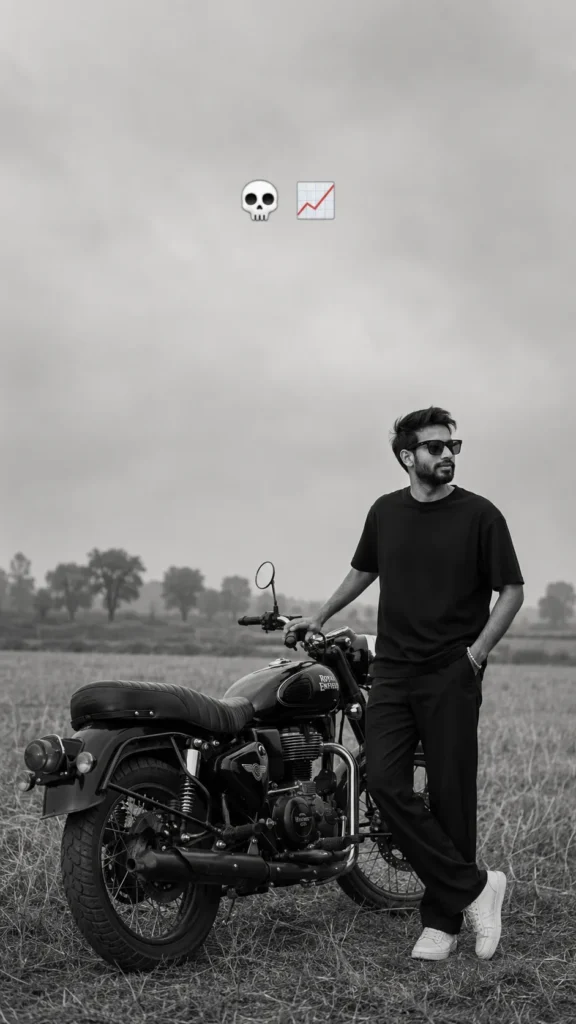
Create an ultra-realistic black-and-white cinematic portrait of the subject standing beside a black real Royal Enfield Bullet 350 CC bike in the middle of a peaceful rural field. The subject is standing on the right side of the motorcycle in a relaxed pose, one hand inside the pants pocket and the other hand resting naturally on the motorcycle handlebar. The subject is shown in perfect side profile, looking into the distance with a calm, thoughtful expression.
The motorcycle is positioned diagonally toward the camera, showing the rear wheel, exhaust, fuel tank, seat, and handlebar clearly. The subject wears a plain oversized black crew-neck T-shirt, straight-fit black pants, clean white sneakers, and a simple wrist bracelet. No jacket, no logos, no accessories except the bracelet.
The environment is an open countryside landscape with tall grass, farmland, scattered trees on the horizon, and a wide empty sky. Weather is hazy and overcast with soft diffused natural light. The atmosphere is quiet, moody, nostalgic, and cinematic.
Convert the entire image into monochrome black and white with soft faded contrast, deep blacks, subtle highlights, slight matte finish, realistic film grain, Kodak Tri-X 400 film look, vintage documentary photography aesthetic, soft shadows, natural texture, and minimal editing.
Composition is vertical 9:16. The subject occupies the lower-right third of the frame while the motorcycle fills the lower-left. Leave a large amount of negative space in the sky above.
Camera: Sony A7R V, 85mm prime lens, f/2.0, ISO 200, 1/500s, eye-level perspective, shallow depth of field, ultra-sharp subject, slightly blurred background, realistic skin texture, crisp clothing details, professional editorial photography, 8K RAW, HDR, ultra-photorealistic.
Add two floating emojis centered near the top of the sky:
💀 📈
Do not add text, watermark, extra people, buildings, vehicles, birds, power lines, or unrealistic lighting.
✨ AI PROMPT
👦 Boys Prompt
Use the uploaded image only as the face reference. Preserve the person's exact facial identity, hairstyle, hairline, facial proportions, skin tone, age, and natural expression with maximum accuracy. Create an ultra-realistic cinematic black-and-white luxury portrait of the subject leaning confidently against a premium white SUV. Dress him in a perfectly tailored black suit with a crisp white shirt, luxury black watch, and hold a realistic car key in one hand. Keep the same body pose, camera angle, composition, and side profile while looking away confidently. Use a dark urban background with dramatic lighting, high contrast, soft shadows, shallow depth of field, DSLR photography, 85mm lens, editorial fashion style, ultra-detailed realistic skin texture, photorealistic, 8K. Remove all screenshot UI, text, icons, watermarks, and overlays.
Create the Same Photo with Google Gemini
You can also try this trend with Google Gemini. Upload your clear reference photo and paste the prompt.
If the first result doesn't look right, ask the AI to keep your face closer to the original photo. You can also change the car, pose, or background to create a different version.
Small Details That Make the Photo Look Real
The small details are important in this type of photo.
The car should have realistic headlights, reflections, windows, and body details. The hands should also look natural, especially if the person is holding a car key.
Keep the background slightly blurred so the person and car remain the main focus.
Where Can You Use This AI Photo?
This type of portrait is perfect for:
Instagram posts
WhatsApp Status
Facebook profile photos
Birthday edits
Personal branding
YouTube thumbnails
Stylish profile pictures
You can create a 4:5 image for Instagram posts or a 9:16 version for Stories and WhatsApp Status.
Advertisement
Frequently Asked Questions
Can I create this photo with my own picture?
Yes. A clear portrait with your face properly visible will usually give better results.
Can I change the car?
Yes. You can ask the AI for an SUV, sedan, sports car, or another luxury vehicle.
Can girls use this AI photo trend?
Yes. The same concept can be created with a saree, gown, blazer, or another stylish outfit.
Does the photo need to be black and white?
No. You can also create a color version, but black and white gives this style its classic cinematic look.
Final Thoughts
The Black and White Luxury Car AI Photo trend is a simple way to turn an ordinary portrait into a stylish cinematic photo. A formal outfit, premium car, city lights, and black and white effect are enough to create the luxury look.
Just upload a clear photo, use the right prompt, and experiment with different cars and poses until you find a style you like.
Eliza is a content writer who has a passion for exploring different genres of literature and music. Her professional expertise lies in the field of India geopolitics and technology relations. She has a keen eye for detail and a natural ability to distill complex ideas into simple, easy-to-understand language.





Leave a Reply