By EDITORIAL STAFF • August 12, 2026 • 83730 Views • No Comments
Devotional photos have a simple charm. You don't need a fancy background or too many effects to make them look beautiful. A peaceful Ganpati idol, traditional clothes, flowers, and a natural prayer moment can be enough.
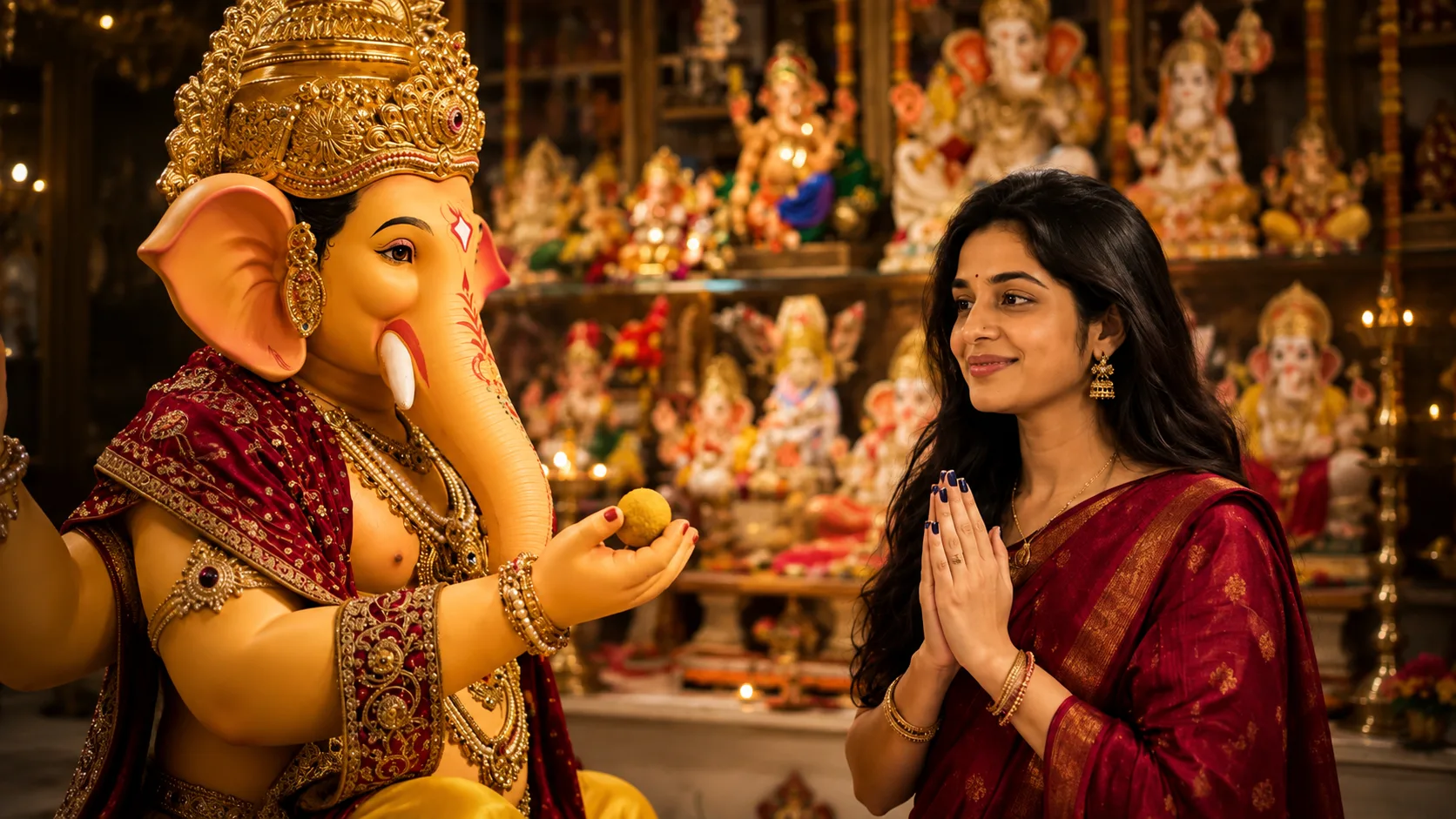
The Ganpati AI Photo Editing Trend is a simple way to create this type of devotional picture using your own photo. In this style, you can appear standing or praying beside Lord Ganesha in a beautifully decorated setting.
You can create a similar photo using ChatGPT or Google Gemini without spending hours editing it manually.
What is the Ganpati AI Photo Trend?
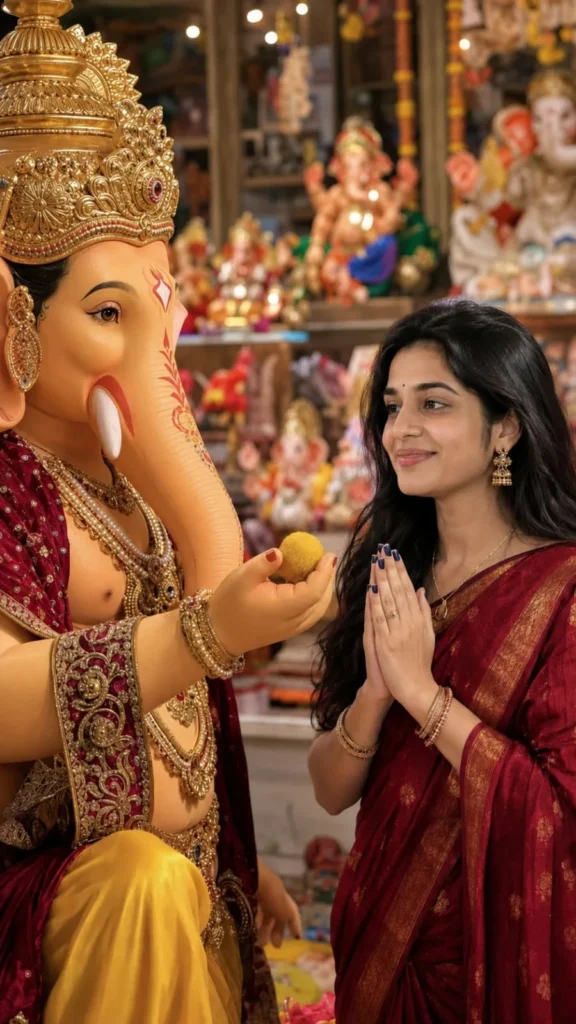
This AI photo trend creates a realistic devotional scene with Lord Ganesha and a devotee.
The person is usually shown with folded hands while looking at Ganpati Ji with a peaceful smile. A traditional outfit, flowers, diya, sweets, jewellery, and a decorated Ganpati idol help create the festive atmosphere.
The main focus stays on the devotional moment, so the photo feels more like a real Ganesh Chaturthi celebration.
How to Create a Ganpati AI Photo
First, choose a clear photo where your face is properly visible. Upload it to ChatGPT or Google Gemini and use a detailed prompt.
You can ask the AI to keep your face and natural appearance the same while creating the Ganpati celebration scene around you.
Ganpati AI Photo Editing Prompt
✨ AI PROMPT
Create an ultra-realistic vertical 9:16 devotional photograph using the uploaded reference image as the STRICT VISUAL REFERENCE for the entire composition.
HIGHEST PRIORITY:
Recreate the SAME POSE, SAME BODY POSITIONING, SAME CAMERA ANGLE, SAME COMPOSITION, SAME RELATIVE DISTANCE BETWEEN THE WOMAN AND GANESHA, SAME HAND POSITIONS, SAME HEAD ANGLES, and SAME INTERACTION shown in the reference image.
Do not reinterpret the pose.
Do not create a different pose.
Do not make a similar pose.
Reproduce the pose as accurately as possible.
IMPORTANT:
The uploaded reference image is being used as the visual reference for:
- woman's identity
- woman's facial structure
- woman's head position
- woman's body position
- woman's hand position
- Ganesha's position
- Ganesha's hand position
- Ganesha's trunk direction
- modak position
- distance between woman and Ganesha
- camera perspective
- framing
- composition
- subject placement
WOMAN — STRICT IDENTITY LOCK:
Preserve the woman's recognizable identity from the uploaded reference.
Maintain:
- exact facial proportions
- face shape
- forehead
- hairline
- eyebrows
- eyes
- eyelids
- eyelashes
- nose
- cheeks
- lips
- jawline
- chin
- natural facial asymmetry
- natural skin tone
- apparent age
- distinctive facial characteristics
Do not redesign her face.
Do not create a generic woman.
Do not beautify her.
Do not slim or reshape her face.
Do not enlarge her eyes.
Do not modify her nose or lips.
Do not change her facial proportions.
Do not apply a beauty filter.
She must look like the SAME woman from the reference photograph.
POSE — EXTREMELY IMPORTANT:
Copy the woman's pose from the reference image as accurately as possible.
The woman is positioned on the RIGHT side of the frame.
Her upper body is turned toward Lord Ganesha on the LEFT.
Her face is turned toward Ganesha.
Her head is tilted and positioned exactly like the reference.
Her body leans toward Ganesha in the same natural devotional posture.
Her hands are held together in namaste/prayer near her chest exactly as shown.
Preserve the exact:
- elbow position
- wrist position
- finger positioning
- hand height
- shoulder angle
- neck angle
- head tilt
- torso angle
- body lean
- distance from Ganesha
- facial direction
- eye direction
Do not change the pose into a generic praying pose.
The woman's praying hands must remain in the same location and orientation relative to her face and body.
GANESHA — POSE LOCK:
Recreate Lord Ganesha in the LEFT side of the frame in the same position and orientation as the reference.
Preserve the exact relationship between:
- Ganesha's face
- trunk
- extended hand
- woman's face
- woman's hands
- yellow modak
Ganesha's trunk extends toward the woman exactly as shown.
Ganesha's hand extends toward the woman holding a small round yellow modak.
The modak must remain positioned between Ganesha and the woman's praying hands in the same approximate location as the reference.
Do not move the modak elsewhere.
Do not change the interaction.
LORD GANESHA:
Create a highly detailed traditional Indian Lord Ganesha idol.
- warm peach/orange complexion
- large expressive dark eyes
- long curved elephant trunk
- elaborate golden mukut
- intricate antique-gold jewelry
- ornate earrings
- multiple necklaces
- detailed armlets and bangles
- rich maroon/burgundy clothing
- intricate gold embroidery
- colorful traditional decorative details
- bright golden-yellow dhoti
- realistic handcrafted idol texture
- authentic Indian Ganesh festival appearance
The idol should look physically real and beautifully handcrafted.
WOMAN'S CLOTHING:
Dress the woman in the same overall traditional style and color appearance shown in the reference.
Deep red/maroon traditional saree with elegant golden detailing.
Preserve realistic fabric folds and embroidery.
Traditional jhumka earrings.
Natural Indian jewelry.
Dark navy/blue nail polish.
Do not let clothing changes alter her facial identity or pose.
BACKGROUND:
Recreate the same type of environment shown in the reference:
A colorful Indian Ganesh temple/festival interior.
Behind the subjects are multiple devotional idols placed on shelves/platforms.
Use:
- warm orange lighting
- red
- gold
- yellow
- green
- blue decorative elements
- temple/festival decorations
- multiple softly blurred idols
- warm glowing lights
The background should have strong natural optical blur.
Keep the background visually similar in structure and depth to the reference while making it a realistic original environment.
CAMERA AND FRAMING:
Vertical 9:16 portrait photograph.
Match the reference camera perspective as closely as possible.
Match:
- camera height
- viewing angle
- focal perspective
- subject scale
- framing
- crop
- distance between subjects
- amount of background visible
- head placement
- body placement
The composition must feel like the same photograph setup recreated from scratch.
Use approximately a 50mm equivalent portrait lens.
Natural perspective.
No fisheye distortion.
No wide-angle distortion.
Natural shallow depth of field.
Keep the woman's face and Ganesha's face sharply detailed.
Background should gradually become soft and blurred.
LIGHTING:
Match the warm photographic lighting style of the reference.
Soft golden-orange indoor festival illumination.
Natural highlights on the woman's face, hair and jewelry.
Warm reflections on Ganesha's golden ornaments.
Realistic shadows.
Natural exposure.
High dynamic range without excessive HDR.
Authentic camera photograph appearance.
PHOTOREALISM:
Ultra-realistic professional photography.
Natural skin pores.
Individual hair strands.
Realistic eyelashes.
Realistic fabric texture.
Realistic jewelry reflections.
Realistic Ganesha idol surface.
Natural optical depth of field.
Real camera lens characteristics.
No CGI appearance.
No 3D render.
No illustration.
No cartoon appearance.
No artificial AI look.
NO TEXT:
Absolutely NO text anywhere in the image.
Do NOT add "Ab".
Do NOT add any watermark.
Do NOT add any logo.
Do NOT add captions.
Do NOT add typography.
Do NOT add letters or symbols.
NEGATIVE PROMPT:
different woman,
different identity,
generic face,
face replacement,
face redesign,
beautified face,
AI beauty filter,
altered facial proportions,
different eyes,
different nose,
different lips,
different jawline,
different chin,
different eyebrows,
changed skin tone,
changed age,
different hairstyle,
different pose,
different hand position,
different head angle,
different body angle,
different camera angle,
different composition,
different subject placement,
different Ganesha position,
different trunk direction,
different modak position,
changed interaction,
extra fingers,
missing fingers,
six fingers,
deformed hands,
fused fingers,
extra hands,
extra arms,
bad anatomy,
distorted face,
deformed face,
duplicate people,
duplicate Ganesha,
distorted Ganesha,
deformed trunk,
warped jewelry,
floating objects,
cartoon,
anime,
illustration,
painting,
digital art,
3D render,
CGI,
plastic skin,
artificial skin,
excessive makeup,
beauty filter,
oversharpening,
excessive HDR,
fisheye,
wide-angle distortion,
unnatural perspective,
flat lighting,
harsh flash,
artificial background,
low resolution,
blurred faces,
text,
letters,
"Ab",
watermark,
logo,
caption,
typography.
FINAL INSTRUCTION:
The uploaded reference is the visual authority for the pose and composition.
PRIORITY ORDER:
1. EXACT WOMAN IDENTITY
2. EXACT POSE
3. EXACT HAND AND HEAD POSITION
4. EXACT WOMAN–GANESHA INTERACTION
5. SAME CAMERA PERSPECTIVE AND COMPOSITION
6. REALISTIC GANESHA DETAILS
7. REALISTIC INDIAN FESTIVAL ENVIRONMENT
8. PHOTOREALISTIC QUALITY
Do not reinterpret the scene.
Do not simplify the pose.
Do not change the interaction.
Do not add any text.
Create one ultra-realistic vertical 9:16 photograph.
Make the Photo Look More Real
Small details can make a big difference in a devotional AI photo.
The diya flames should look natural, flowers should sit properly around the idol, and the person's hands should have realistic fingers.
Avoid adding too many glowing effects. Soft warm lighting usually looks much better and makes the picture feel like a real festival photograph.
Try Different Ganpati Poses
You can also change the pose according to your preference.
For example, you can ask the AI to show:
Folding hands in front of Ganpati Ji
Offering flowers
Holding a puja thali
Offering a modak
Sitting beside the Ganpati idol
Performing aarti
Looking at Lord Ganesha with a gentle smile
Each pose can give the final photo a different feel.
Advertisement
Can Boys Create This Ganpati AI Photo?
Yes. The same idea works for boys as well.
You can replace the saree with a traditional kurta, Nehru jacket, or kurta-pajama. The pose can be changed to folded hands, offering flowers, or performing aarti.
Where Can You Use This Photo?
A vertical 9:16 version is perfect for:
WhatsApp Status
Instagram Stories
Instagram Reels
Facebook posts
Ganesh Chaturthi greetings
Devotional profile pictures
Festival posts
You can also add a short line such as “Ganpati Bappa Morya” after creating the image.
Frequently Asked Questions
Can I use my own photo?
Yes. A clear photo with your face properly visible usually gives better results.
Can I change the saree or outfit?
Yes. You can ask for a saree, salwar suit, kurta, lehenga, or any other traditional outfit.
Can I create the photo with Google Gemini?
Yes. You can upload your photo and use a similar prompt in Gemini's supported image-generation or editing features.
Can I create a Ganpati photo for Ganesh Chaturthi?
Yes. This style works especially well for Ganesh Chaturthi, Ganpati Visarjan, devotional posts, and festival greetings.
Final Thoughts
The Ganpati AI Photo trend is a simple way to create a beautiful devotional picture using your own photo. The combination of a decorated Ganesha idol, traditional clothes, flowers, diyas, and a natural prayer pose gives the image a festive feel.
Keep the lighting soft, the expressions natural, and the decorations realistic. That will help the final image look more like a real Ganesh Chaturthi photograph instead of an overly edited AI picture.
Eliza is a content writer who has a passion for exploring different genres of literature and music. Her professional expertise lies in the field of India geopolitics and technology relations. She has a keen eye for detail and a natural ability to distill complex ideas into simple, easy-to-understand language.








Leave a Reply