By Kiara Sharma • August 21, 2026 • 187403 Views • No Comments
Birthday photos don't always need balloons, cakes, or colorful decorations. Sometimes, a simple photo with a dark background, flowers, and a beautiful birthday message can look much more stylish.
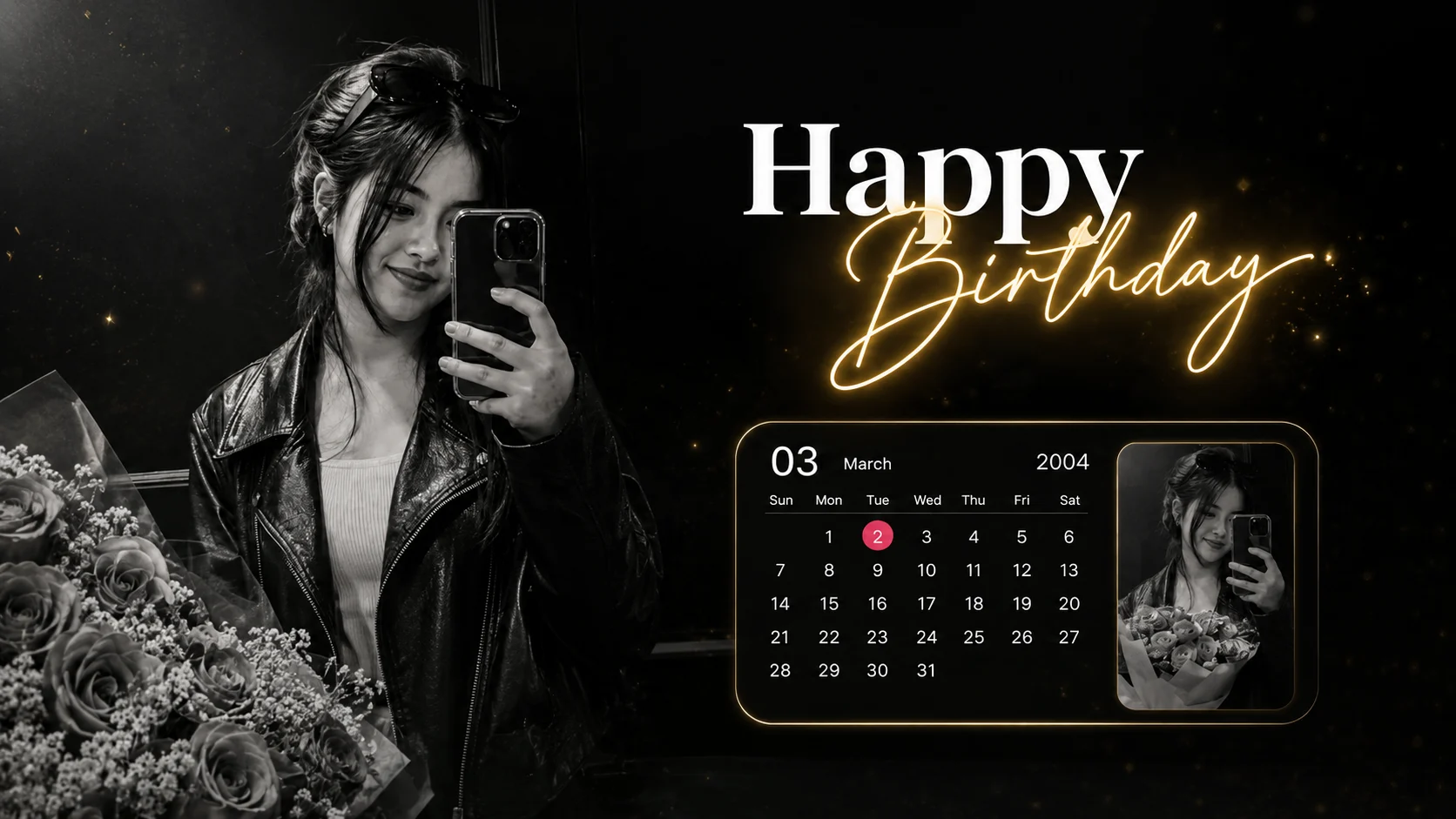
The Birthday AI Photo Editing Trend is a popular way to turn a normal selfie into a creative birthday portrait. In this style, the main photo is usually kept in black and white, while a small part of the design is shown in color. A calendar with the birthday date, a flower photo, and a glowing “Happy Birthday” text complete the look.
You don't need a professional camera or Photoshop to create a similar photo. With your own picture and a good AI prompt, you can try this style using ChatGPT or Google Gemini.
What is the Birthday AI Photo Editing Trend?
This birthday photo style combines a portrait with a simple birthday-themed graphic design.
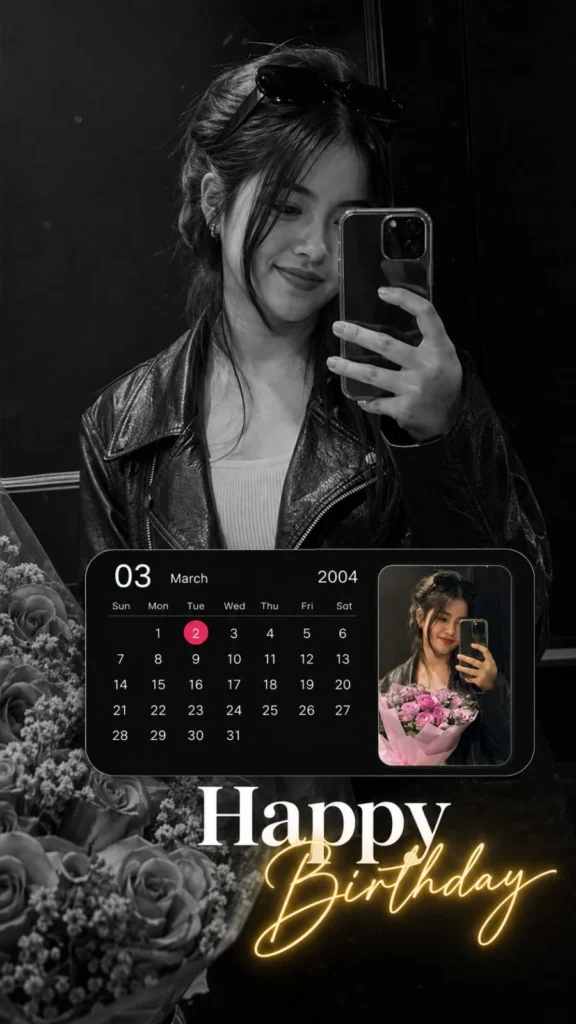
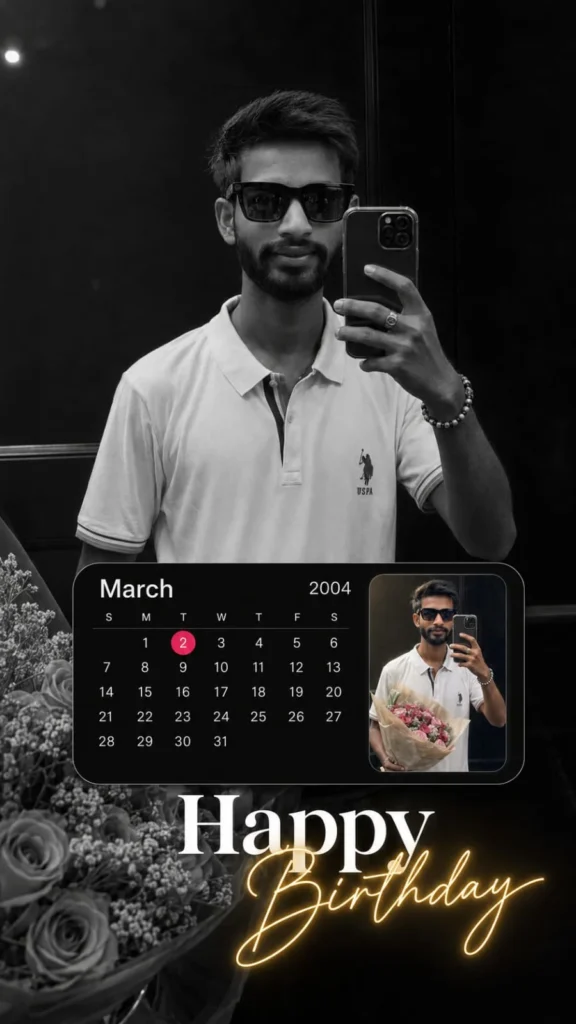
The main portrait is edited in black and white, giving the image a classy look. A calendar is placed in front of the photo, showing the person's birth month, year, and date. The birthday date can be highlighted with a circle or another simple effect.
A small color photo can also be added to the calendar section. In the reference style, the smaller image shows the person holding a bouquet of flowers.
At the bottom, a large “Happy Birthday” message adds the final touch.
What Makes This Birthday Photo Look Special?
The main reason this style looks different is the combination of black and white with a few colorful elements.
The black and white portrait keeps the design simple, while the flowers, highlighted date, and glowing birthday text add some color.
The calendar also makes the photo more personal because you can show your exact birthday date instead of using a normal birthday template.
How to Create a Birthday AI Photo with ChatGPT
Start by choosing a clear selfie or portrait. A photo where your face is clearly visible works best.
Upload it to ChatGPT and use a detailed prompt. You can ask the AI to keep your face and hairstyle the same while creating the birthday design around you.
✨ Birthday AI Photo Editing Prompt
✨ AI PROMPT
Create an ultra-realistic vertical birthday photo edit using the uploaded image as the primary and strongest visual reference.
IMPORTANT — STRICT IDENTITY PRESERVATION:
Use the uploaded image as the exact reference for the person.
Preserve the person's facial identity, facial structure, eyes, eyebrows, nose, lips, jawline, cheek structure, skin tone, skin texture, hairstyle, hairline, loose hair strands, body proportions, clothing, pose, hand position, smartphone position, camera angle, mirror-selfie perspective, and natural facial expression.
Do NOT change the person's identity. Do NOT create a different person. Do NOT beautify or reshape the face. Do NOT make the eyes larger. Do NOT change the nose, lips, jawline, cheeks, or facial proportions. Do NOT change the hairstyle. Do NOT change the clothing. Do NOT alter the person's body proportions.
The final person must look like the exact same person from the uploaded reference photograph.
MAIN IMAGE:
Create a premium, ultra-realistic vertical 9:16 Instagram Story-style birthday photograph.
Canvas: 9:16 vertical composition, approximately 1080 × 1920 pixels.
The main photograph is a dark, elegant, cinematic black-and-white mirror selfie.
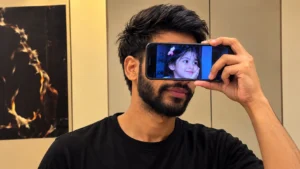
The person is standing indoors in front of a mirror, holding a modern smartphone in one hand. The smartphone partially covers the right side of the face/body, exactly as naturally seen in the reference.
Preserve the original mirror-selfie perspective and framing.
The person has long dark hair tied back, with natural loose strands falling around the face. Sunglasses are resting naturally on top of the head.
The person is wearing the same dark leather jacket and light-colored top visible in the reference image.
Keep the pose relaxed and natural.
Keep the person's hand and fingers anatomically realistic and in the same general position as the reference.
Keep the smartphone realistic, with accurate proportions, camera lenses, reflections, and case details.
PHOTOGRAPHIC REALISM:
Make the image look like a genuine photograph taken with a modern smartphone camera.
Natural skin texture. Natural facial details. Realistic hair strands. Realistic hands and fingers. Realistic leather texture. Realistic smartphone reflections. Realistic mirror reflection. Natural depth of field. Subtle photographic imperfections. Subtle film grain. High dynamic range. Sharp facial details. No artificial plastic skin.
Do not make it look like an illustration, painting, 3D render, cartoon, or obvious AI-generated image.
BLACK-AND-WHITE COLOR GRADING:
Convert the main photograph into a sophisticated high-contrast black-and-white photograph.
Use deep blacks, rich dark shadows, soft gray midtones, and controlled highlights.
Keep the face clearly visible despite the dark cinematic treatment.
Maintain realistic skin texture in monochrome.
Use a premium editorial photography look.
The overall mood should feel: dark, elegant, romantic, cinematic, emotional, minimal, luxurious, and premium.
BACKGROUND:
Keep the original indoor mirror environment and dark wall appearance.
The background should remain subtle and slightly out of focus.
Keep the dark atmosphere of the reference.
Include realistic flowers/roses toward the lower-left/lower portion of the composition, blending naturally into the photograph.
Do not introduce unnecessary objects.
Do not add additional people.
BIRTHDAY CALENDAR GRAPHIC:
Add a premium black rounded-rectangle calendar card across the lower-middle portion of the composition.
The calendar should resemble a modern smartphone calendar widget.
Calendar requirements:
Month: March
Birthday date: 02
Calendar year: 2004
The calendar must show the CORRECT calendar layout for [MONTH] [YEAR].
Use the correct number of days and the correct weekday/date alignment for that exact month and year.
Display:
- [03] as the month heading in clean white text
- Small weekday labels underneath
- Correct dates
- Clean white date numbers
- Minimal thin grid/divider lines
- Black background
- Large rounded corners
- Premium modern smartphone-calendar appearance
IMPORTANT:
Highlight ONLY the birthday date [Date].
Place a small bright pink/red circular highlight directly behind the number [Date].
Do not highlight any other date.
Make sure the highlighted number is clearly readable.
Do not invent or incorrectly arrange calendar dates.
The calendar should look like a realistic, professionally designed smartphone calendar widget rather than a random graphic.
CALENDAR POSITION:
Place the calendar in the lower-middle/left area of the composition.
Keep it large enough to be clearly visible but do not allow it to cover the person's face.
The calendar should naturally sit over the photograph as part of the birthday graphic design.
Keep generous rounded corners and clean spacing.
SMALL COLOR PHOTO INSIDE CALENDAR:
Inside the right side of the calendar card, place a small rectangular color photograph of the SAME PERSON from the uploaded reference.
The small inserted photograph should show the same person taking a mirror selfie while holding a bouquet of pink flowers.
Use natural color for this small photograph.
The small image should contrast beautifully against the monochrome main photograph.
Preserve the person's exact identity in this smaller photograph as well.
Do not create a different face.
Do not change the person's appearance.
The inserted photograph should have:
- natural skin tones
- pink/purple flowers
- realistic mirror selfie appearance
- warm natural colors
- realistic lighting
- clean rectangular framing
Place the small color photograph neatly inside the right portion of the black calendar card.
Keep its edges clean and sharp.
HAPPY BIRTHDAY TYPOGRAPHY:
Add elegant birthday typography in the lower-middle/lower-right portion of the composition.
Write:
"Happy"
Use large, bold, white, slightly italic/display-style lettering.
Directly underneath and slightly overlapping it, write:
"Birthday"
Use elegant flowing handwritten/cursive script.
Make "Birthday" warm golden-yellow with a soft glowing neon effect.
The golden glow should be subtle but clearly visible.
The glow should softly illuminate the surrounding area without becoming excessive.
"Happy" should remain bright white and highly readable.
"Birthday" should appear slightly lower and partially overlapping the "Happy" text, creating the same layered premium birthday-card aesthetic.
TEXT STYLE:
Elegant. Modern. Luxury. Romantic. Premium Instagram aesthetic.
Do not add any other words.
Do not add names.
Do not add quotes.
Do not add emojis.
Do not add logos.
Do not add stickers.
Do not add watermarks.
LIGHTING:
Keep the overall photograph dark and cinematic.
The person's face should remain naturally visible.
Use soft highlights around the face and hair.
Maintain deep shadows throughout the background.
The warm golden glow from the word "Birthday" should provide the main color accent.
The calendar should remain predominantly black and white.
The small inserted photograph should remain in natural color.
OVERALL DESIGN:
The final image should closely reproduce the visual style and overall composition of the uploaded reference:
- Dark black-and-white mirror selfie
- Elegant cinematic mood
- Same person and identity
- Dark leather jacket
- Sunglasses on head
- Smartphone mirror selfie
- Flowers toward lower portion
- Black rounded calendar card
- Correct [MONTH] [YEAR] calendar
- Birthday date [DATE] highlighted in pink/red
- Small color selfie inside the calendar
- Large white "Happy"
- Glowing golden "Birthday"
- Minimal premium Instagram birthday design
- 9:16 vertical format
COMPOSITION PRIORITY:
1. Exact identity preservation
2. Natural photographic realism
3. Same overall mirror-selfie composition
4. Black-and-white cinematic treatment
5. Correct calendar layout
6. Correct birthday date highlight
7. Small color photograph inside calendar
8. "Happy Birthday" typography
9. Premium minimal finishing
NEGATIVE PROMPT:
Do not change the person's identity. Do not create a new face. Do not alter facial structure. Do not change eyes. Do not change nose. Do not change lips. Do not change jawline. Do not change hairstyle. Do not change clothing. Do not change body proportions. Do not add another person. Do not remove the smartphone. Do not distort hands. Do not create extra fingers. Do not create missing fingers. Do not distort the phone. Do not distort the mirror reflection. Do not make skin plastic. Do not over-smooth the face. Do not make the image cartoonish. Do not make it an illustration. Do not make it a painting. Do not make it a 3D render. Do not make it overly colorful. Do not add unnecessary objects. Do not add extra text. Do not add logos. Do not add stickers. Do not add emojis. Do not add borders. Do not add random decorations. Do not incorrectly arrange the calendar. Do not highlight the wrong date. Do not highlight multiple dates.
FINAL OUTPUT:
Create a highly realistic, premium, cinematic birthday Instagram Story that looks like a professionally edited real photograph.
The final result should feel elegant, dark, emotional, romantic, and luxurious while staying extremely close to the uploaded reference image in terms of the person's appearance, composition, photographic style, calendar placement, color treatment, and overall visual design.
✨ AI PROMPT
Create an ultra-realistic vertical birthday photo edit using the uploaded image as the primary and strongest visual reference.
IMPORTANT — STRICT IDENTITY PRESERVATION:
Use the uploaded image as the exact reference for the male subject.
Preserve the person's facial identity, facial structure, eyes, eyebrows, nose, lips, jawline, cheek structure, skin tone, natural skin texture, hairstyle, hairline, facial hair if present, body proportions, clothing, pose, hand position, smartphone position, camera angle, mirror-selfie perspective, and natural facial expression.
Do NOT change the person's identity.
Do NOT create a different person.
Do NOT feminize the face.
Do NOT beautify or reshape the face.
Do NOT make the eyes larger.
Do NOT change the nose, lips, jawline, cheeks, or facial proportions.
Do NOT change the hairstyle.
Do NOT add or remove facial hair unless it is already present in the uploaded reference.
Do NOT change the clothing.
Do NOT alter the person's body proportions.
Do NOT make the person look younger or older.
The final person must look like the exact same male person from the uploaded reference photograph.
────────────────────────
MAIN IMAGE
────────────────────────
Create a premium, ultra-realistic vertical 9:16 Instagram Story-style birthday photograph.
Canvas:
9:16 vertical composition, approximately 1080 × 1920 pixels.
The main photograph is a dark, elegant, cinematic black-and-white mirror selfie.
The male subject is standing naturally indoors in front of a mirror, holding a modern smartphone in one hand.
Preserve the original mirror-selfie perspective, camera angle, framing, pose, and proportions from the uploaded reference.
The smartphone should remain naturally positioned in the hand and should partially cover the appropriate portion of the face/body exactly according to the reference image.
Preserve the male subject's exact hairstyle, hairline, facial hair if present, clothing, accessories, and overall appearance from the uploaded image.
Do NOT add female-specific features or styling.
Keep the pose relaxed, confident, natural, and authentic.
Keep the person's hands and fingers anatomically realistic and consistent with the reference.
Keep the smartphone realistic, with accurate proportions, camera lenses, reflections, case details, and natural positioning.
────────────────────────
PHOTOGRAPHIC REALISM
────────────────────────
Make the image look like a genuine photograph taken with a modern smartphone camera.
Natural skin texture.
Natural facial details.
Realistic hair strands.
Realistic facial hair if present.
Realistic hands and fingers.
Realistic clothing texture.
Realistic leather/fabric texture.
Realistic smartphone reflections.
Realistic mirror reflection.
Natural depth of field.
Subtle photographic imperfections.
Subtle film grain.
High dynamic range.
Sharp facial details.
Natural shadows.
Natural highlights.
No artificial plastic skin.
The image must look like a real photograph, not an AI-generated portrait.
Do not make it look like an illustration, painting, 3D render, cartoon, CGI, or digital artwork.
────────────────────────
BLACK-AND-WHITE COLOR GRADING
────────────────────────
Convert the main photograph into a sophisticated high-contrast black-and-white photograph.
Use:
Deep blacks.
Rich dark shadows.
Soft gray midtones.
Controlled highlights.
Subtle bright facial highlights.
Natural monochrome skin texture.
Keep the male subject's face clearly visible despite the dark cinematic treatment.
Use a premium editorial photography look.
The overall mood should feel:
Dark.
Elegant.
Masculine.
Cinematic.
Emotional.
Minimal.
Luxurious.
Premium.
Modern.
Avoid making the image excessively dramatic or artificial.
────────────────────────
BACKGROUND
────────────────────────
Keep the original indoor mirror environment from the uploaded image.
Keep the background dark, minimal, subtle, and slightly out of focus.
Maintain the same general atmosphere and perspective as the reference.
Add subtle realistic flowers or a bouquet toward the lower portion of the composition only if they naturally fit the reference and design.
The flowers should remain understated and should not overpower the male subject.
Do not introduce unnecessary objects.
Do not add additional people.
Do not change the room into a completely different environment.
────────────────────────
BIRTHDAY CALENDAR GRAPHIC
────────────────────────
Add a premium black rounded-rectangle calendar card across the lower-middle portion of the composition.
The calendar should resemble a realistic modern smartphone calendar widget.
CALENDAR INFORMATION:
Month: March
Birthday date: 02
Calendar year: 2004
IMPORTANT:
The calendar must show the CORRECT calendar layout for March 2004.
March 2004 has 31 days.
The calendar must use a Sunday-to-Saturday weekly layout:
S M T W T F S
March 1, 2004 was a Monday.
Therefore:
Sunday: empty
Monday: 1
Tuesday: 2
Wednesday: 3
Thursday: 4
Friday: 5
Saturday: 6
Then continue the dates correctly through March 31.
The calendar must not use an incorrect date arrangement.
Display:
- "March" as the month heading in clean white text
- Small weekday labels underneath
- Correct March 2004 dates
- Clean white date numbers
- Minimal thin grid/divider lines
- Black background
- Large rounded corners
- Premium modern smartphone-calendar appearance
IMPORTANT — BIRTHDAY DATE:
Highlight ONLY the birthday date "2".
Place a small bright pink/red circular highlight directly behind the number "2".
The number "2" must remain clearly readable in white over the highlight.
Do NOT highlight 02 as a separate number.
Do NOT highlight any other date.
Do NOT highlight multiple dates.
Make the birthday date visually obvious but elegant.
The calendar should look like a professionally designed smartphone calendar widget rather than a random graphic.
────────────────────────
CALENDAR POSITION
────────────────────────
Place the calendar in the lower-middle/left area of the composition.
Keep it large enough to be clearly visible.
Do not allow the calendar to cover the male subject's face.
The calendar should naturally sit over the photograph as part of the birthday graphic design.
Keep generous rounded corners, clean spacing, and realistic proportions.
────────────────────────
SMALL COLOR PHOTO INSIDE CALENDAR
────────────────────────
Inside the right side of the calendar card, place a small rectangular color photograph of the SAME MALE PERSON from the uploaded reference.
The small inserted photograph must use the same male subject and preserve his exact facial identity.
Show the same person in a natural mirror-selfie style pose.
If a bouquet is included, make it subtle and masculine/elegant rather than overly feminine.
Use realistic natural colors in the small photograph.
The small color image should contrast beautifully against the monochrome main photograph.
IMPORTANT:
The person's face in the small inserted photograph must remain the exact same person as the uploaded reference.
Do not create a different face.
Do not change facial structure.
Do not change hairstyle.
Do not change skin tone.
Do not change body proportions.
The inserted photograph should have:
- Natural skin tones
- Realistic lighting
- Realistic mirror selfie appearance
- Natural smartphone photography
- Accurate facial identity
- Clean rectangular framing
- Subtle depth of field
- Authentic photographic texture
Place the small color photograph neatly inside the right portion of the black calendar card.
Keep its edges clean and sharp.
────────────────────────
HAPPY BIRTHDAY TYPOGRAPHY
────────────────────────
Add elegant birthday typography in the lower-middle/lower-right portion of the composition.
Write exactly:
"Happy"
Use large, bold, white, slightly italic/display-style lettering.
Directly underneath and slightly overlapping it, write:
"Birthday"
Use elegant flowing handwritten/cursive script.
Make "Birthday" warm golden-yellow with a soft glowing neon effect.
The golden glow should be subtle but clearly visible.
The glow should softly illuminate the surrounding area without becoming excessive.
"Happy" should remain bright white and highly readable.
"Birthday" should appear slightly lower and partially overlap the "Happy" text.
Create the same layered premium birthday-card aesthetic as the reference.
Do not make the typography oversized enough to hide the subject.
────────────────────────
TEXT STYLE
────────────────────────
Elegant.
Modern.
Masculine.
Luxury.
Cinematic.
Premium Instagram aesthetic.
Minimal.
Sophisticated.
Do not add any other words.
Do not add the person's name.
Do not add quotes.
Do not add emojis.
Do not add logos.
Do not add stickers.
Do not add watermarks.
Do not add additional dates.
────────────────────────
LIGHTING
────────────────────────
Keep the overall photograph dark and cinematic.
The male subject's face should remain naturally visible.
Use soft highlights around the face and hair.
Maintain deep shadows throughout the background.
Keep the black-and-white photograph sophisticated and slightly moody.
The warm golden glow from the word "Birthday" should provide the main color accent.
The calendar should remain predominantly black and white.
The small inserted photograph should remain in natural color.
The pink/red birthday-date highlight should remain subtle and clearly visible.
────────────────────────
OVERALL DESIGN
────────────────────────
The final image should closely reproduce the visual style and overall composition of the uploaded birthday reference:
- Dark black-and-white mirror selfie
- Exact male subject identity
- Elegant cinematic mood
- Masculine premium aesthetic
- Smartphone mirror selfie
- Natural male hairstyle exactly matching the reference
- Exact clothing from the reference
- Realistic indoor background
- Subtle flowers/bouquet toward the lower portion
- Black rounded calendar card
- Correct March 2004 calendar
- Birthday date 2 highlighted in pink/red
- Small color selfie inside the calendar
- Large white "Happy"
- Glowing golden "Birthday"
- Minimal premium birthday design
- 9:16 vertical format
────────────────────────
COMPOSITION PRIORITY
────────────────────────
1. Exact male identity preservation
2. Natural photographic realism
3. Exact hairstyle, facial features, clothing, and body proportions from the uploaded image
4. Same overall mirror-selfie composition
5. Black-and-white cinematic treatment
6. Correct March 2004 calendar layout
7. Correct birthday date "2" highlight
8. Small color photograph inside calendar
9. "Happy Birthday" typography
10. Premium minimal finishing
────────────────────────
NEGATIVE PROMPT
────────────────────────
Do not change the person's identity.
Do not create a new face.
Do not feminize the face.
Do not make the person look like a woman.
Do not alter facial structure.
Do not change eyes.
Do not change eyebrows.
Do not change nose.
Do not change lips.
Do not change jawline.
Do not change cheeks.
Do not change skin tone.
Do not change hairstyle.
Do not change hairline.
Do not remove existing facial hair.
Do not add facial hair if it is not present in the reference.
Do not change clothing.
Do not change accessories.
Do not change body proportions.
Do not make the subject muscular or thinner artificially.
Do not make the subject younger or older.
Do not add another person.
Do not remove the smartphone.
Do not distort hands.
Do not create extra fingers.
Do not create missing fingers.
Do not distort the phone.
Do not distort the mirror reflection.
Do not create unnatural reflections.
Do not make skin plastic.
Do not over-smooth the face.
Do not create an AI-looking face.
Do not make the image cartoonish.
Do not make it an illustration.
Do not make it a painting.
Do not make it a 3D render.
Do not make it CGI.
Do not make it overly colorful.
Do not add unnecessary objects.
Do not add extra text.
Do not add logos.
Do not add stickers.
Do not add emojis.
Do not add borders.
Do not add random decorations.
Do not incorrectly arrange the calendar.
Do not use an incorrect March 2004 calendar.
Do not highlight the wrong date.
Do not highlight multiple dates.
Do not highlight March 20 or any other date.
Only highlight March 2.
────────────────────────
FINAL OUTPUT
────────────────────────
Create a highly realistic, premium, cinematic birthday Instagram Story that looks like a professionally edited real photograph.
The final result should feel elegant, dark, masculine, emotional, sophisticated, and luxurious while staying extremely close to the uploaded reference image in terms of the person's appearance, identity, composition, photographic style, calendar placement, color treatment, typography, and overall visual design.
The birthday information must clearly show:
MARCH
2004
2nd birthday date highlighted
The final image must look like an authentic premium birthday edit created from a real male mirror selfie, not like an AI-generated image.
Change the Birthday Date in the Prompt
One of the best things about this design is that you can customize the calendar.
Simply replace the birth month, year, and date with your own details.
Advertisement
For example, you can tell the AI:
Show the calendar for August 2002 and highlight August 15 as the birthday date.
Make sure you clearly mention the month, year, and exact date so the calendar can be created correctly.
Add Your Own Birthday Photo
You can also make the design more personal by adding another photo inside the calendar.
For example, the smaller photo can show you:
Holding a bouquet
Holding a birthday cake
Smiling at the camera
Wearing a traditional outfit
Taking another mirror selfie
Celebrating with friends
This gives the final image a scrapbook-style birthday look.
Create the Birthday Photo with Google Gemini
You can also try the same concept with Google Gemini.
Upload your reference photo and paste the prompt. Tell Gemini to keep your facial appearance unchanged and create the birthday poster around the original photo.
For better results, use a clear original image instead of a heavily filtered selfie.
If the calendar date comes out incorrectly, generate the image again with the exact month, year, and date written clearly in the prompt.
Tips for Getting a Better Result
A few small changes can make the final birthday photo look much better.
Use a clear photo: Make sure your face is not covered by hair, sunglasses, or another object.
Keep the design simple: Too many decorations can make the image look crowded.
Use a clear birthday date: Mention the exact date you want highlighted.
Ask for realistic text: AI-generated text can sometimes contain spelling mistakes, so check the final image carefully.
Try a vertical format: A 9:16 image works especially well for Instagram Stories and WhatsApp Status.
Where Can You Use This Birthday Photo?
You can use this type of birthday edit for:
Instagram Stories
Instagram posts
WhatsApp Status
Facebook posts
Birthday profile pictures
Birthday invitations
Personal photo collections
Birthday greeting posts
You can also create different versions with different outfits, flowers, backgrounds, and birthday dates.
Frequently Asked Questions
Can I create this birthday photo using my own picture?
Yes. Upload a clear photo of yourself and use a detailed prompt to create the design.
Can I change the date shown on the calendar?
Yes. Mention the exact month, year, and birthday date you want in the prompt.
Can I change the flowers?
Yes. You can ask for roses, lilies, sunflowers, or any other flowers you like.
Can I make the whole photo colorful?
Yes. The reference uses a black-and-white style, but you can ask the AI to create a full-color version.
Can I use this photo for WhatsApp Status?
Yes. A vertical 9:16 version is a good choice for WhatsApp Status and Instagram Stories.
Final Thoughts
This Birthday AI Photo Editing trend is a nice option if you want something more personal than a regular birthday template. The black-and-white portrait, custom calendar, birthday date, flowers, and glowing text come together to create a clean and stylish design.
The best part is that you can customize almost everything. Use your own photo, add your birthday date, choose different flowers, and even add another birthday picture inside the calendar.
With a clear reference photo and the right prompt, you can create a birthday poster that feels personal instead of looking like a ready-made template.
Kiara provides detailed insights and updates on Xiaomi products, helping readers stay informed about the latest trends, tips, and reviews to maximize their tech investments.


Leave a Reply