Home>AI> Instagram Sad Profile Photo AI Editing Trend
Instagram Sad Profile Photo AI Editing Trend
By EDITORIAL STAFF • October 5, 2026 • 69506 Views • No Comments
Sometimes a simple photo can express feelings better than a long caption. Dark colors, a sunset background, an empty Instagram profile, and a lonely pose can give a photo a completely different mood.
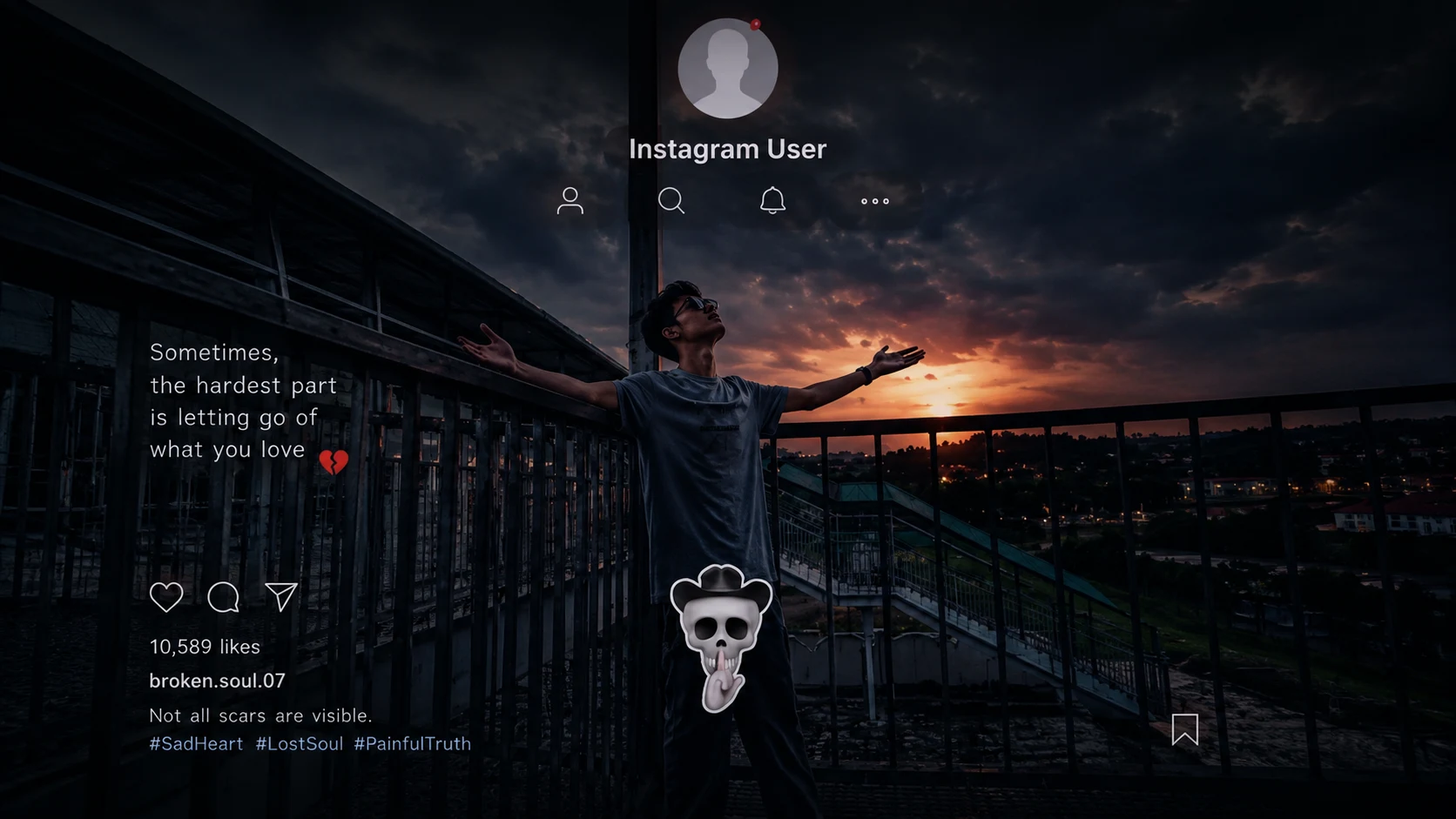
The Instagram Sad Profile Photo AI Editing Trend is one such style. In this edit, a normal photo is turned into a dark and emotional Instagram post. The image usually includes a sad sunset, a person standing alone, and an Instagram-style profile screen with an emotional quote and caption.
You can create a similar photo using your own picture and an AI photo editing tool.
What is the Instagram Sad Photo Editing Trend?
This trend is based on the look of a sad or emotional Instagram post.
The reference style shows a person standing on a bridge or rooftop during sunset with both arms open. The image has dark tones, soft lighting, and an emotional atmosphere.
An Instagram profile and post interface are added over the photo to make it look like a real social media screenshot.
Small details such as the profile name, likes, caption, hashtags, and emotional quote make the edit look more realistic.
How to Create This Sad Instagram Photo
You can create this type of image with your own photo using AI tools such as ChatGPT or Google Gemini.
Start with a clear photo where your face and body are visible. Upload it and describe the mood, background, Instagram layout, and other details you want.
For a more realistic result, ask the AI to keep your original face, hairstyle, body shape, and clothing unchanged.
AI Prompt for Sad Instagram Photo
✨ AI PROMPT
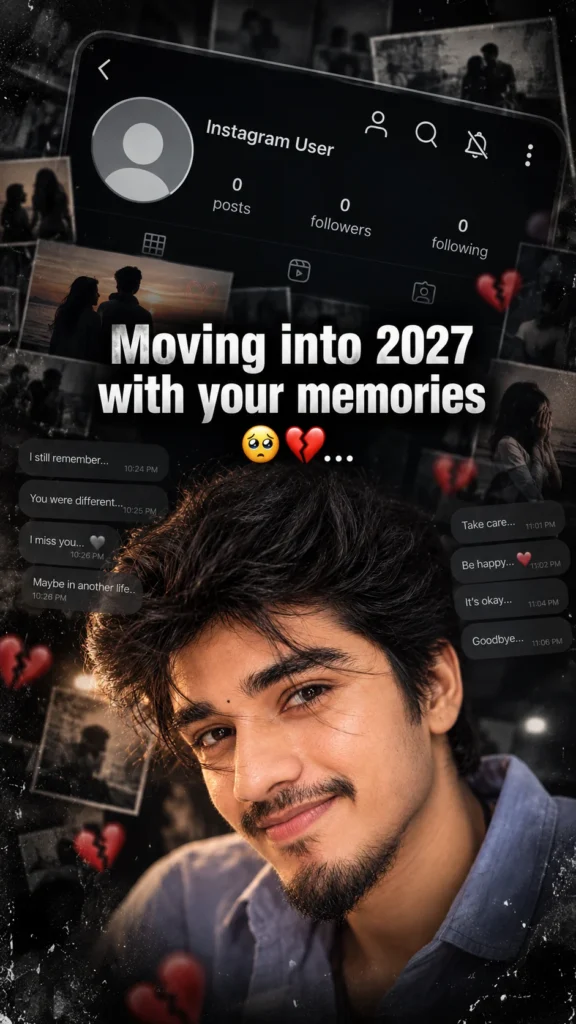
Create a dark, emotional Instagram heartbreak memories edit using the uploaded photo. Keep the person's face, hairstyle, skin tone, body shape, clothes, and pose 100% unchanged. Do not modify identity. Design: • Background should be dark, faded, and slightly blurred. • Add a large semi-transparent Instagram profile interface behind the subject. • Profile picture should appear removed with a default Instagram avatar. • Username: "Instagram User" • Add Profile, Search, Mute, and Options icons. • Use a black and grey color theme with a soft vignette. • Add subtle film grain, motion blur, dust particles, and cinematic lighting. • Place the subject at the bottom center with a soft shadow. Text (large bold white font): "Moving into 2027 with your memories" Below the text add: 🥺💔... Additional effects: • Broken heart emoji 💔 • Sad emoji 🥺 • Faded chat/message overlays in the background. • Instagram aesthetic, nostalgic breakup vibe. • Moody color grading with low saturation. • High contrast, realistic photo edit. • Soft glow around the subject. • Premium viral Instagram reel thumbnail style. • Ultra HD, photorealistic, 4K quality. • No cartoon, no anime, no AI-looking face. • Keep everything natural and cinematic.
✨ AI PROMPT
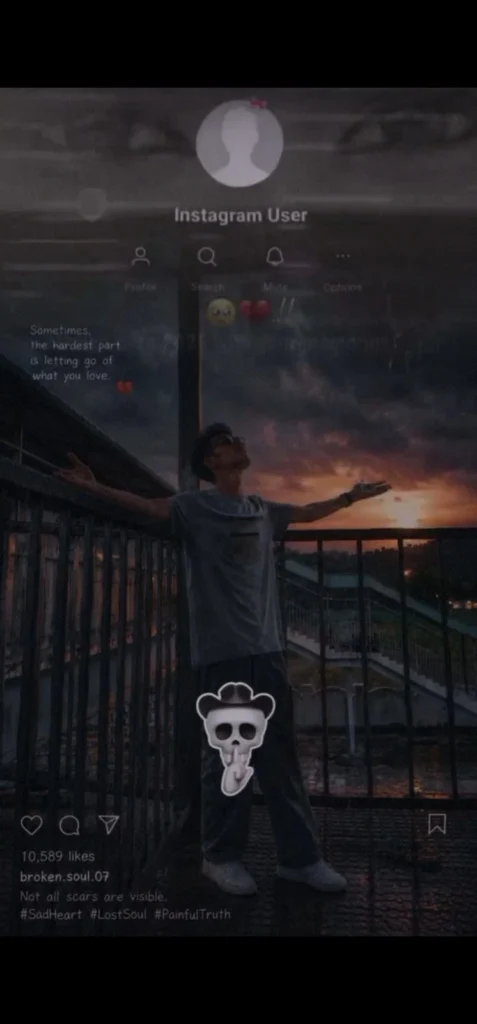
Create a **photorealistic vertical 9:16 image (716×1536 composition)** that recreates the same overall visual style, framing, mood, Instagram-style overlay, lighting, pose, background arrangement, darkness, grain, and emotional atmosphere as the described reference.
### IMPORTANT IDENTITY INSTRUCTION
Use the **uploaded girl/person reference image ONLY for the person's identity and facial appearance**.
Preserve the reference person's:
* exact recognizable face
* facial structure and proportions
* eyes, eyebrows, nose, lips and jawline
* skin tone
* hairstyle and hairline
* natural body proportions
Do **not** beautify, reshape, replace, age, de-age, or alter the person's identity. The person must remain clearly recognizable as the same reference person.
### CANVAS & COMPOSITION
* Vertical portrait composition
* 9:16 aspect ratio
* A tall smartphone-screen-like composition
* The main image occupies the center of the frame
* Black empty bars at the very top and bottom
* Extremely dark, muted, cinematic appearance
* Slightly low-resolution social-media screenshot feeling
* Subtle compression artifacts and fine digital grain
* No clean modern AI-generated appearance
### MAIN SUBJECT
Place the reference person standing on an **outdoor pedestrian bridge / elevated walkway** during sunset.
The person is positioned around the **center-lower portion of the image**.
Pose:
* standing naturally
* body facing generally toward the camera
* head tilted slightly upward
* looking toward the sky/sunset
* both arms extended outward
* left arm extending toward the left side of the frame
* right arm extending toward the right side
* palms/hands naturally open
* emotional, lonely, surrendered pose
* relaxed but slightly dramatic posture
The person's full body should be visible from head to shoes.
### CLOTHING
Keep the person's clothing realistic and simple:
* loose muted gray/blue short-sleeve T-shirt
* dark loose-fitting pants
* light-colored sneakers
* natural fabric folds
* realistic clothing texture
* no logos or unnecessary graphics on the clothing
### LOCATION & BACKGROUND
The person is standing on a metal pedestrian bridge.
Include:
* dark metal railings on both sides
* vertical railing bars
* horizontal handrails
* walkway floor with realistic metal/concrete texture
* urban/suburban surroundings in the distance
* rooftops and structures visible below
* distant trees and buildings
* atmospheric depth
* slightly blurred distant background
The bridge should create strong leading lines toward the horizon.
### SUNSET
Behind the person, create a dramatic sunset.
The sky should contain:
* dark gray-blue clouds
* muted purple/blue tones
* warm orange and reddish sunset near the horizon
* soft golden glow around the setting sun
* sun positioned toward the **right side of the background**
* subtle sunset reflection/light around the horizon
Do not make the sunset overly bright. It should remain dark, melancholic and cinematic.
### LIGHTING
Use realistic natural sunset backlighting.
* strong but soft backlight from the setting sun
* person's front/body mostly underexposed
* subtle rim light around shoulders, arms and hair
* deep shadows
* low exposure
* muted highlights
* realistic sunset color spill
* no studio lighting
* no artificial beauty lighting
The overall image should feel like a **sad cinematic Instagram post captured on a phone at dusk**.
### INSTAGRAM-STYLE OVERLAY
Overlay a realistic, semi-transparent **Instagram profile/post interface** over the entire photograph.
The Instagram interface should look like a darkened screenshot rather than a clean UI mockup.
At the upper-middle portion:
* circular default gray profile avatar
* generic silhouette inside the avatar
* small red/pink flower-like detail near the top-right edge of the avatar
* username text below/near the avatar:
**Instagram User**
Below the profile area, include a row of subtle Instagram-style controls:
* Profile icon with label **Profile**
* Search/magnifying-glass icon with label **Search**
* Bell icon with label **Mute**
* three-dot icon with label **Options**
Use thin white/gray line icons with low opacity.
### TEXT ON IMAGE
On the left side around the upper-middle area, place small handwritten-style emotional text:
**“Sometimes,
the hardest part
is letting go of
what you love.”**
Below it, place a small broken-heart emoji/symbol.
The text should be:
* small
* white/light gray
* slightly transparent
* handwritten/simple social-media style
* naturally integrated into the photograph
* not oversized
### SMALL EMOJI/REACTION DETAILS
Near the upper-right/middle area of the image, subtly include:
* one crying/sad face emoji
* one red heart emoji
* faint small emotional reaction marks
Keep these elements slightly blurred and transparent so they look like part of an old social-media post.
### SKULL STICKER
On the person's upper thigh/pants area, add a large cute cartoon-style **skull/ghost sticker**.
Sticker appearance:
* white/light-gray cartoon skull
* rounded skull head
* black/dark eye sockets
* small nose cavity
* tiny hands/fingers near the mouth in a “shh” gesture
* rounded hat-like shape above the skull
* soft white outline
* subtle glow
* slightly oversized compared with the leg
* centered around the upper-thigh/knee area
It should look like a sticker placed over the original Instagram photo, not physically printed onto the clothing.
### INSTAGRAM BOTTOM UI
At the lower portion of the image, overlay subtle Instagram post controls:
* heart outline icon
* comment bubble icon
* paper-plane/share icon
* bookmark icon toward the right
Below them, add:
**10,589 likes**
Then username:
**broken.soul.07**
Then caption:
**Not all scars are visible.**
Below that, add hashtags:
**#SadHeart #LostSoul #PainfulTruth**
Keep all Instagram UI elements:
* small
* thin
* white/light gray
* semi-transparent
* slightly blurred
* integrated naturally into the dark screenshot aesthetic
### SCREENSHOT EFFECT
Make the entire image look like an **old, dark Instagram screenshot photographed or captured from a phone**.
Add:
* subtle screen texture
* fine diagonal/moiré pattern
* slight pixel grid
* compression noise
* low-resolution softness
* mild blur
* very subtle vignette
* faint transparency between UI and photograph
* realistic smartphone screenshot imperfections
Do NOT make the interface perfectly crisp. It should look slightly degraded and atmospheric.
### COLOR GRADING
Use:
* very dark blacks
* charcoal gray
* muted blue-gray
* desaturated colors
* deep purple clouds
* warm orange sunset
* subtle red highlights
* low saturation
* cinematic contrast
Overall feeling:
**loneliness, heartbreak, letting go, sadness, isolation, emotional exhaustion, quiet acceptance.**
### CAMERA LOOK
Photorealistic smartphone photography:
* natural perspective
* realistic human proportions
* realistic hands and fingers
* realistic skin texture
* realistic clothing
* natural depth
* slight low-light phone-camera noise
* no excessive HDR
* no plastic skin
* no artificial AI sharpness
### FINAL VISUAL HIERARCHY
The final result should visually read as:
**dark Instagram screenshot → sad sunset photograph → person standing on bridge with arms open → emotional quote → Instagram User profile overlay → skull sticker → bottom Instagram engagement/caption area.**
Keep the composition vertically balanced and closely match the visual placement and proportions described above.
### NEGATIVE PROMPT
Do not change the person's identity. Do not alter facial structure. Do not beautify the face. No extra people. No duplicate person. No distorted hands. No extra fingers. No missing fingers. No deformed limbs. No cartoon person. No anime style. No 3D render. No glossy skin. No excessive HDR. No bright cheerful colors. No daylight. No modern clean UI. No oversized text. No random watermark. No additional logos. No extra stickers. No incorrect Instagram controls. No cropped feet. No cropped arms. No unrealistic sunset. No fantasy background. No studio background. No excessive sharpness.
**Final output: photorealistic, dark, emotional, cinematic, realistic smartphone Instagram screenshot aesthetic, vertical 9:16.**
Why Does This Edit Look Different?
The main attraction of this edit is the combination of a normal portrait with an emotional social media design.
The dark background makes the sunset stand out, while the Instagram interface gives the image a familiar social media look. The emotional quote also helps tell a small story without using too much text.
You can change the quote according to your mood. For example, you can use a short line about memories, loneliness, heartbreak, or moving on.
Where Can You Use This Photo?
This type of image works well for:
Advertisement
Instagram Stories
Instagram posts
WhatsApp Status
Sad profile pictures
Emotional reels
Photo editing posts
Mood-based social media content
A 9:16 version is especially useful for Instagram Stories and WhatsApp Status.
Final Thoughts
The Instagram sad photo trend is simple but effective. You don't need a complicated background or too many effects. A lonely pose, sunset, dark colors, and a meaningful quote can completely change the mood of an ordinary photo.
If you're creating your own version, focus on keeping the face natural and making the lighting realistic. Small details in the Instagram layout can then make the final image look much more like a real social media post.
Eliza is a content writer who has a passion for exploring different genres of literature and music. Her professional expertise lies in the field of India geopolitics and technology relations. She has a keen eye for detail and a natural ability to distill complex ideas into simple, easy-to-understand language.






Leave a Reply