Home>AI> How to Create a Realistic Hyderabad Waterfront Photo With AI
How to Create a Realistic Hyderabad Waterfront Photo With AI
By Kiara Sharma • September 8, 2026 • 81655 Views • No Comments
Want to create a professional-looking travel photo without visiting a new location? AI photo editing tools can now place your photo into realistic locations, change the background, improve lighting, and create cinematic travel portraits in just a few steps.
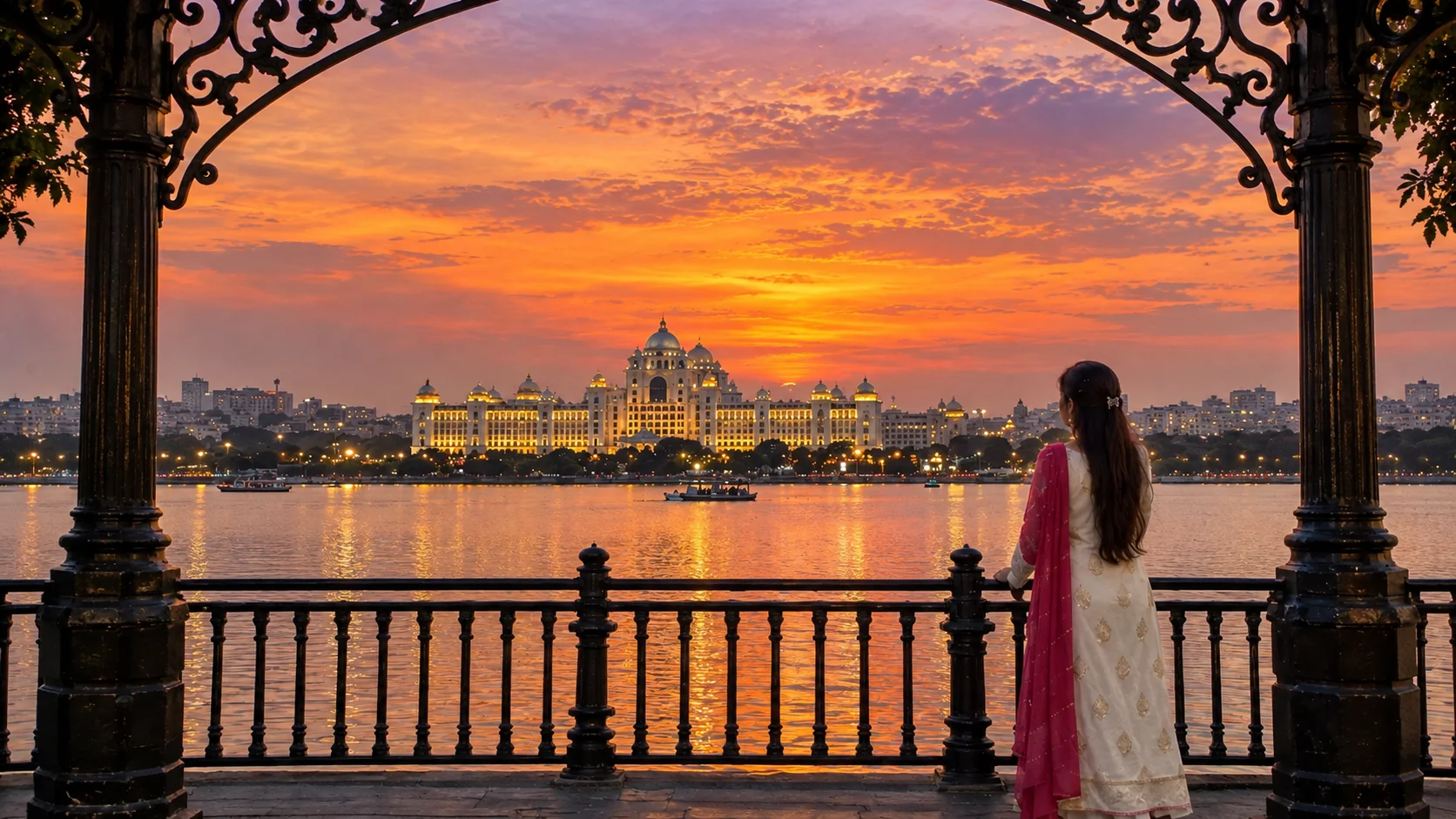
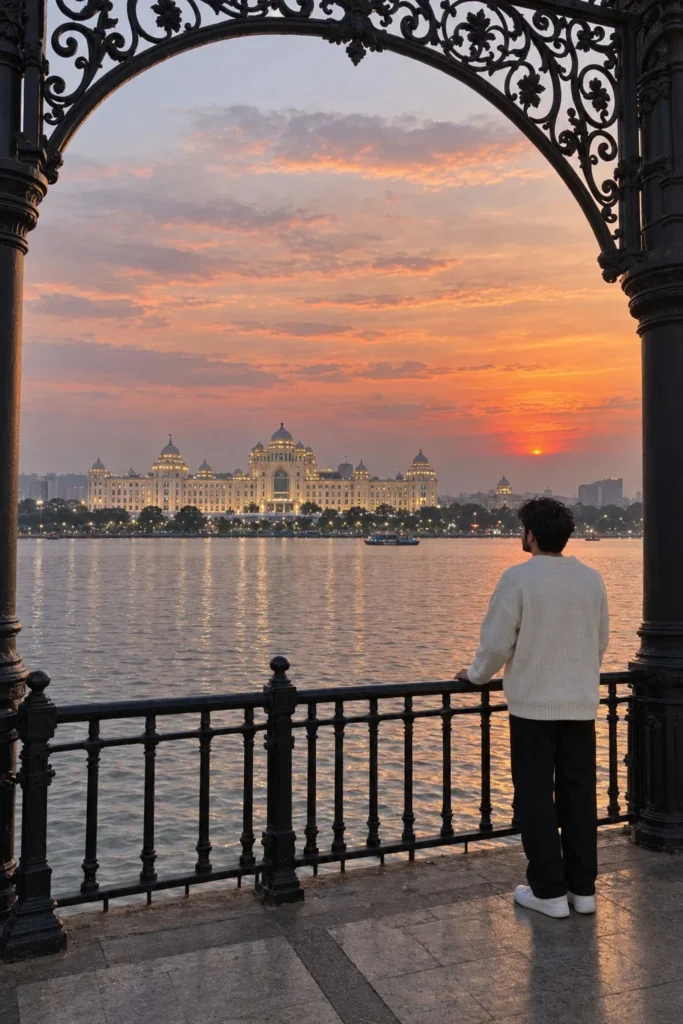
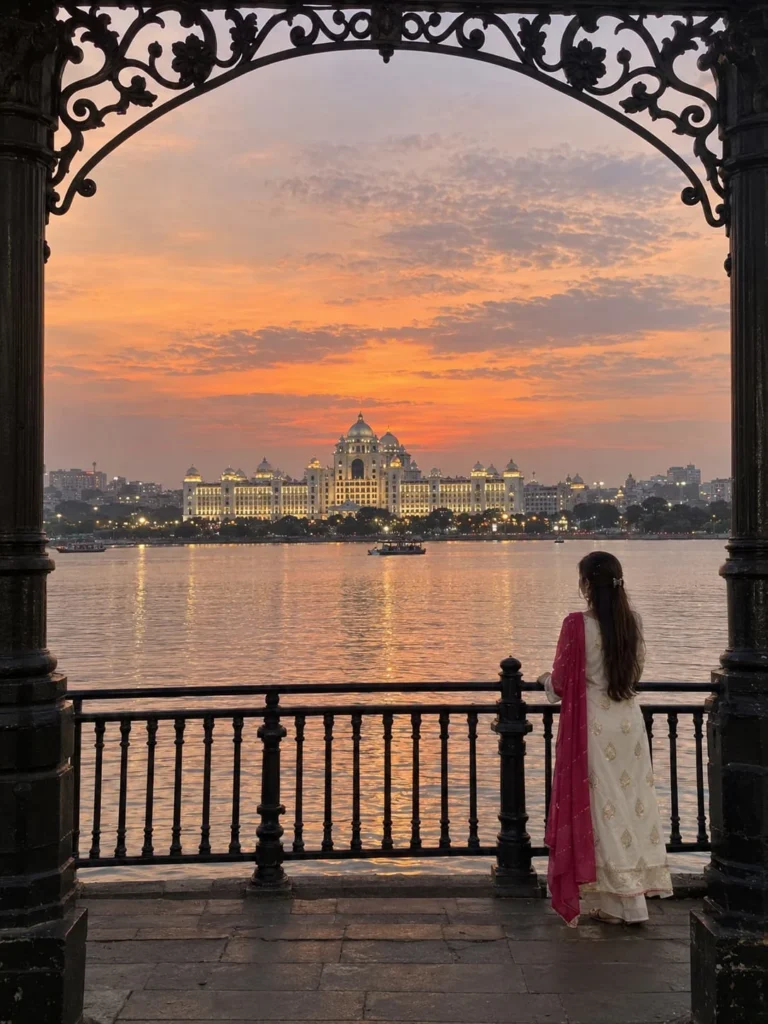
The reference images show a beautiful Hyderabad waterfront sunset photo featuring Hussain Sagar Lake and the Telangana Secretariat in the background. The decorative arch, lake, sunset, and city lights give the image a premium travel-photography look.
If you want to create a similar photo using your own picture, here is what you need to know.
Create a Hyderabad Travel Photo With AI
The first step is to choose a clear photo of yourself. A front-facing or full-body image usually gives better results because AI editing tools can understand your face, clothing, and body position more easily.
You can then use an AI photo editor to place yourself into a Hyderabad waterfront scene.
The important thing is to keep the location realistic. The Hussain Sagar Lake should appear in the middle of the scene, while the Telangana Secretariat should remain across the water in the background.
The large decorative iron arch and pillars should stay in the foreground, just like in the reference image.
Add a Realistic Sunset Background
Sunset is one of the main reasons this type of photo looks so attractive.
A warm orange and pink sky can create a cinematic travel-photo effect. The sunlight should also reflect naturally on the surface of Hussain Sagar Lake.
As the evening becomes darker, the lights around the city and buildings can add more detail to the background.
However, avoid making the colors too strong. Extremely bright orange skies or unrealistic reflections can make an AI-generated photo look fake.
Keep Your Face and Clothes Natural
If you're editing your own photograph, preserving your original appearance is very important.
A good AI photo editor should maintain your:
Facial features
Skin texture
Hairstyle
Body proportions
Clothing details
Natural expression
The lighting should also match the new environment. For example, if the sunset is coming from behind you, your body should have the same warm evening light and shadows.
Advertisement
This small detail can make a big difference in the final result.
Make It Look Like an iPhone Photo
You don't always need a professional camera to get a premium-looking travel photo.
For a natural smartphone photography style, keep the image realistic rather than adding too many cinematic effects. Natural skin, balanced exposure, realistic shadows, and slightly soft background details can make the result look like an actual iPhone photograph.
This style is useful for Instagram photos, WhatsApp Status, Facebook posts, profile pictures, and travel memories.
✨ AI PROMPT
Recreate the uploaded reference image as closely and faithfully as possible. USE THREE REFERENCE IMAGES WITH STRICT PRIORITY: REFERENCE 1 — WATERFRONT SCENE: Use the uploaded Hyderabad waterfront image as the PRIMARY reference for the exact location, composition, camera viewpoint, Telangana Secretariat, Hussain Sagar Lake, sunset, water, railing, decorative arch, columns, background, perspective, and overall visual arrangement. REFERENCE 2 — MAN'S FACE: Use the uploaded man's face photo as the PRIMARY facial identity reference. The man in the final image must be the SAME man. REFERENCE 3 — MAN'S CLOTHING: Use the uploaded male clothing image as the PRIMARY clothing reference. Recreate the same outfit, colors, fabric, pattern, fit, sleeves, and overall styling. ================================================== LOCATION — HYDERABAD ================================================== The scene is beside Hussain Sagar Lake in Hyderabad, Telangana, India. Across the lake is the Dr. B. R. Ambedkar Telangana State Secretariat. The building must look like the real Telangana Secretariat seen from the waterfront. Do NOT turn it into a historical palace. Preserve the building's recognizable white/cream façade, symmetrical architecture, large domes, smaller domes, windows, architectural details, and warm evening illumination. ================================================== SCENE & COMPOSITION ================================================== Use the uploaded waterfront photograph as the exact composition reference. Preserve: - Same camera viewpoint - Same camera height - Same viewing direction - Same perspective - Same horizon - Same waterline - Same Secretariat position - Same architectural framing - Same foreground railing - Same ornamental arch - Same side columns - Same sunset atmosphere - Same overall visual balance Do not redesign the scene. ================================================== CAMERA — MODERN IPHONE ================================================== Make the final image look like a genuine photograph taken with a modern high-end iPhone. Use the visual characteristics of an iPhone Pro main 1× camera. It should look like a normal photograph captured directly from the native iPhone Camera app. Use: - Natural iPhone lens rendering - Realistic Smart HDR - Natural highlight recovery - Natural shadow recovery - Realistic dynamic range - Natural exposure - Natural white balance - Realistic skin tones - Natural sunset colors - Subtle computational sharpening - Fine realistic detail - Slight natural digital noise in darker areas - Realistic atmospheric haze - Natural contrast - Realistic distant-detail rendering Do NOT make it look like DSLR photography. Do NOT make it look like a movie still. Do NOT make it look like a studio portrait. Do NOT use excessive cinematic color grading. ================================================== ZOOM & DISTANCE ================================================== Keep the overall image approximately 10–15% more zoomed out than the original reference. The man MUST NOT be close to the camera. He should be positioned farther away in the scene and appear relatively small. He should feel like a natural person photographed as part of the waterfront environment rather than a close-up portrait subject. Keep his full body naturally visible. At the same time, make the Telangana Secretariat slightly more prominent than in the previous version. The Secretariat should appear approximately 10–15% larger/more visually prominent while remaining realistically across Hussain Sagar Lake. IMPORTANT SPATIAL RELATIONSHIP: TELANGANA SECRETARIAT: Distant background, slightly more prominent. MAN: Farther away, smaller, lower-right area. RAILING: Foreground. ORNAMENTAL ARCH: Frames the upper portion. ================================================== MAN — POSITION ================================================== Place the man in the lower-right area of the composition. He is standing naturally near the waterfront railing and looking toward the Telangana Secretariat. Keep him primarily back-facing if the scene reference requires a back-facing pose. He should NOT be close to the camera. He should NOT dominate the frame. He should NOT be centered. He should appear naturally integrated into the wider landscape. Maintain realistic: - Body proportions - Height - Posture - Shoulder position - Head position - Arm position - Leg position - Standing position - Distance from camera Do not exaggerate his physique. Do not make him unnaturally muscular. ================================================== FACE — STRICT IDENTITY ================================================== Use the uploaded man's face photo as the exact facial identity reference. Preserve his identity as accurately as possible. Maintain: - Face shape - Facial proportions - Eyes - Eyebrows - Nose - Lips - Jawline - Cheeks - Chin - Skin tone - Hairline - Facial hair if present - Natural facial characteristics Do NOT create a generic AI male face. Do NOT substitute another person. Do NOT beautify his face. Do NOT alter his facial structure. Do NOT make him younger or older. Do NOT change his natural appearance. If the man is facing away from the camera, do not artificially turn his face toward the camera. If any portion of his face becomes visible naturally, it must match the uploaded face reference. ================================================== HAIR & FACIAL HAIR ================================================== Use the uploaded male face reference for hairstyle and facial hair. Preserve: - Hair color - Hairline - Hair length - Hair texture - Hairstyle - Beard/moustache if present - Natural grooming Do not invent a different hairstyle. Do not add or remove facial hair unnecessarily. ================================================== CLOTHING — EXACT MALE CLOTHING REFERENCE ================================================== Use the uploaded male clothing image as the exact clothing reference. The man must wear the same outfit. Preserve: - Exact colors - Pattern - Print - Fabric - Texture - Shirt/top design - Sleeves - Collar - Pants/trousers - Jacket if present - Shoes if visible - Overall silhouette - Fit - Styling Do NOT redesign the outfit. Do NOT change its colors. Do NOT substitute another outfit. Do NOT add random accessories. The clothing should look like the SAME real clothing shown in the uploaded reference. ================================================== FOREGROUND ARCHITECTURE ================================================== Preserve the dark ornate architectural framing from the waterfront reference. A large black decorative wrought-iron arch frames the upper portion. Preserve: - Floral motifs - Curved metalwork - Scrollwork - Symmetrical ornamentation - Fine decorative details - Dark silhouette Keep the large dark architectural columns on the left and right edges. Do not remove them. Do not simplify them. ================================================== RAILING ================================================== Preserve the dark wrought-iron railing across the lower foreground. Maintain: - Horizontal bars - Vertical bars - Decorative details - Posts - Perspective - Dark silhouette The man should stand naturally near/behind the railing. ================================================== TELANGANA SECRETARIAT ================================================== Keep the Dr. B. R. Ambedkar Telangana State Secretariat across Hussain Sagar Lake. Make it slightly more prominent than the previous generation. Preserve: - White/cream exterior - Symmetrical façade - Large central domes - Smaller domes - Windows - Architectural details - Warm illumination - Realistic proportions - Realistic distance Do not replace it with another Hyderabad landmark. Do not turn it into Falaknuma Palace. Do not turn it into Chowmahalla Palace. Do not create a fictional palace. ================================================== HUSSAIN SAGAR LAKE ================================================== Keep the calm lake between the man and the Secretariat. Create realistic subtle water ripples. Use natural reflections of: - Sunset sky - Secretariat lights - Surrounding atmosphere Do not make the water perfectly mirror-like. Keep distant boats subtle and realistic. ================================================== SUNSET ================================================== Preserve the same Hyderabad sunset atmosphere. Large expansive sky with: - Soft pink - Peach - Warm orange - Lavender - Muted blue-gray Subtle natural clouds. Keep the sunset realistic and consistent with the reference. ================================================== LIGHTING ================================================== Natural golden-hour sunset. Warm light on the Secretariat. Dark foreground arch, railing, and columns due to backlighting. The man should naturally appear darker than the bright background. Use realistic atmospheric haze across the lake. No studio lighting. No artificial spotlight. No excessive glow. ================================================== PHOTOREALISM ================================================== Ultra-photorealistic real iPhone photograph. Authentic real-world textures. Realistic skin. Realistic hair. Realistic clothing fabric. Realistic architecture. Realistic water. Natural shadows. Natural highlights. Natural reflections. Natural atmospheric perspective. Subtle iPhone computational photography. No CGI. No 3D render. No illustration. No painting. No anime. No cartoon. No fantasy. No artificial AI appearance. ================================================== STRICT NEGATIVE INSTRUCTIONS ================================================== DO NOT: - Make the man close to the camera - Make the man large - Make the man dominate the frame - Move him to the center - Change his identity - Create a different face - Change his facial structure - Change his hairstyle unnecessarily - Change his facial hair unnecessarily - Change his clothing - Redesign his clothing - Change clothing colors - Add another person - Make him unnaturally muscular - Distort his body - Remove the railing - Remove the ornamental arch - Remove the side columns - Change the Hyderabad location - Change Hussain Sagar Lake - Replace the Telangana Secretariat - Turn the Secretariat into a historical palace - Add unnecessary buildings - Add unnecessary boats - Change the sunset - Use DSLR-style studio photography - Use movie-poster styling - Use CGI - Use 3D rendering - Use illustration - Use painting - Use anime - Use cartoon styling - Use excessive HDR - Use oversaturated colors - Use plastic skin - Use fake reflections - Use fisheye distortion - Add text - Add logos - Add captions - Add watermarks ================================================== REFERENCE PRIORITY ================================================== When the references conflict, follow this exact hierarchy: 1. WATERFRONT IMAGE: Location + composition + camera + architecture + environment. 2. MAN'S FACE IMAGE: Exact male identity + facial characteristics + hair + facial hair. 3. MAN'S CLOTHING IMAGE: Exact outfit + colors + pattern + material + styling. Do not let the scene reference replace the man's identity. Do not let the face reference change the scene. Do not let the clothing reference change the composition. ================================================== FINAL RESULT ================================================== Create a genuine-looking iPhone photograph taken beside Hussain Sagar Lake in Hyderabad during sunset. The Telangana Secretariat should be visible across the lake and slightly more prominent. The man should be FARTHER AWAY and SMALLER in the lower-right portion of the image. He must be the SAME man from the uploaded face reference. He must wear the SAME clothing from the uploaded male clothing reference. Preserve the ornate architectural frame, railing, lake, sunset, Secretariat, perspective, and overall composition. The result should look as if a real person stood at this exact Hyderabad waterfront location and captured the scene with the main 1× camera of a modern iPhone. SAME LOCATION. SAME SCENE. SAME MAN. SAME CLOTHING. SAME SUNSET. SAME ARCHITECTURAL FRAME. Only adjust: - Man farther away / smaller - Secretariat slightly more prominent - Overall framing slightly wider - Authentic iPhone-camera appearance PRIORITIZE REFERENCE ACCURACY OVER CREATIVE INTERPRETATION.
✨ AI PROMPT
Recreate the uploaded reference image as closely and faithfully as possible. USE THREE REFERENCE IMAGES WITH STRICT PRIORITY: REFERENCE 1 — WATERFRONT SCENE: Use the uploaded waterfront image as the PRIMARY reference for the exact location, composition, camera viewpoint, architecture, sunset, water, railing, decorative arch, columns, background, perspective, and overall visual arrangement. REFERENCE 2 — WOMAN'S FACE: Use the uploaded woman's face photo as the PRIMARY facial identity reference. The woman in the final image must be the same woman. Preserve her natural facial identity and characteristics exactly as closely as the image-generation system allows. REFERENCE 3 — DRESS: Use the uploaded dress image as the PRIMARY clothing reference. Recreate the same dress, including its color, pattern, fabric appearance, design, sleeves, silhouette, length, and decorative details. ================================================== LOCATION — HYDERABAD ================================================== The scene is a real waterfront location in Hyderabad, Telangana, India, beside Hussain Sagar Lake. The large illuminated building across the water is the Dr. B. R. Ambedkar Telangana State Secretariat. IMPORTANT: Do NOT interpret or redesign the building as a historical palace. It must resemble the real Telangana Secretariat seen from across Hussain Sagar Lake, including its grand symmetrical white/cream architecture, prominent domes, smaller domes, windows, façade details, and warm evening illumination. Preserve the real-world appearance and proportions of the building shown in the reference. ================================================== EXACT SCENE & COMPOSITION ================================================== Use the waterfront reference as the exact composition guide. Preserve: - Camera viewpoint - Camera height - Viewing direction - Perspective - Horizon position - Waterline - Secretariat position - Secretariat proportions - Foreground railing - Ornamental arch - Left-side architectural column - Right-side architectural framing - Woman's general placement - Background landscape - Sky-to-water ratio - Overall visual balance Do not redesign or reinterpret the composition. The final image should immediately resemble the uploaded waterfront photograph. ================================================== CAMERA — REAL IPHONE PHOTOGRAPH ================================================== The final image must look like it was genuinely photographed using a modern high-end iPhone Camera app. Simulate a recent iPhone Pro main camera, approximately the visual characteristics of an iPhone 15 Pro / 16 Pro / 17 Pro. Use the MAIN 1× camera look. Do NOT make it look like DSLR photography. Do NOT make it look like a movie still. Do NOT make it look like a professionally staged photoshoot. It should feel like a real person casually captured this exact Hyderabad waterfront scene using an iPhone. Use realistic iPhone computational photography: - Natural iPhone lens rendering - Realistic Smart HDR - Natural highlight recovery - Natural shadow recovery - Realistic dynamic range - Natural exposure - Natural white balance - Realistic skin tones - Realistic sunset colors - Subtle computational sharpening - Fine but natural image detail - Realistic low-light/sunset noise - Natural atmospheric haze - Realistic distant detail - Natural contrast - Slight computational photography character Avoid excessive processing. The image should look like an authentic photo directly captured from the native iPhone Camera app. ================================================== ZOOM / FRAMING ================================================== Make the overall composition approximately 10–15% more zoomed out than the uploaded waterfront reference. The camera should feel slightly farther away or use a slightly wider 1× iPhone framing. IMPORTANT: THE GIRL MUST NOT BE CLOSE TO THE CAMERA. Make the girl noticeably smaller and farther away than the previous version. She should look like a person naturally present in the waterfront scene, NOT like the main foreground portrait subject. Her full body should be naturally visible. Leave sufficient environment around her. Do not enlarge her head, body, or dress. At the same time, make the Telangana Secretariat slightly more prominent than in the previous version. The Secretariat should appear approximately 10–15% larger/more visually prominent while still realistically being across Hussain Sagar Lake. Do not make it unrealistically close. The final spatial relationship should be: TELEANGANA SECRETARIAT: Distant background, slightly more prominent. WOMAN: Farther away, smaller, lower-right area. RAILING: Foreground. ORNAMENTAL ARCH: Frames the upper portion. ================================================== WOMAN — POSITION ================================================== Place the woman in the lower-right area of the frame, approximately where she appears in the reference composition. She is standing near the waterfront railing and looking toward the Telangana Secretariat. Keep her primarily back-facing if the scene reference shows her from behind. She should NOT be close to the camera. She should NOT dominate the frame. She should NOT be centered. She should NOT look like a portrait subject. She should look naturally photographed as part of the wider landscape. Maintain natural: - Body proportions - Posture - Head position - Shoulder position - Arm position - Standing position - Distance from camera ================================================== FACIAL IDENTITY — UPLOADED FACE REFERENCE ================================================== Use the uploaded woman's face image as the exact identity reference. Preserve her: - Facial structure - Face shape - Facial proportions - Eyes - Eyebrows - Nose - Lips - Jawline - Cheeks - Chin - Skin tone - Natural facial characteristics - Hair characteristics Do not create a generic AI face. Do not substitute another woman. Do not significantly beautify her. Do not change her facial structure. Do not make her look younger or older. Do not alter her natural appearance. If her face is not visible because she is facing away, maintain the correct identity through her hair, head shape, body proportions, and overall appearance. If any part of her face becomes naturally visible, it must match the uploaded face reference. Do NOT turn her toward the camera simply to reveal her face. ================================================== HAIR ================================================== Use the uploaded woman's hairstyle as the reference. Preserve: - Hair color - Hair length - Hair texture - Hairstyle - Thickness - Natural appearance If the uploaded reference shows a braid, maintain the same braid naturally. Do not invent a completely different hairstyle. ================================================== DRESS — EXACT CLOTHING REFERENCE ================================================== The woman must wear the SAME dress shown in the uploaded dress reference. Preserve the clothing as accurately as possible. Match: - Main color - Secondary colors - Pattern - Floral/ornamental design - Print - Embroidery - Fabric - Fabric texture - Sleeves - Neckline - Bodice - Skirt/dress shape - Length - Dupatta/scarf if present - Decorative details - Overall silhouette The dress should look like the SAME real garment from the uploaded clothing reference. Do NOT redesign it. Do NOT change the color. Do NOT simplify the pattern. Do NOT add random embroidery. Do NOT substitute another outfit. Do NOT add unnecessary accessories. ================================================== TELANGANA SECRETARIAT ================================================== Keep the Telangana Secretariat across Hussain Sagar Lake. It should be the main architectural subject in the distant background. Make it slightly more prominent than the original generated version. Preserve: - White/cream exterior - Grand symmetrical façade - Central architectural structure - Large domes - Smaller domes - Windows - Ornamental details - Warm illumination - Realistic proportions - Realistic distance Do not replace it with another Hyderabad landmark. Do not turn it into Falaknuma Palace. Do not turn it into Chowmahalla Palace. Do not create a fictional palace. It must remain the Telangana Secretariat. ================================================== FOREGROUND ARCHITECTURAL FRAME ================================================== Preserve the dark ornate architectural framing visible in the reference. A large black decorative wrought-iron arch frames the upper portion. Preserve its: - Floral motifs - Curved metalwork - Scrollwork - Symmetrical ornaments - Fine decorative details - Dark silhouette Keep large dark architectural columns on the left and right edges. Do not remove them. Do not simplify them. Do not modernize them. ================================================== RAILING ================================================== Preserve the dark wrought-iron waterfront railing across the lower portion. Maintain: - Horizontal bars - Vertical bars - Decorative elements - Posts - Ornamental details - Perspective - Dark silhouette The woman should stand naturally near/behind this railing. ================================================== HUSSAIN SAGAR LAKE ================================================== Keep Hussain Sagar Lake between the camera and the Secretariat. The water should be calm with subtle natural ripples. Create realistic reflections of: - Sunset sky - Warm Secretariat lighting - Surrounding atmosphere Reflections should be subtle and naturally broken by water movement. Do not make the water perfectly mirror-like. Retain only subtle distant boats similar to the reference. Do not add unnecessary boats. ================================================== SUNSET SKY ================================================== Preserve the same peaceful sunset atmosphere. Large open sky with: - Soft pink - Peach - Warm orange - Pale lavender - Muted blue-gray Subtle natural clouds. Keep the sky expansive. The colors should look like a real iPhone photograph rather than a heavily edited cinematic image. ================================================== LIGHTING ================================================== Natural Hyderabad golden-hour/sunset lighting. The sky remains softly illuminated. The Secretariat has warm white/golden architectural lighting. The foreground railing, columns and ornate arch remain dark due to backlighting. The woman is naturally darker than the illuminated background. Use realistic atmospheric haze across the lake. No studio lighting. No artificial spotlight. No exaggerated glow. ================================================== REAL IPHONE IMAGE CHARACTER ================================================== The final image must have the subtle characteristics of an actual modern iPhone photograph: Natural computational HDR. Slightly lifted shadows. Controlled sunset highlights. Natural skin tones. Realistic white balance. Subtle sharpening. Realistic fine detail. Natural digital noise in darker areas. Natural lens rendering. No excessive bokeh. No fake cinematic depth of field. No artificial film grain. No extreme color grading. No overprocessed HDR. No oversaturation. No crushed blacks. No unrealistic glowing lights. It should look like the original image could genuinely have been taken from the iPhone Camera app. ================================================== PHOTOREALISM ================================================== Ultra-photorealistic. Authentic real-world photography. Realistic architecture. Realistic water. Realistic fabric. Realistic hair. Realistic skin. Realistic atmospheric perspective. Natural shadows. Natural highlights. Natural reflections. No CGI appearance. No 3D render. No illustration. No painting. No anime. No cartoon. No fantasy artwork. No artificial AI aesthetic. ================================================== STRICT NEGATIVE INSTRUCTIONS ================================================== DO NOT: - Make the girl close to the camera - Make the girl large - Make the girl dominate the photograph - Move the girl to the center - Change the girl's identity - Create a different face - Change her facial structure - Change her dress - Redesign her dress - Change the dress color - Remove the dress pattern - Add another person - Turn the girl toward the camera unnecessarily - Distort her body - Make her unnaturally thin or tall - Remove the railing - Remove the ornate arch - Remove the side columns - Change the Hyderabad location - Replace Hussain Sagar Lake - Replace the Telangana Secretariat - Turn the Secretariat into a historical palace - Add modern clutter - Add unnecessary buildings - Add excessive boats - Change the sunset - Change the overall composition - Use DSLR-style studio photography - Use movie-poster aesthetics - Use CGI - Use 3D rendering - Use illustration - Use painting - Use anime - Use cartoon styling - Use excessive HDR - Use oversaturated colors - Use plastic skin - Use artificial sharpening - Use fake reflections - Use fisheye distortion - Use extreme wide-angle distortion - Add text - Add logos - Add captions - Add watermarks ================================================== FINAL REFERENCE PRIORITY ================================================== When the three uploaded references are used, follow this priority: 1. WATERFRONT IMAGE: Scene + Hyderabad location + composition + camera + architecture + environment. 2. WOMAN FACE IMAGE: Exact woman's identity + facial characteristics + natural appearance. 3. DRESS IMAGE: Exact clothing + color + pattern + material + styling. Do not allow one reference to override the purpose of another. ================================================== FINAL RESULT ================================================== Create a completely photorealistic iPhone photograph taken at Hussain Sagar Lake in Hyderabad during sunset. The image must show: - The real-looking Telangana Secretariat across the lake - The ornate dark architectural frame - The foreground railing - The sunset sky - Calm Hussain Sagar water - The SAME woman from the uploaded face reference - The SAME dress from the uploaded dress reference The woman must remain FARTHER AWAY and SMALLER in the frame. The Telangana Secretariat must be SLIGHTLY MORE PROMINENT / CLOSER than in the previous generation. The overall frame should be slightly more zoomed out. The final result must feel completely natural, as if someone actually stood at the Hyderabad waterfront and captured the scene with the main 1× camera of a modern iPhone. SAME LOCATION. SAME SCENE. SAME WOMAN. SAME DRESS. SAME SUNSET. SAME ARCHITECTURAL FRAME. SAME REALISTIC VIEWPOINT. ONLY ADJUST: - Woman farther/smaller - Secretariat slightly more prominent - Overall framing slightly wider - Authentic modern iPhone-camera appearance PRIORITIZE REFERENCE ACCURACY OVER CREATIVE INTERPRETATION.
Best AI Photo Editing Apps for This Style
Several types of AI tools can be used for this kind of editing. Background replacement tools are useful when you want to keep your original photo while changing the location.
AI image generators are better when you want to create a completely new composition based on your photo.
You can also use regular photo-editing apps after AI generation to make small adjustments to brightness, contrast, sharpness, and colors.
When choosing an AI photo editor, look for features such as AI background replacement, image enhancement, face preservation, realistic lighting, photo upscaling, and object editing.
Why Hyderabad Locations Work Well for AI Photos
Hyderabad has many recognizable locations that can make an AI travel portrait more interesting.
Apart from Hussain Sagar Lake, you can experiment with locations such as Charminar, Necklace Road, Tank Bund, Golconda Fort, and other well-known parts of the city.
Using a recognizable location also makes the photo more useful for travel content and social media posts.
Tips for Better AI Travel Photos
Keep these simple points in mind:
Start with a high-quality photo.
Use realistic backgrounds.
Don't make buildings unnecessarily large.
Match the lighting between the person and background.
Keep natural skin texture.
Avoid excessive HDR effects.
Use realistic shadows and reflections.
Keep the camera perspective consistent.
Add small details such as boats and city lights naturally.
Check the final image for strange hands, faces, clothing, or background objects.
Frequently Asked Questions
Can I create a Hyderabad travel photo using my own picture?
Yes. Many AI photo editing tools allow you to use your own photo and replace or generate the background around you.
Can AI make the photo look like it was taken on an iPhone?
Yes. You can create a natural smartphone photography style by using realistic lighting, balanced colors, natural skin texture, and subtle depth of field.
Which Hyderabad location is shown in the reference?
The reference represents the Hussain Sagar waterfront in Hyderabad, with the Telangana Secretariat visible across the lake.
Can I change the outfit in an AI photo?
Many modern AI image editors support clothing and appearance changes. However, the result can vary depending on the tool and the quality of the reference image.
Can I use AI-edited photos on Instagram?
Yes, you can generally use AI-edited images for social media. However, you should check the terms of the particular AI tool you use, especially if you plan to use the images for commercial purposes.
Final Thoughts
Creating a realistic Hyderabad AI travel photo is much easier today with AI image editing tools. A clear personal photo, realistic background, matching lighting, and natural colors can turn an ordinary picture into a professional-looking travel portrait.
The combination of Hussain Sagar Lake, Telangana Secretariat, decorative architecture, and sunset lighting makes this style especially attractive for social media and travel content.
If you are creating these images for your website, focus on useful information around AI photo editors, photo enhancement, background removal, image upscaling, mobile editing apps, and commercial AI tools rather than simply describing the image. This gives the article broader search value and can also attract readers looking for tools and services.
Kiara provides detailed insights and updates on Xiaomi products, helping readers stay informed about the latest trends, tips, and reviews to maximize their tech investments.






Leave a Reply